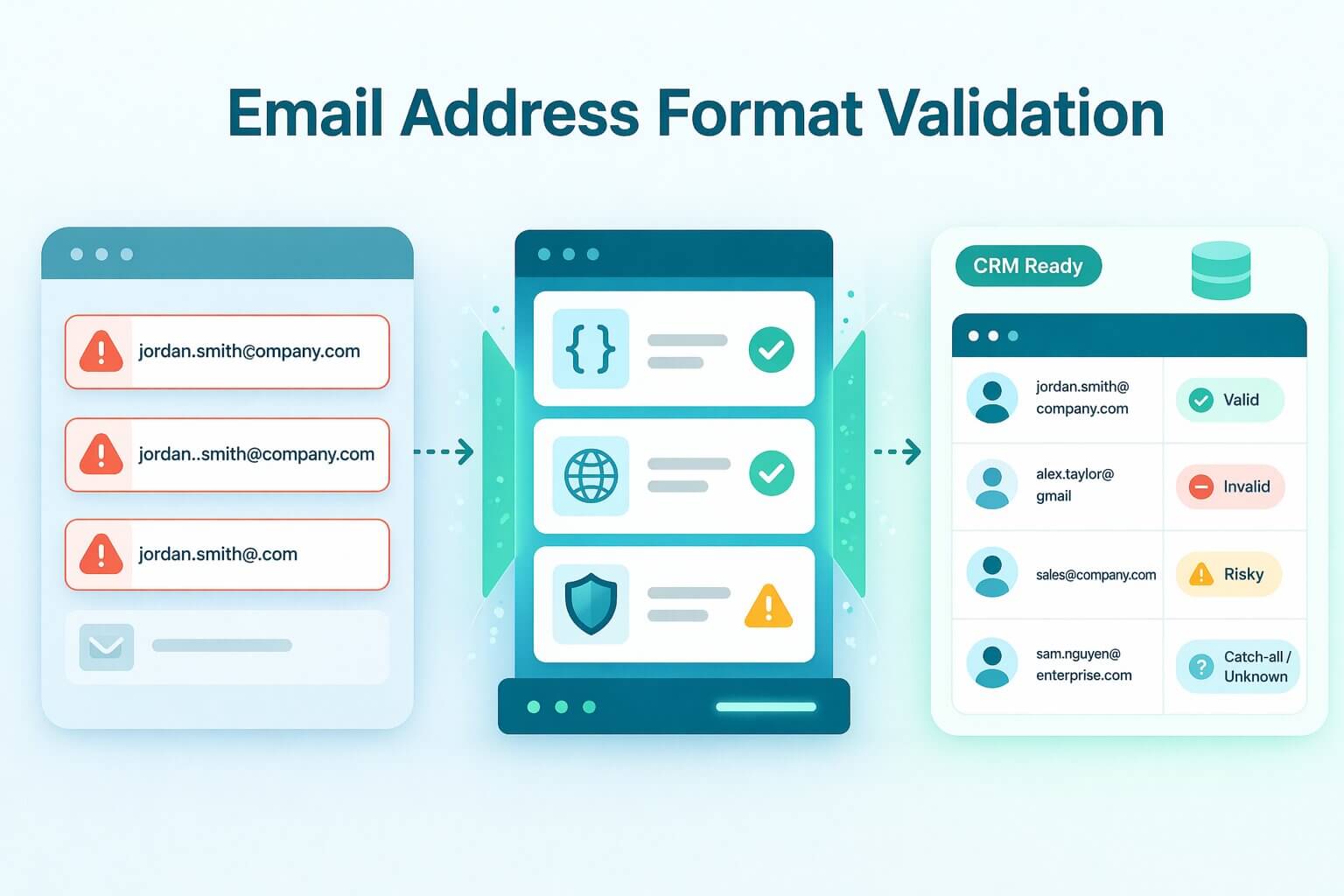
Capturing an email address is only the first step in building a high-performing B2B database. Revenue teams and data providers rely on email address format validation to confirm that incoming data is structurally sound and real enough to store. The ultimate goal is to establish a reliable gatekeeper that prevents malformed addresses from entering your CRM, saving your infrastructure from hard bounces and a damaged sender reputation.
However, confirming a valid email format is more complex than simply checking for an "@" symbol. A string of text can pass basic syntax rules while still belonging to a dead inbox, a disposable domain, or a corporate catch-all server. Relying solely on outdated regex scripts leaves your domain vulnerable to the hidden decay of enterprise data.
This guide provides a comprehensive breakdown of a layered validation pipeline, moving from quick manual format checks to automated, high-scale email validation API for bulk lists. We will explore how to build reliable safeguards for your signup forms and how to accurately interpret infrastructure responses like valid, invalid, risky, catch-all, and unknown. By the end, you will have the technical blueprint needed to maintain pristine data quality without sacrificing conversion rates.
TL;DR: While verifying the syntax of an email address, ensuring it contains an "@" symbol and a valid top-level domain, is a necessary first step to block obvious typos and malformed data from entering your CRM, it is dangerously insufficient for modern B2B outreach. A string of text can easily pass basic regex format rules while still belonging to a deactivated inbox, a disposable domain, or a corporate catch-all server designed to trap unsolicited mail. If your validation pipeline stops at these superficial format checks, you will inevitably blast emails to dead addresses, triggering the hard bounces that permanently destroy your sending domain's reputation. To secure your infrastructure and ensure high deliverability, revenue teams must layer basic format validation with deep, out-of-band verification tools, like Allegrow, that analyze MX records and behavioral signals to definitively prove an inbox is active and monitored.
What does it mean to validate the format of an email address?
Validating the format of an email address means verifying that the text string conforms to the established rules of internet communication, specifically the exact syntax parameters defined by the Internet Engineering Task Force (IETF) in RFC 5322. This process acts as a structural gatekeeper, ensuring the input contains a valid local part, an "@" symbol, and a recognized top-level domain. While it confirms the address is written correctly, a format check alone does not prove the inbox is active or capable of receiving your message.
Think of format validation like reviewing the syntax of a physical mailing address on an envelope. You are confirming that the sender included a recognized state abbreviation and the correct number of digits in the zip code, but you aren't actually checking a map to see if that specific street exists. It is the necessary first step to catch obvious structural errors before you commit the resources to attempt delivery.
In B2B revenue workflows, format validation is just the foundational layer of a comprehensive data hygiene strategy. If you take deliverability seriously and want to protect your sending domain's reputation, stopping at basic syntax is a dangerous liability. You must run further verification layers—such as DNS MX validation, SMTP handshakes, and proprietary behavioral signals—to conclusively prove the inbox exists and is actively monitored.
What are the safest ways to validate an email address without sending an email?
The most dangerous method for checking if an email address is valid is sending a blank test message to see if it bounces. This aggressive tactic alerts internet service providers to your poor data hygiene, which can trigger blocklists and severely damage your sender reputation. The professional standard is to validate emails without sending a single message, relying instead on passive intelligence gathered from syntax rules, global DNS queries, and risk analysis.
How do you check email address syntax correctly?
An email syntax check is your initial filter to ensure the string follows universal formatting rules, such as including an "@" symbol and a recognized top-level domain. This process easily catches common formatting issues like double dots (user..name@domain.com) or obvious typos (name@gamil.com) before they enter your CRM.
However, syntax validation only proves that an address looks correct. Because a perfectly formatted email can still belong to a non-existent user or a defunct company, this step must always be followed by deeper infrastructure checks to confirm actual deliverability.
How do you check whether the email domain can receive mail?
Once you confirm a valid email format, the next layer is DNS email validation to verify that the domain itself is active and configured to accept messages. This requires an MX record lookup, which queries the Domain Name System to find the specific servers responsible for routing that company's mail. If no MX record is found, any email sent to that domain will result in a hard bounce.
It is critical to understand the limitations of this check. While an MX record confirms the business has the "building" to receive emails, it does not guarantee that your specific prospect's "office" (their individual inbox) actually exists on that server.
How do you detect disposable and role-based email addresses?
Even if an address passes syntax and domain verification, it might still carry high strategic risk for your revenue team. Disposable email detection identifies temporary, self-destructing inboxes that users create to bypass gated content, which will inevitably bounce if you try to nurture them days later. Similarly, role-based email addresses (like sales@ or info@) are managed by teams rather than individual decision-makers, leading to poor engagement and higher spam complaints.
For high-stakes B2B marketing, it is best practice to instantly block disposable domains at the point of entry so they never reach your database. Role-based addresses, however, should often be allowed but actively flagged in your CRM, ensuring they do not consume your primary sending limits while your sales team searches for a direct contact.
What are the technical rules for a valid email address format?
To build a reliable syntax filter, developers must follow the official internet message format defined by the RFC 5322 standard. A perfectly formatted email address is divided into two distinct sections separated by an "@" symbol: the local part and the domain part. Understanding the strict character limits and permitted symbols for each section is the absolute foundation of any frontend validation script.
The local part (preceding the "@") can contain up to 64 characters. This section permits uppercase and lowercase Latin letters, digits, and a specific subset of special characters like plus signs or hyphens. However, the rules dictate that a period cannot be the very first or last character, nor can two periods appear consecutively (e.g., first..last@company.com).
The domain part (following the "@") is much more restricted. It allows only alphanumeric characters and hyphens, and it must include at least one period to separate the domain label from the top-level domain (TLD). When combining the local part, the "@" symbol, and the domain part, the entire email string cannot exceed a maximum length of 254 characters.
While many engineering teams rely on Regular Expressions (Regex) to enforce these formatting rules on signup forms, writing a completely RFC-compliant Regex is notoriously difficult and prone to edge-case failures. Because hard-coding complex syntax rules can accidentally block legitimate enterprise addresses, high-performance GTM teams prefer utilizing an API that automatically normalizes the format while simultaneously checking the active infrastructure.
How can you validate an email address manually for a one-off check?
There are times when your sales team is working a high-value enterprise prospect and needs to confirm contact details before launching a personalized outbound sequence. Manual validation acts as a targeted, low-impact sanity check to ensure the address is well-formed and logical. This approach allows you to verify the basics without running a full API batch or triggering automated systems.
What should you look for before using any tools?
Before running an address through any software, start with a quick visual inspection to confirm a valid email format. Look closely for subtle typos, extra trailing spaces, repeated dots (first..last@company.com), or incorrect domain variants (e.g., using .co instead of .com). These simple formatting errors are common during manual data entry and will cause an immediate delivery failure if not caught early.
You can also perform lightweight credibility checks that don’t involve blasting test emails. Simply typing the domain into your browser can confirm if the company website is active and matches the prospect's actual business. If the site fails to load or redirects to a parked domain page, the email address tied to it is highly unlikely to be active, allowing you to discard it immediately.
Once an address passes your visual and domain checks, the most efficient next step is to run it through your standard email verification tool. Instead of guessing or risking a manual test send, inputting the single address into your provider’s dashboard gives you an instant, definitive "Valid" or "Invalid" status. This ensures your sales team can confidently sequence high-value prospects without hitting sudden bounces or secure email gateway (SEG) traps.
When is sending a single confirmation email appropriate?
While sending a blank "test" email to check for a bounce is highly dangerous for your domain reputation, sending a genuine confirmation email is appropriate in specific, consent-driven scenarios. Double opt-in workflows—such as new account activation or newsletter consent confirmation—naturally require the user to interact with a functional inbox. In these cases, the email serves a legitimate business purpose rather than acting as a covert ping.
However, you should strictly avoid "test sends" for the purpose of list cleaning or verifying cold B2B leads. As Microsoft Exchange documentation outlines, modern Secure Email Gateways (SEGs) are frequently configured to suppress bounce reports (NDRs) to prevent "backscatter" attacks. This trick often returns a false positive to the sender, causing your CRM to treat a dead inbox as active.
How do email validation tools and APIs validate an email address?
When scaling operations or managing high-volume data pipelines, manual checks become impossible. Professional email validation tools and APIs perform complex, multi-layered checks in seconds to confirm an address is deliverable without sending a test message. This automated process evaluates everything from basic syntax to proprietary behavioral signals, protecting your sender reputation at scale.
What checks a good validator runs behind the scenes?
A high-performance validator begins with syntax and normalization, instantly stripping hidden spaces and correcting basic format errors. From there, it moves to domain and MX record verification to confirm the receiving server is active and properly configured for email traffic.
The final and most critical layer involves mailbox-level heuristics and risk signals. Instead of simply pinging the server with standard SMTP requests, advanced tools analyze behavioral data to resolve catch-all servers and Secure Email Gateways (SEGs) like Mimecast or Barracuda. This deep verification, such as the one done by Allegrow, prevents the false positives and high number of “Unknown” results that plague legacy tools, ensuring you are reaching an active primary inbox rather than a spam trap or an abandoned alias.
What results you should expect and what to do with each one?
Interpreting the response from your validation API dictates how you manage your CRM data and protect your campaigns. A "Valid" result means the address is verified and ready to accept and store for immediate outreach. Conversely, an "Invalid" result should trigger an immediate block or prompt the user for a correction, preventing a guaranteed hard bounce from hitting your sender record.
The middle ground requires more strategic handling to avoid discarding good leads or accepting dangerous data. "Risky" addresses—often role-based or disposable—should be routed to a safer nurture path or allowed with added friction during signup. An "Unknown" result usually occurs when a server times out or blocks standard verification attempts, meaning you should queue a background recheck or rely on an API that uses managed quality IPs, like Allegrow, to resolve aggressive security filters.
Finally, "Catch-all" domains represent the biggest blind spot in B2B data, as they are configured to accept all mail regardless of whether the specific user exists. While basic tools leave these as uncertain risks that you must monitor closely, an enterprise-grade API will evaluate behavioral signals to resolve them into conclusive "Valid" or "Invalid" statuses. This allows you to confidently message high-value prospects without gambling your deliverability on a guess.
How do you validate an email address in real time on signup forms?
Implementing real-time validation at the point of entry is the most effective way to protect your CRM from rapid data decay. When you rely on a high-speed API to verify addresses as they are typed, you create an active shield against typos, disposable domains, and malicious signups. This proactive approach ensures that every new lead entering your database is immediately actionable and deliverable for your sales team.
How do you prevent bad emails without adding too much friction?
The challenge with any security measure is that overly aggressive blocking can frustrate legitimate prospects and increase form abandonment. To maintain high conversion rates, your validation API should act as a helpful guide rather than a rigid roadblock. By providing instant inline feedback, you can alert the user to a mistake before they hit submit, keeping the experience smooth and intuitive.
The most effective way to reduce friction is by utilizing "did you mean" suggestions for common syntax errors. If a prospect accidentally types name@gamil.com, the form instantly prompts them with the correct spelling, allowing them to fix the typo with a single click. For high-stakes actions like booking a demo, you can then require a quick confirmation step to guarantee the address is fully valid and actively monitored by the decision-maker.
To prevent bad data from slipping through entirely, GTM teams can also implement automated verification at the point of send. Allegrow integrates directly into your CRM and sales engagement platforms to run a final Safety Net check immediately before an email is dispatched. This acts as an ultimate guardrail against human error, guaranteeing that every outbound message reaches a conclusively "Valid" inbox while protecting your domain from unexpected bounces.
How do you design fallbacks when validation is inconclusive?
In the complex ecosystem of B2B mail servers, there are times when a validation request times out or returns an inconclusive status due to aggressive security filters. When this happens, your signup form needs a smart fallback logic that doesn't blindly reject a potentially massive enterprise deal. The best practice is to let the user proceed with the initial signup, but flag the record in your database for a deeper background verification.
While the user is allowed into the system, you should strategically gate key actions—like downloading a proprietary report or accessing a software trial—until the address is definitively verified. By queuing an asynchronous background recheck using an enterprise-grade verification tool, you can resolve the status without disrupting the user journey. This ensures you capture the lead while maintaining a strict barrier against invalid data polluting your core marketing segments.
How do you validate email addresses in bulk without damaging deliverability?
Validating a single address is straightforward, but auditing millions of records requires a completely different operational approach. When data providers or GTM teams upload massive lists without prior verification, they risk catastrophic bounce spikes that can permanently blacklist their sending domains. To protect your deliverability at scale, you need a high-velocity bulk validation process that scrubs bad data before it ever reaches your email service provider.
How do you clean a list safely before campaigns?
The most effective way to protect your sender reputation is to run a full bulk validation pass immediately before every major outreach campaign. This proactive sweep identifies and removes guaranteed hard bounces, ensuring your messaging only targets active, deliverable inboxes. For high-volume data providers, this means processing hundreds of millions of requests through a customizable API to guarantee data integrity for their end-users.
Once the initial scrub is complete, you must segment the remaining addresses based on their risk profile. While "Invalid" records should be purged instantly, "Catch-all" and "Risky" domains require specialized handling to avoid discarding valuable enterprise leads. By isolating these complex addresses, you can route them through Allegrow's proprietary behavioral signals to resolve them into conclusive "Valid" or "Invalid" statuses without risking a blind send.
How do you run bulk validation operationally?
Running bulk validation at an enterprise scale requires careful technical management to avoid server timeouts or provider blocking. Operations teams must account for strategic batch sizing, API rate limits, and automated retries to handle temporary "Unknown" responses caused by server greylisting. By using an infrastructure equipped with managed quality IPs, you ensure all verification requests are able to resolve aggressive security filters and return accurate results without generating false positives.
Beyond the technical execution, maintaining long-term database hygiene requires meticulous CRM record-keeping. Every contact should log the specific verification outcome and store a precise "last-checked" timestamp. Because B2B email data decays rapidly as professionals change roles, this timestamp allows you to build automated workflows that trigger a fresh background verification the moment a record becomes stale.
How do you decide what to suppress versus keep?
Building a sustainable data pipeline means making definitive rules about what enters your active sending pool versus what goes on your Global Suppression List. Any address returning a hard "Invalid" status or identified as a known spam trap must be permanently suppressed to shield your domain from penalty. However, temporary "Unknowns" caused by momentary server congestion should only be placed on a temporary hold, queuing them for a secondary automated check later in the week.
The most difficult decisions often revolve around "Risky" categories like role-based inboxes or unresolved catch-all domains. Rather than suppressing these outright and losing potential revenue, high-performance teams rely on advanced risk detection to filter out unmonitored aliases while identifying the primary executive inbox. This ensures you are suppressing the dead weight while confidently keeping the active decision-makers who actually drive your pipeline.
How often should you validate email addresses?
B2B email data is highly volatile, decaying at an estimated rate of over 22.5% every year as professionals change jobs, receive promotions, or companies restructure. If you treat email validation as a one-time event during list acquisition, your CRM will quickly fill with dead inboxes and hidden deliverability traps. To maintain a pristine sender reputation and keep bounce rates low, you must shift from a static, one-off check to a continuous database hygiene schedule.
The ideal validation frequency depends heavily on your overall sending volume and the natural churn rate of your target market. High-velocity GTM teams launching daily sequences should integrate automated verification directly into their workflows, checking active lists every 30 to 60 days. Because Allegrow’s Scale-Plus plan offers unlimited verification volume, revenue operations teams can run these recurring checks across their entire database without the friction of arbitrary credit limits.
Beyond a standard calendar cadence, specific operational events should automatically trigger an immediate revalidation pass. The most critical trigger is a new data import; whether you are a data provider ingesting a new vendor list or a sales team uploading event attendees, no record should enter your ecosystem unverified. Running an automated check at the point of entry ensures that you never inadvertently inherit another company's bad data.
Similarly, launching a reactivation campaign to cold leads who haven't been emailed in six months requires a full list scrub to identify inboxes that have been deactivated in the interim. Finally, if you ever notice a sudden bounce spike above standard baselines — bearing in mind the industry average safe bounce rate is just 1.0% (Campaign Monitor) — pause your outreach instantly and run the affected segment through a deep verification. This will catch newly converted spam traps or domain-level security changes before they can trigger a permanent block on your sending IP.
What are the most common mistakes when validating email addresses?
Even sophisticated data providers and GTM teams frequently fall into validation traps that silently erode their sender reputation. These mistakes usually stem from relying on legacy infrastructure that cannot penetrate modern B2B security environments. When you overlook these critical nuances, you aren't just letting bad data into your CRM; you are actively inviting internet service providers to throttle your outreach.
Relying solely on syntax checks
The most frequent error is assuming that a correctly formatted string guarantees a deliverable inbox. While a syntax check ensures the "@" symbol and domain are present, it leaves your database completely exposed to fake but well-formed submissions. Relying on format validation alone ensures your next campaign will hit immediate hard bounces when those non-existent addresses fail at the server level.
Treating MX presence as proof the mailbox exists
Verifying that a domain possesses an active MX record is necessary, but it is not proof of life for an individual prospect. It is the equivalent of confirming a corporate headquarters exists without checking if your target buyer actually works inside. Many organizations maintain active MX records but implement strict routing rules or deactivate former employees, meaning you must verify the specific mailbox to avoid a bounce.
Sending bulk test emails that create bounces
Perhaps the most damaging tactic in list hygiene is sending a blank message to see if an address bounces. Modern Secure Email Gateways (SEGs) like Mimecast and Barracuda are designed to detect this probing behavior, often returning a false delivery signal to trap the sender. When you finally send your real marketing campaign, the SEG blocks your domain entirely, crippling your core deliverability.
Never revalidating lists as they age
Data is a highly perishable asset, yet many teams treat email validation as a one-time event completed during the initial import. Because B2B contact data decays so rapidly, a list that was perfectly clean six months ago is now a significant deliverability hazard. Failing to implement a continuous revalidation cycle ensures your bounce rates will steadily climb as your target buyers change roles or companies.
Mishandling catch-all and unknown outcomes
Treating all ambiguous validation results as a single "risky" category destroys your ability to segment effectively. Legacy tools frequently return an "Catch-all" status for enterprise catch-all servers, forcing GTM teams to either blindly guess and risk a bounce, or discard highly valuable leads. By using Allegrow's proprietary signals, you can confidently resolve these catch-all domains into definitive "Valid" or "Invalid" statuses, eliminating the guesswork from your pipeline.
Conclusion: Moving Beyond Basic Format Validation
Validating the format of an email address is the critical first step in building a healthy CRM, but it is not a complete defense strategy. While catching syntax errors and malformed strings prevents obvious junk data from entering your systems, it cannot protect your domain from the hidden threats of B2B outreach. If your process stops at a basic regex script or a simple DNS ping, you are leaving your sender reputation exposed to Secure Email Gateways and abandoned aliases.
To truly protect your deliverability and empower your GTM team, you must move from passive validation to conclusive verification. This means replacing the guesswork of "Unknown" catch-all responses with definitive "Valid" or "Invalid" statuses. By deploying a verification layer built specifically for the complexities of enterprise mail servers, you ensure your outbound campaigns reach the primary decision-maker every time.
Stop letting catch-all domains and SEGs dictate your deliverability. While legacy tools guess, Allegrow provides the technical depth required to verify the hardest B2B addresses, identify spam traps, and detect primary executive inboxes.
Ready to see the true status of your data? Start your 14-Day Free Trial today to securely upload a CSV and verify up to 1,000 of your most complex contacts with absolute confidence.
FAQs
Can you validate an email without other information?
Yes, you can determine if an address is deliverable using only the email string itself. By analyzing the syntax, performing a DNS MX lookup, and executing a sophisticated SMTP handshake, professional tools can confirm the inbox is active. However, determining if that address is the primary executive inbox versus an unmonitored alias requires deeper proprietary behavioral signals.
Do MX checks guarantee the inbox exists?
No, an MX record lookup is strictly a domain-level check. It only confirms that the target company has a server set up to route email traffic, acting as a "proof of building" rather than a "proof of resident." To guarantee the specific user's inbox is active and not blocked by a Secure Email Gateway (SEG), you must perform a mailbox-level verification.
How should you handle catch-all domains?
Catch-all servers are designed to accept all incoming mail requests, which causes standard validation tools to return a frustrating "Unknown" or "Risky" status. Instead of guessing and risking a hard bounce, GTM teams should use a specialized verification provider. Advanced tools evaluate proprietary signals to solve the catch-all shield, resolving the address into a definitive "Valid" or "Invalid" status.