Claude MCP
Connect Allegrow to Claude from the connector directory. Verify contacts, check sender reputation across every inbox, and audit deliverability in plain language.
Claude MCP
Allegrow's Claude connector installs from the Claude connector directory in about a minute, with no custom setup required. Once connected, Claude can validate addresses through Allegrow and reason over deliverability data from every mailbox linked to your Allegrow user, with our verification data and best practices built into its answers.
About Claude integration
Most verification work involves leaving what you are doing, opening a dashboard, uploading a file and waiting. The Claude integration removes that step. You ask a question in plain language and Claude uses Allegrow to answer it, whether that means validating an address, checking which mailboxes are at risk, or working out why your bounce rate moved last week.
What makes this different from a standard email connector is that it understands deliverability rather than just message text, it works across all your go-to-market inboxes at once rather than one account in isolation, and it verifies contacts using the same engine that resolves catch-all domains for our platform customers. By connecting, you'll unlock the following functionality:
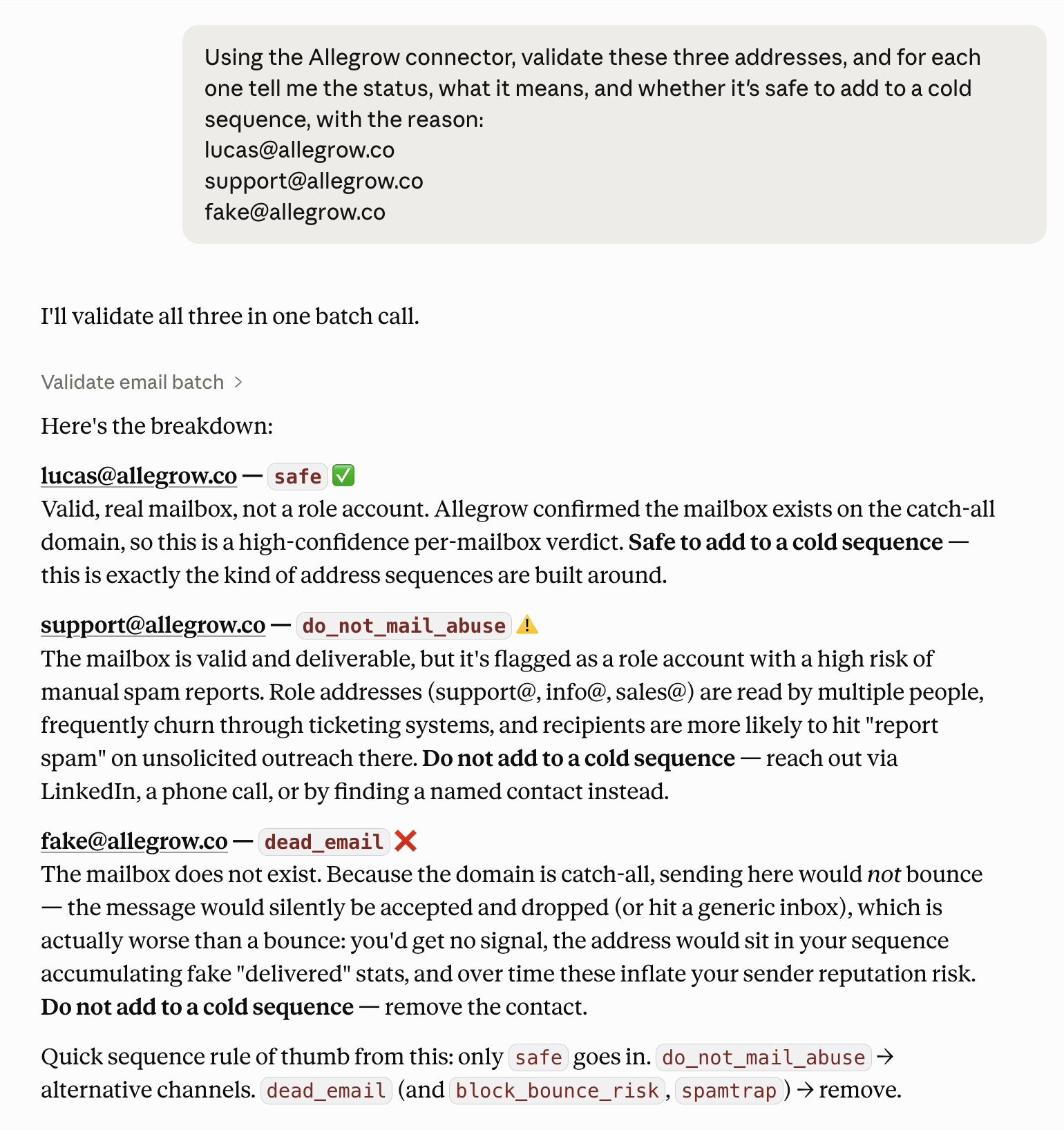
- Verify addresses conversationally, with conclusive results on catch-all and enterprise domains where basic checkers return accept-all or unknown.
- Check the recipients sitting in your drafts before a send session, and flag the ones that are not safe to email.
- Rank every connected mailbox by sender reputation and see which needs attention first.
- Track reputation by sending domain across your whole company, day by day.
- Diagnose a reputation drop by reviewing what was actually sent, judged against Allegrow's deliverability best practices.
- Run a bounce audit that separates a data-quality problem from a deliverability one.
- Find warm threads across every inbox that never got a reply from you.
- Put any of it on a schedule, so a weekly reputation report or a daily missed-reply check runs on its own.
Our help centre keeps a running set of example prompts for the connector, and our full guide to the Allegrow MCP in Claude walks through every workflow above with results from the live connector.
Allegrow partners with the platforms our customers already work with, so the verification and deliverability data that protects your outbound is available wherever your team is making decisions. Claude is where a growing number of go-to-market teams now do that thinking, and this connector puts our data directly into it.
Connect Claude integration
Firstly, you'll need an Allegrow subscription and a Claude account. The integration is available by default on every Allegrow subscription, as Allegrow has been reviewed and listed in the Claude connector directory, so there is no custom setup and nothing to configure on our side.
To connect Claude to Allegrow you can follow these steps:
- Open the Allegrow listing in the Claude connector directory at claude.ai/directory/allegrow, or find Allegrow under Customize, then Connectors, inside Claude.
- Select Allegrow and click Connect.
- Log in to Allegrow and click Allow Access to authorise the connection.
- Start a chat or a co-working session and reference the Allegrow connector in your prompt.
If you connected Allegrow before it was listed, you were using a custom connector and that has now been removed. Reconnect through the directory listing. To confirm you are on the new one, open Customize, then Connectors, and check that the type reads Web Community rather than Web Custom.
Connecting gives Claude access to data from the mailboxes linked to your Allegrow user, so on shared accounts with several connected mailboxes, check with your customer success manager first.
You can find in-depth guidance on the connection process, including annotated pictures of each step, in our help centre guide on the Claude integration. For a full walkthrough of what to ask once you are connected, with real examples from the live connector, see our guide to the Allegrow MCP in Claude.
Support Claude integration
Allegrow will provide you with a dedicated customer success manager (CSM) as your key point of contact for any support-related questions while using our platform. Support on Allegrow can be delivered through the following mediums:
- Zoom meeting scheduled directly with your CSM.
- Email directly to your CSM.
- Live chat with in-app customer support.
- Self-service support is also available in our help centre, including a dedicated collection of Claude connector guides covering verification, draft checks, bounce audits, template reviews and cross-inbox search.
- Consistent research and playbooks for best practices are also available in our knowledge base.
You will also receive a sequence of onboarding materials when your account is created, so your team can get value from the connector without waiting on a call.

.png)
.png)