Verifying a contact or pulling an inbox's deliverability history usually means stopping what you're doing and logging into a dashboard. The Allegrow MCP takes that detour out. It connects your Allegrow account to Claude and turns Allegrow into an email verification MCP and deliverability MCP you can simply talk to: you ask a question, and Claude uses Allegrow to answer it, whether that means validating an address, checking sender reputation across every inbox you've connected, or working out which sequences are quietly hurting your deliverability.
It is listed in the Claude connector directory and we are still adding to it, but it already does real work. This page shows exactly what you can ask it to do, with real examples from the live connector, why Allegrow's results are more conclusive than a basic checker, and how to set it up.
In one line: the Allegrow MCP is the email MCP for go-to-market teams. Connect Allegrow to Claude to verify addresses and assess deliverability across all your inboxes at once.
What is the Allegrow MCP?
MCP, the Model Context Protocol, is an open standard that lets an AI assistant like Claude connect securely to outside tools and data. An MCP server exposes a product's capabilities to the model, and an email MCP server does that for your email stack.
The Allegrow MCP is Allegrow's MCP server. Once connected, Claude can validate email addresses through Allegrow and pull deliverability context from any mailbox linked to your Allegrow user, then reason over it with Allegrow's verification data and best practices built in.
That makes it, in effect, a Claude email MCP focused on verification and deliverability, and it supports MCP email automation a generic email connector can't do: it verifies contacts, it works across all your GTM inboxes together, and it understands deliverability, not just message text. Whether you think of it as an email verification MCP, a deliverability MCP, or an email marketing MCP, it is the layer that puts Allegrow's data inside Claude's reasoning.
What makes it different from a standard Google or Microsoft email connector in Claude:
- It verifies email addresses with Allegrow's verification statuses, including conclusive results on catch-all domains.
- It analyzes sender reputation and inbox placement risk across multiple GTM inboxes at the same time, not one account in isolation.
- It brings Allegrow's deliverability intelligence and cold-email best practices into Claude's reasoning.
What can you ask Allegrow to do inside Claude?
These are live today. Each one is a real prompt pattern, so try them with the connector on.
Verify an email address and read the result
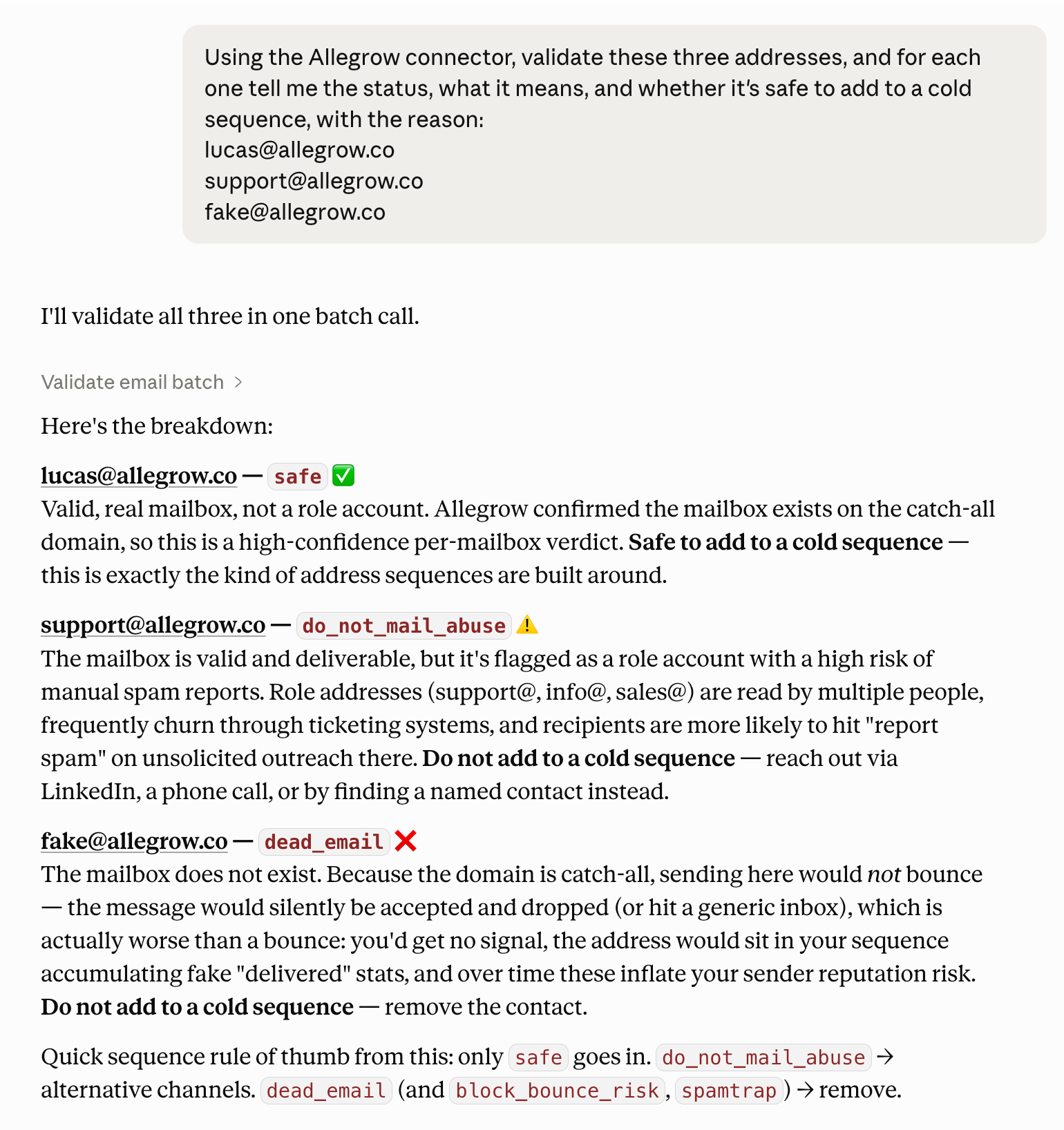
Ask Claude to validate an address and explain what to do with it. Allegrow hands back a clear status plus domain and mailbox enrichment, so Claude can tell you not just whether an address is valid or invalid but whether a contact is risky and why. This is the heart of the email verification MCP: verifying emails with Claude, conversationally. It is the front end to Allegrow's email verification, including the catch-all verification that basic tools can't resolve.
Allegrow's statuses, which Claude will explain whichever applies:
- safe: valid and safe to send to, including safe catch-all addresses.
- do_not_mail_abuse: valid but high manual-spam-report risk; better reached by other channels.
- spamtrap: valid but high spam-trap risk; remove the contact.
- some_risk: inconclusive with identified risk; remove for 30 days and re-validate.
- block_bounce_risk: invalid and very likely to bounce; remove.
- dead_email: the mailbox doesn't exist, and because the domain is catch-all it won't bounce, so the message is silently dropped (worse than a bounce); remove the contact.
Example prompt
Using the Allegrow connector, validate these three addresses, and for each one tell me the status, what it means, and whether it's safe to add to a cold sequence, with the reason: lucas@allegrow.co, support@allegrow.co, fake@allegrow.co
Check your draft recipients before you send
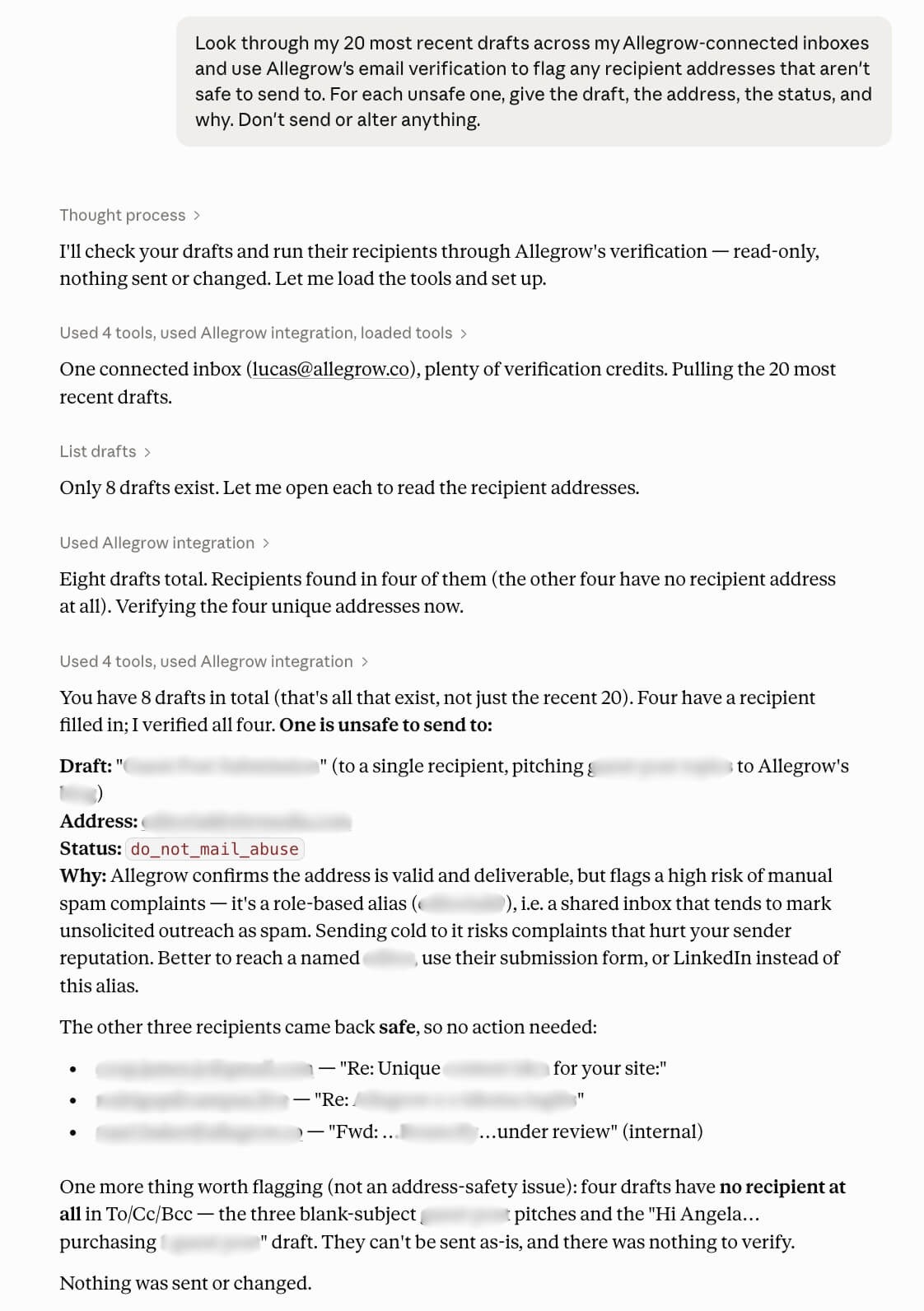
Before a send session, ask Claude to look through your drafts across your connected inboxes and flag any recipients that aren't safe to email, using Allegrow's verification. It only flags, and never sends or alters your drafts. This is closer to list cleaning inside Claude: you catch invalid, risky, and catch-all dead addresses before they cost you a bounce.
Example prompt
Look through my 20 most recent drafts across my Allegrow-connected inboxes ({inbox1}, {inbox2}, {inbox3}) and use Allegrow's email verification to flag any recipient addresses that aren't safe to send to. For each unsafe one, give the draft, the address, the status, and why. Don't send or alter anything.
Check sender reputation across all your inboxes
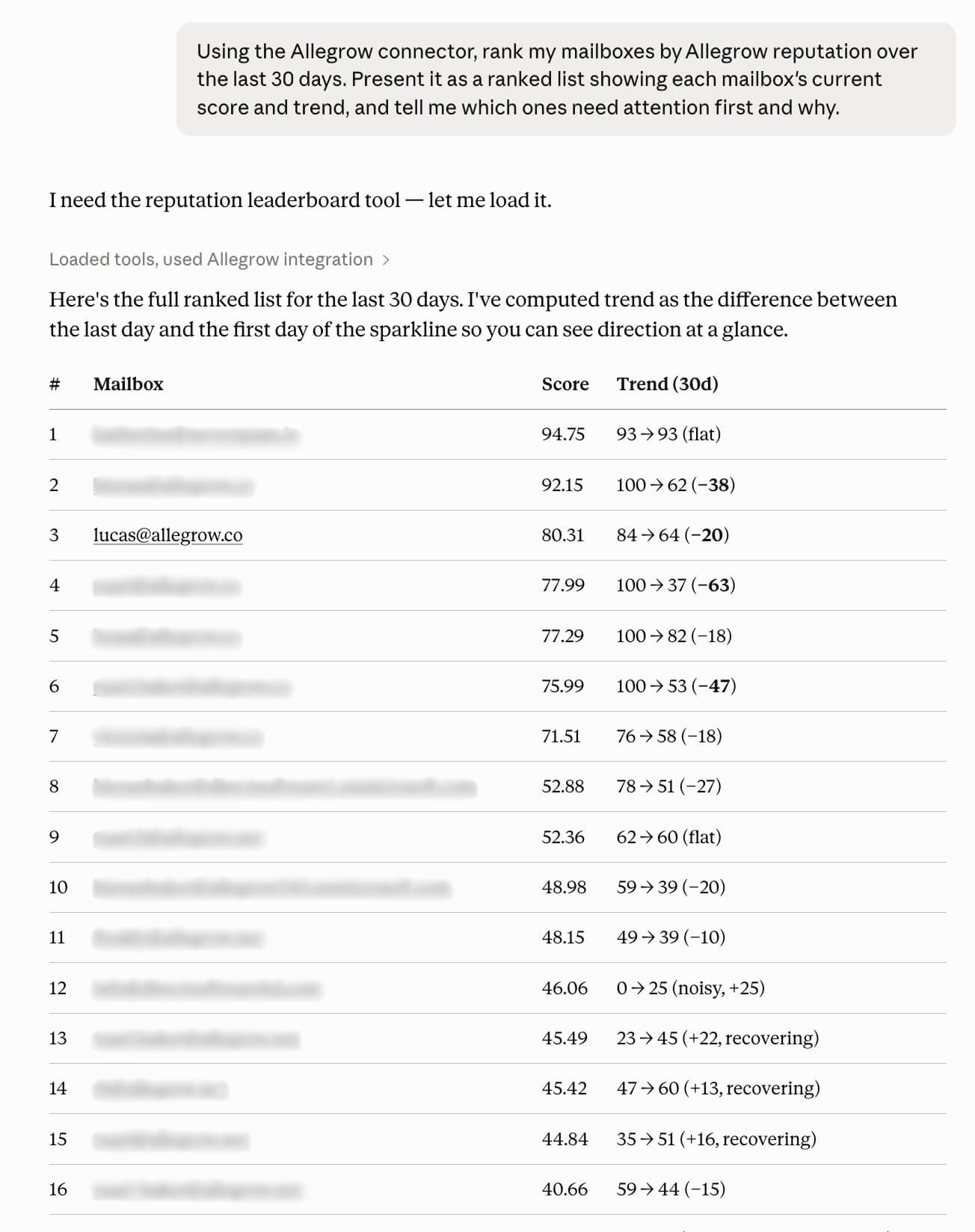
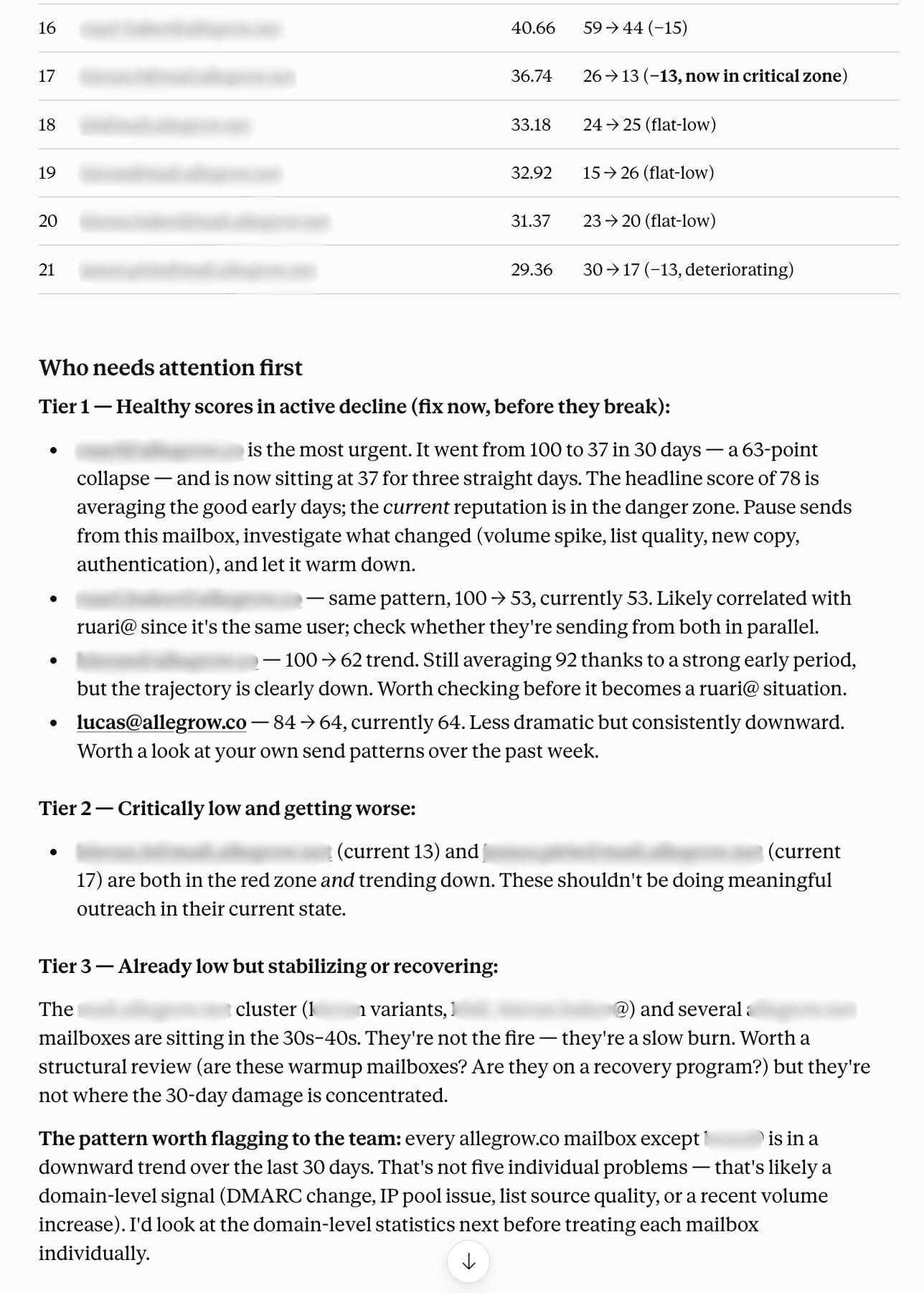
Ask Claude for a health check across every connected mailbox at once: which inboxes are at risk, what's trending down, and what to fix first. This is the core deliverability MCP workflow, a cross-inbox view you can't get from a single-account connector. It reads from the same sender reputation data Allegrow tracks continuously.
Example prompt
Using the Allegrow connector, rank my mailboxes by Allegrow reputation over the last 30 days and tell me which ones need attention first and why.
Diagnose why a mailbox's reputation dropped
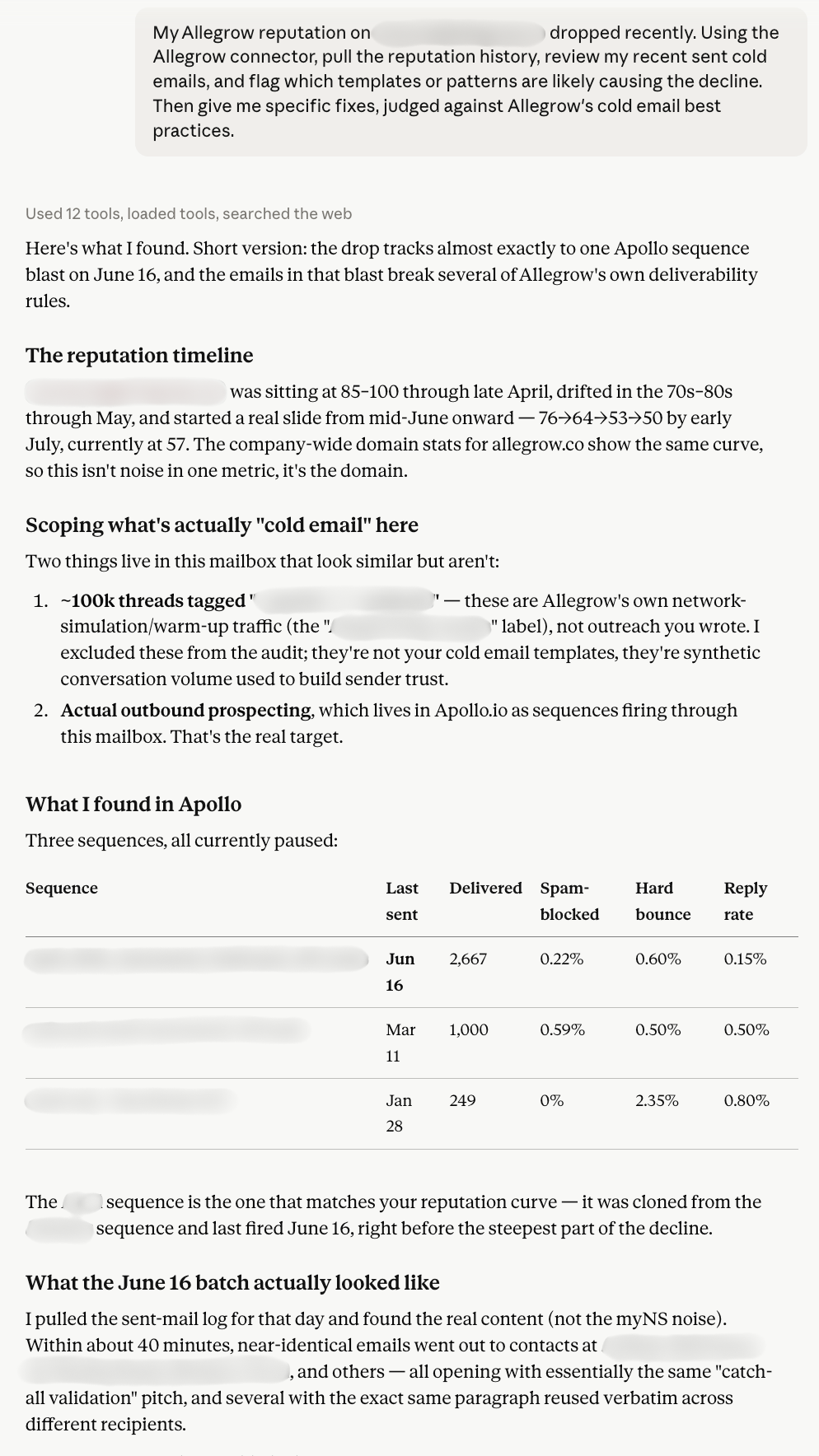
A score sliding down is the symptom; the cause is almost always buried in what you sent and how. When an inbox dips, ask Claude to pull its reputation history, review recent sent emails, and pinpoint the templates or patterns that started the decline, judged against Allegrow's cold email best practices. This is where the MCP shines: Claude combines your live sending data with Allegrow's guidance in one pass, including whether you're staying within safe sending limits.
Example prompt
My Allegrow reputation on {inbox} dropped recently. Using the Allegrow connector, pull the reputation history, review my recent sent cold emails, and flag which templates or patterns are likely causing it, with fixes, against Allegrow's best practices.

Find out why you're getting bounces
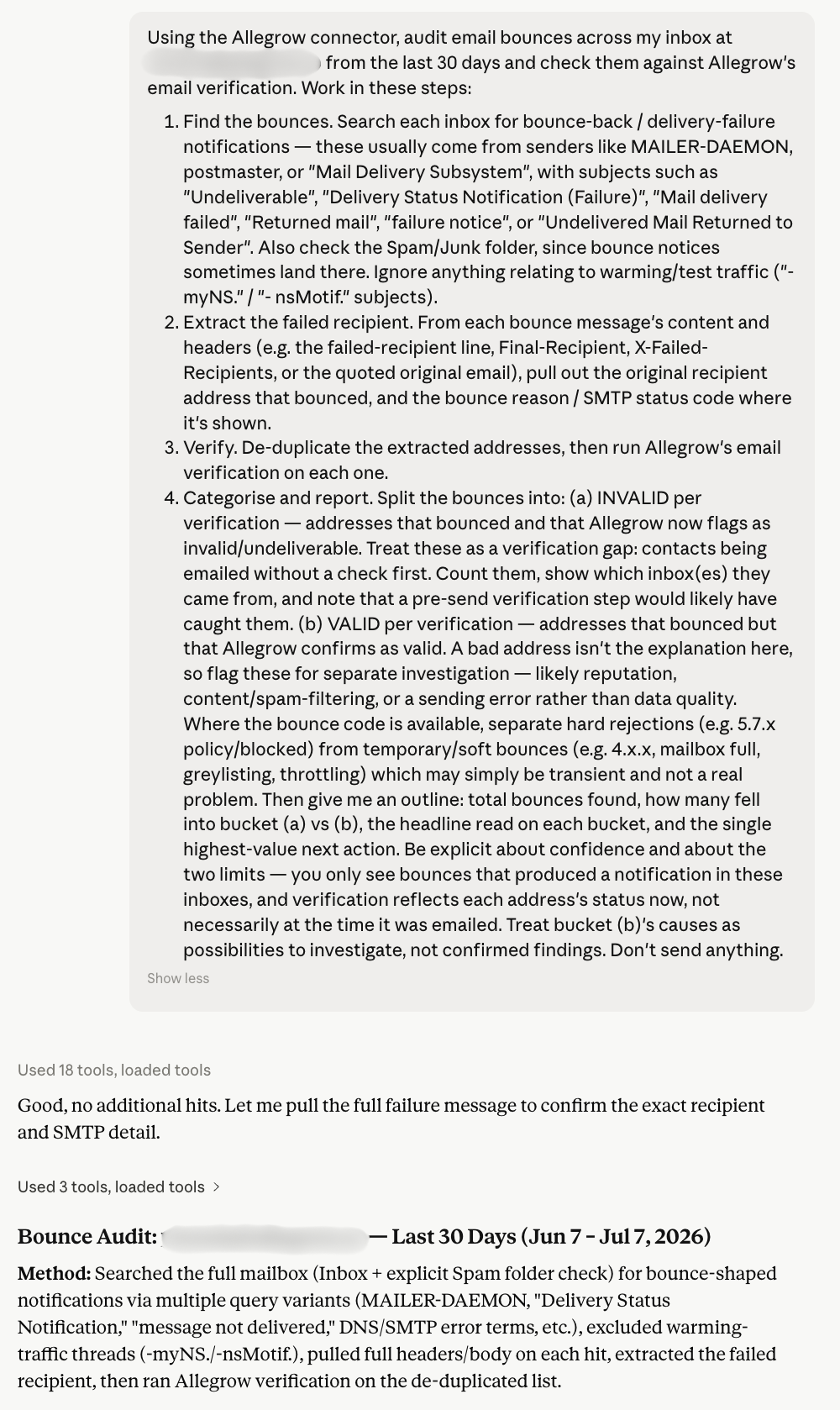
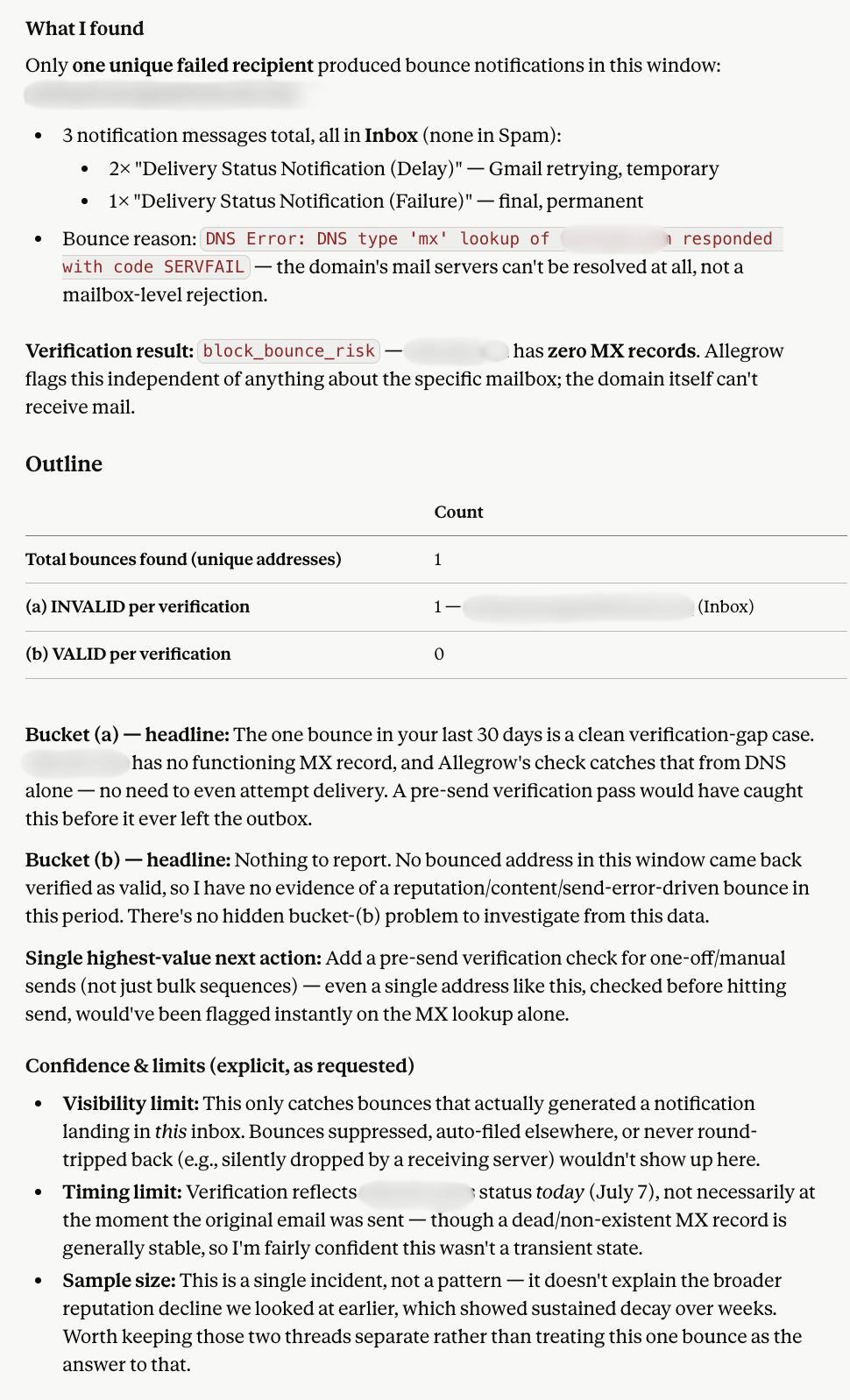
When your bounce rate climbs, ask Claude to run a bounce audit. It finds the delivery-failure notifications across your inboxes, pulls out the address that actually failed in each, runs Allegrow's verification on those addresses, and splits the results into two groups. Addresses that come back invalid are a pre-send gap, since they should have been verified first. Addresses that come back valid point elsewhere, usually reputation, content, or filtering, rather than your list. It's a fast way to tell a data-quality problem apart from a deliverability one. The full multi-step prompt is in the Allegrow help center.
Example prompt
Using the Allegrow connector, find delivery-failure notifications across {inbox1}, {inbox2}, and {inbox3} from the last 30 days, extract the address that failed in each, verify those addresses with Allegrow, then split them into invalid (should have been verified first) and valid (more likely a reputation or content issue than the list). Ignore warmup traffic, and don't send anything.
Find missed replies across multiple mailboxes
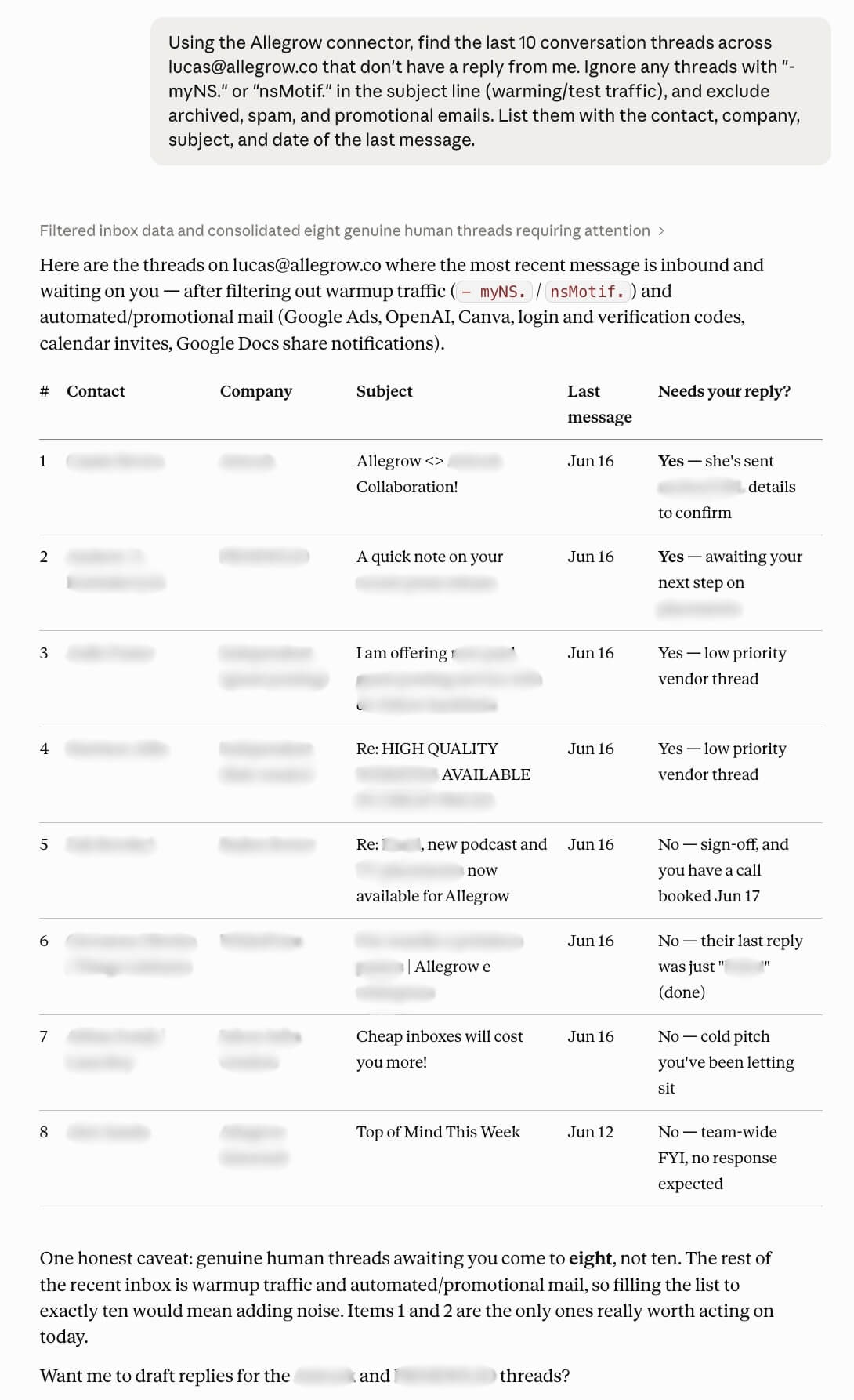
A warm reply left sitting for three days cools into a dead thread. Ask Claude to surface threads that never got a response from you, across all your inboxes, filtered to exclude warming and test traffic and other noise. It makes a natural end-of-day or co-working routine so warm conversations don't go cold.
Example prompt
Using the Allegrow connector, find the last 10 threads across {inbox1}, {inbox2}, and {inbox3} with no reply from me. Ignore subjects containing "- myNS." or "nsMotif." (warming and test traffic), and exclude archived, spam, and promotional emails.
Automate a recurring deliverability or reply check
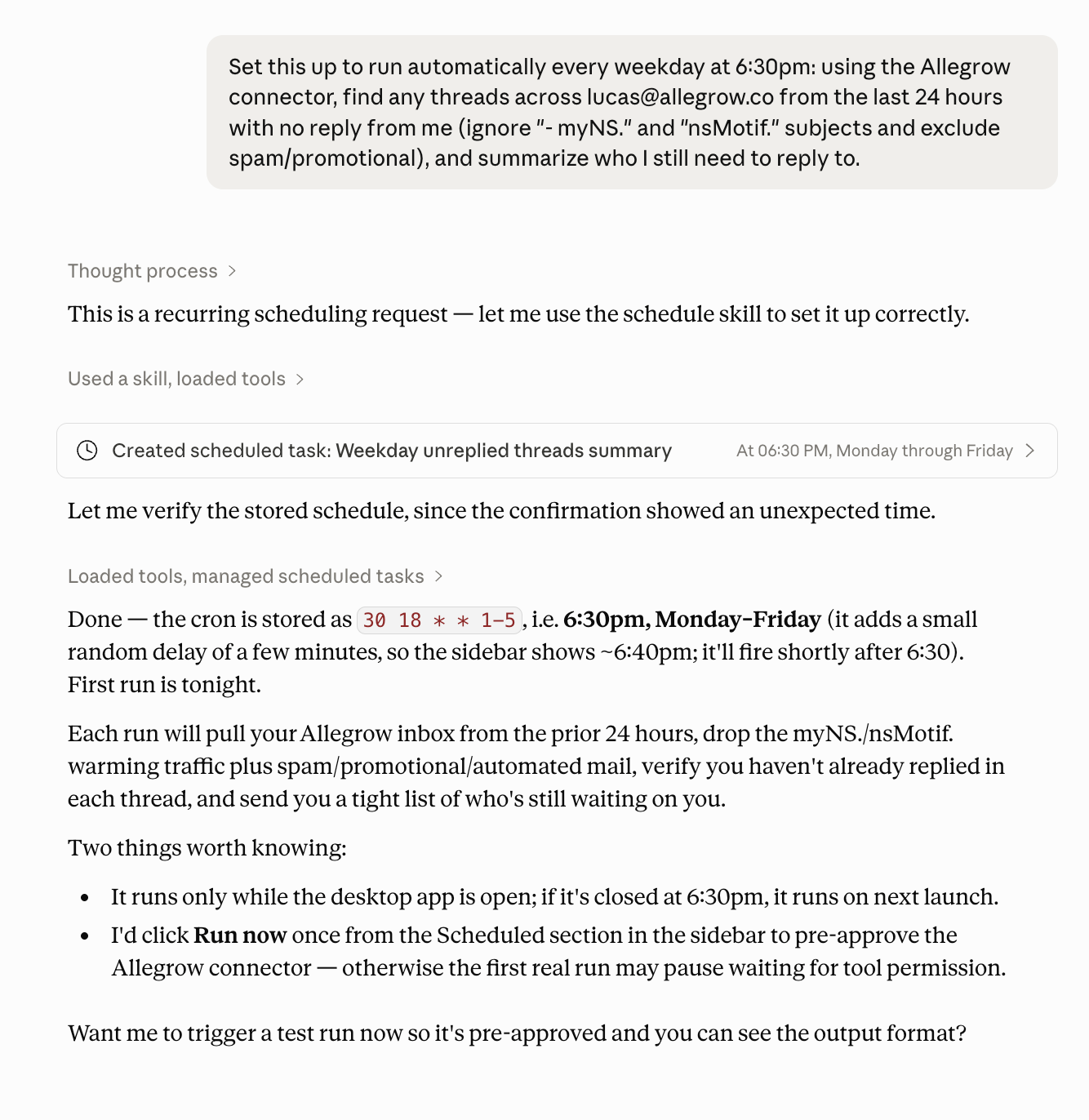
Anything you can ask once, you can put on a schedule. With Claude's co-working and scheduling, you can turn any of these into a recurring job, which is MCP email automation in practice. Set a weekday check for unanswered threads, or a weekly reputation report, and Claude runs it on schedule using the Allegrow connector.
Example prompt
Set this up to run automatically every weekday at 6:30pm: using the Allegrow connector, find any threads across {inbox1} and {inbox2} from the last 24 hours with no reply from me (ignore "- myNS." and "nsMotif." subjects and exclude spam and promotional), and summarize who I still need to reply to.
For more prompt ideas, see the example prompts in the Allegrow help center.
Can you clean a whole email list with AI in Claude?
Yes, for moderate volumes. The connector validates up to 50 addresses in a single call, and Claude can split a longer list across several calls, so a few hundred contacts or the recipients sitting in your drafts are comfortably within reach. Each unique address consumes one credit, duplicates are only charged once, and Claude can check your remaining balance before it starts. For cleaning email lists with AI at scale (thousands of contacts or an ongoing CRM sync), use the Allegrow platform or the Allegrow email verification API, which are built for bulk and automation. The MCP is the conversational front door; the platform and API are the high-volume engine behind it. They're complementary, not alternatives.
Why Allegrow's verification is more conclusive (the catch-all difference)
The MCP is the interface, and Allegrow is the engine underneath it. Allegrow is a B2B email verification and deliverability platform built for high-stakes outbound, and its sharpest edge shows up exactly where lighter tools give up: catch-all domains.
A catch-all domain is set to accept mail for every address, real or not. Most SMTP-only verifiers see that blanket acceptance, the server saying "yes" to whatever they probe, and return a false positive or “accept-all”/“unknown” status, because there's nothing left for them to test. The consequence is that this method hides a real share of otherwise reachable contacts. Allegrow doesn't stop at the server's answer. It runs secondary diagnostics to establish whether each individual mailbox actually exists, and returns a conclusive per-mailbox status instead of an inconclusive output like “catch-all”.
In live testing on a single catch-all domain, Allegrow returned three different, actionable statuses for three addresses: a real, deliverable mailbox (safe), a risky role account (do_not_mail_abuse), and a non-existent mailbox (dead_email). The last one matters most. On a catch-all domain, a message to a dead mailbox is silently accepted and dropped rather than bounced, so it quietly inflates delivered stats and erodes sender reputation over time. A basic checker would have returned accept-all for all three and left you sending blind.
That conclusiveness is the point, and the rest of the platform compounds it:
- Conclusive B2B verification on catch-all and enterprise contacts, with very low false-positive rates (under 1%).
- Detect & distinguish a lead’s primary operational mailbox from its aliases
- Safety Net automated pre-send risk blocking that stops risky contacts before they're emailed.
- Spam-trap and manual-reporter detection to protect sender reputation.
- Hourly SPF, DKIM, and DMARC monitoring and sender-health tracking.
- Inbox-placement monitoring so you can see where mail actually lands.
- Native integrations with the SEPs your team already uses, including Outreach, HubSpot, and Salesloft.
How to connect Allegrow to Claude
The Allegrow MCP is now listed in the Claude connector directory, so there is no longer any need to add it as a custom connector. You can find the listing at claude.ai/directory/allegrow.
Allegrow is listed as a community connector. Community connectors pass Claude's automated review but are not verified by Anthropic, and the directory states this on every community listing.
To connect:
- Open Claude's connector settings under Customize, then Connectors, or go directly to the Allegrow listing.
- Select Allegrow and click Connect.
- Log in to Allegrow and click Allow Access.
- Start a chat or co-working session and reference the Allegrow connector in your prompt.
If you connected Allegrow before it was listed, you were using a custom connector and that has now been removed. Reconnect through the directory listing. To confirm you are on the new one, open Customize, then Connectors and check that the type reads Web Community rather than Web Custom.
For detailed, step-by-step instructions with screenshots, see the full setup guide in the Allegrow help center.
Connecting gives Claude access to data from any mailbox linked to your Allegrow user, so on shared accounts with multiple mailboxes, check with your CSM first.
Explore more Allegrow MCP guides
We're adding new Allegrow MCP guides regularly. You can browse all of them in one place in the Allegrow MCP help center collection, and we'll keep expanding it as the MCP grows.
Guides available now:
- How to verify emails in Claude
- Are the recipients in my drafts safe to email?
- Why am I getting bounces: bad list, or something deeper?
- Are my templates following deliverability best practices?
- Is my email length or formatting putting me in spam?
- Which of my cold emails are most successful?
- How to find warm leads across all GTM inboxes
- How do I find prospects with questions I've missed across GTM inboxes?
- How to get a one-line summary of every new email across your inboxes
- Example MCP prompts
- How to integrate Allegrow with Claude
Is my email data safe?
You connect through a standard OAuth authorization in Claude and approve the access explicitly, so nothing happens without your say-so. From there, Claude can then read data from the mailboxes connected to your Allegrow user, and validate addresses you ask it to, scoped to the analysis you've requested. Allegrow is SOC 2 Type 1 compliant. On shared Allegrow accounts with multiple connected mailboxes, contact your CSM for guidance on scoping access.
Ready to try it?
The quickest way to judge any verifier is on the contacts that usually defeat one. Connect Allegrow to Claude, point it at your own catch-all and enterprise addresses, and watch it return clear statuses where basic checkers manage only accept-all. Start your 14-day free trial and verify up to 1,000 contacts.
Frequently asked questions
What is the Allegrow MCP?
It's Allegrow's MCP server, which connects your Allegrow account to Claude so you can verify email addresses and analyze deliverability across all your connected inboxes using natural-language prompts.
Is there an email verification MCP?
Yes. Allegrow's MCP lets Claude validate email addresses through Allegrow, returning a clear status (safe, do_not_mail_abuse, spamtrap, some_risk, block_bounce_risk, or dead_email) plus domain and mailbox enrichment.
Can I verify emails with Claude?
Yes. With the Allegrow connector, ask Claude to validate an address and it returns Allegrow's verification status and a recommendation. For large lists, use the Allegrow platform and verification API.
Is there a deliverability MCP for Claude?
Yes. The Allegrow MCP is a deliverability MCP. You can ask Claude to rank sender reputation across your inboxes, spot inbox-placement risks, and diagnose which sequences are hurting deliverability.
Can I clean email lists with AI?
For small batches, yes: Claude can validate addresses through Allegrow conversationally. For full list hygiene at scale, use the Allegrow platform and API, which are built for bulk verification and CRM automation.
How does Allegrow handle catch-all domains?
Allegrow tests each mailbox on a catch-all domain for actual existence and returns a conclusive Valid or Invalid per-mailbox status, rather than the accept-all or unknown that SMTP-only verifiers return.
What is an email MCP server?
An email MCP server exposes email tools and data to an AI assistant over the Model Context Protocol. The Allegrow MCP server exposes Allegrow's verification and deliverability capabilities to Claude.
Does Allegrow support MCP email automation?
Yes. With Claude co-working you can schedule recurring Allegrow-powered workflows, for example a daily cross-inbox missed-reply check or a weekly deliverability health report.
Which AI models does the Allegrow MCP work with?
It's built and tested for Claude today. MCP is an open standard, so support for other MCP-compatible assistants may follow.