Engagement-based email marketing is often framed as a strategy to increase clicks, opens, and conversions. That definition is not wrong, but it is dangerously incomplete. In today’s inbox ecosystem, engagement is no longer just a marketing optimization lever. It is the core infrastructure signal that mailbox providers use to determine whether your emails should be included in the inbox at all.
At a surface level, engagement-based email means segmenting and messaging contacts based on how they interact with your emails, such as opens, clicks, and replies, instead of sending the same message to everyone. At a deeper level, especially in B2B, engagement determines your email sender reputation, your domain trust, and whether future emails ever reach decision makers.
From a standard marketing view, engagement-based email helps you get more clicks and conversions. From the Allegrow view, engagement is the primary signal Google and other ISPs use to decide if your domain lives or dies. That difference in perspective is where most B2B teams get into trouble.
TL;DR: Engagement-based email marketing is often misunderstood as a tactic for boosting conversion rates, but in the eyes of mailbox providers (ISPs), it is the core infrastructure signal used to determine if a domain is trustworthy or spam. While marketers focus on vanity metrics like "Open Rates"—which are increasingly rendered useless by Apple MPP—ISPs utilize defensive filtering to penalize domains that generate high "ignore" rates or negative signals. Consequently, sustainable B2B deliverability requires shifting from volume-based sending to a reputation-first strategy: prioritizing replies as the ultimate truth, enforcing strict sunset policies to remove "zombie" contacts, and using platforms like Allegrow to route traffic based on engagement quality to prevent domain burnout.
What Is Engagement-Based Filtering?
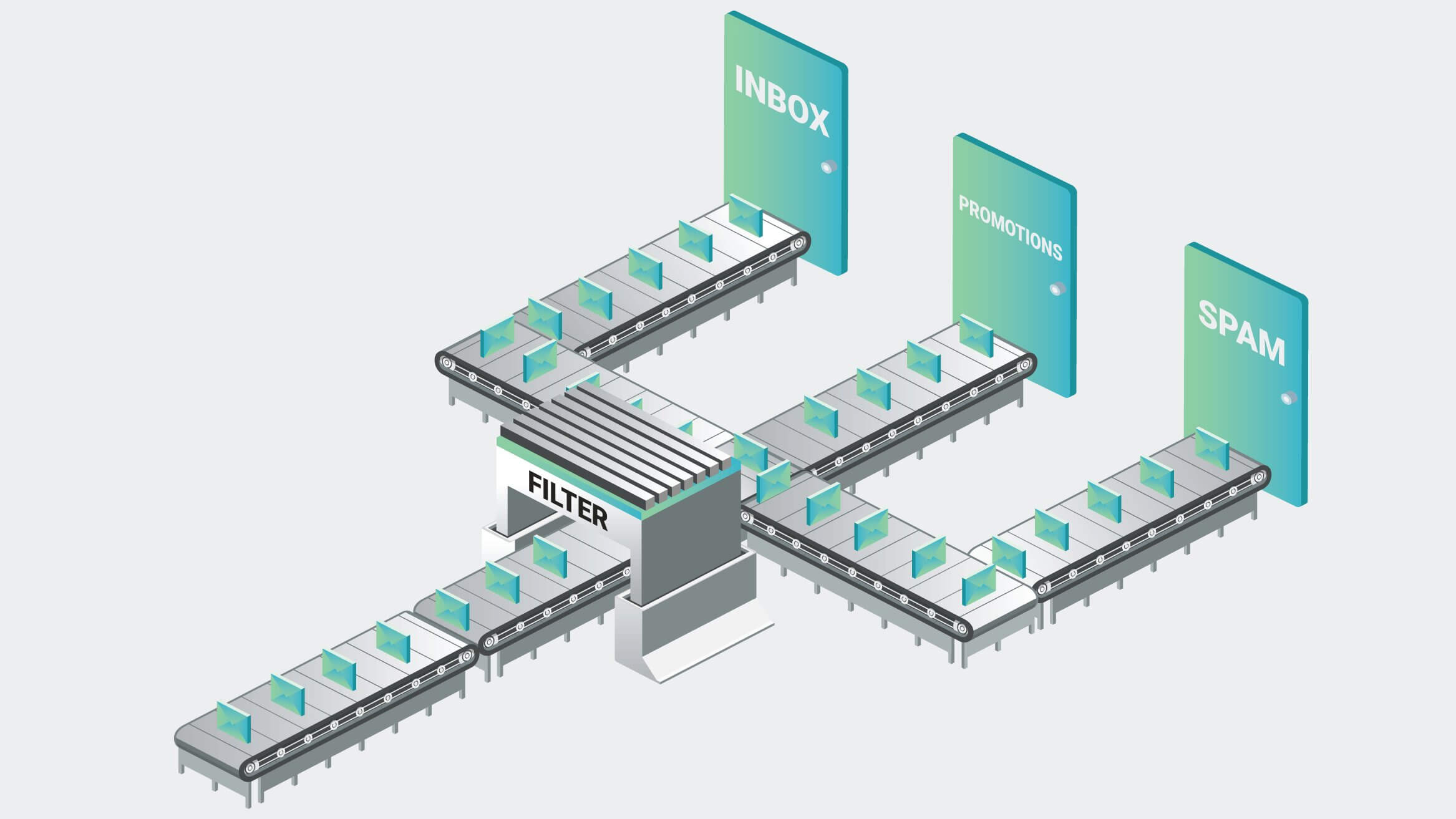
Engagement-based filtering is the mechanism mailbox providers use to decide which emails reach the inbox, which land in spam, and which are silently blocked. While marketers often think about engagement segmentation as a performance tactic, ISPs see engagement as proof of sender legitimacy.
From the standard marketing perspective, engagement-based filtering is typically used to improve campaign metrics. Marketers create segments like recently opened, recently clicked, or inactive subscribers. These segments are then used to personalize messaging, run re-engagement campaigns, or suppress contacts that appear uninterested. This approach is widely recommended by ESPs and platforms like Klaviyo, which emphasize engagement segmentation as a way to increase revenue and reduce unsubscribes.
From the ISP perspective, engagement-based filtering is a defensive system. Gmail, Outlook, and Yahoo analyze how recipients behave when your emails arrive. They measure whether emails are opened, ignored, deleted without reading, marked as spam, replied to, or moved to another folder. Over time, these behaviors form a behavioral reputation score for your sending domain and IP. Low engagement does not just hurt individual campaigns. It degrades your ability to reach the inbox entirely.
This is why engagement-based filtering is especially dangerous for B2B teams relying on outbound email. Inbound marketing platforms often hide the infrastructure impact, showing only campaign-level metrics. Meanwhile, ISPs are quietly adjusting how much of your traffic they trust.
What Are the Key Benefits of Engagement-Based Email Segmentation?
Engagement-based email segmentation helps you send fewer emails to the wrong people and more relevant emails to the right ones. While it’s often positioned as a way to improve campaign performance, its real value lies in protecting sender reputation and inbox placement over time. As Klaviyo explains, the key benefits of engagement-based segmentation include:
- Reduced inbox fatigue and disengagement: by limiting sends to contacts who are not opening or interacting with your emails, you avoid overwhelming recipients and prevent your brand from becoming background noise in crowded inboxes.
- Improved inbox placement and deliverability: sending primarily to engaged contacts reinforces positive engagement signals, helping mailbox providers associate your domain with wanted and relevant communication.
- Lower likelihood of spam complaints: disengaged recipients are far more likely to mark emails as spam. Engagement-based segmentation keeps outreach relevant, reducing complaint rates that directly harm sender reputation.
- Cleaner lists and more reliable performance metrics: removing or suppressing inactive contacts improves the overall quality of your list, making engagement metrics more accurate and preventing low engagement segments from dragging down domain trust.
- Stronger long-term sender reputation: consistently aligning your sending behavior with recipient interest builds trust with inbox providers over time, making future campaigns and new contacts more likely to reach the inbox.
In practice, engagement-based email segmentation is less about optimizing individual campaigns and more about aligning your sending strategy with how inbox providers measure trust and relevance. That’s a critical requirement for sustainable email performance, especially in B2B environments.
The Three Types of Engagement Signals and Their Hierarchy of Value
Not all engagement is equal. ISPs apply a hierarchy of trust to different actions, and B2B teams must understand which signals actually protect their domain.
Positive engagement signals are the gold standard. Replies are the strongest possible signal in B2B email. A reply tells the ISP that the recipient considers the email conversational and wanted. Marking an email as not spam or moving it into the primary inbox also sends a powerful trust signal. These actions indicate intent and consent, not just passive consumption.
Email marked as “Not Spam” is one of the clearest correction signals. If recipients consistently rescue your emails from spam (or manually move them into the inbox), it tells mailbox providers they misclassified your traffic and should trust your domain more over time. In practice, this signal is hard to earn at scale because most people never check their spam folder — so it’s not a strategy you rely on, but it’s a strong signal when it happens.
Weak engagement signals are vanity metrics. Opens are increasingly unreliable due to Apple Mail Privacy Protection, which auto opens emails regardless of user behavior. Clicks are better but still imperfect, as security scanners and bots often trigger them automatically. While clicks are still useful, they should never be the sole criterion for engagement in B2B.
Negative engagement signals are domain killers. Spam complaints, deleting emails without opening, and prolonged ignore behavior actively damage sender reputation. These signals compound over time. A large volume of ignored emails is often worse than a small number of spam complaints, because it signals systemic irrelevance.
Engagement-Based Segmentation in B2C vs. B2B
The difference between B2C and B2B engagement models is critical. In B2C, engagement is primarily transactional. Brands nurture interest, and if a subscriber does not convert, they may receive discounts or promotions. The cost of continued sending is relatively low because volumes are large and individual inbox trust is less fragile.
In B2B, engagement is conversational - that is, the goal is not a click but a reply. If a prospect does not respond, the correct action is often to stop emailing and reach them through other channels. Continuing to send unengaged B2B emails does not just lower ROI. It destroys your sender reputation and reduces inbox placement for the leads who are actively responding.
This is exactly where most outbound teams fail. They treat B2B email like B2C newsletters, optimizing for opens instead of protecting domain trust.
The “Death of the Open Rate” in Engagement Filtering
Apple’s Mail Privacy Protection has fundamentally changed the way engagement is measured. When MPP is enabled, Apple preloads tracking pixels, causing emails to appear as if they have been opened even when the user never sees them. This has rendered open-based segmentation unreliable for both marketing decisions and deliverability protection.
As a consequence, you can no longer safely segment based on opened emails in the last 30 days. Doing so often keeps inactive and uninterested contacts in your sending pool, increasing ignore rates and damaging your reputation.
The solution is to redefine engagement around replies, meaningful clicks, and negative signals like spam complaints and bounces. For B2B teams, reply rate is now the most defensible engagement metric. Monitoring spam rates and bounce behavior is equally important, as these signals directly feed ISP filtering models.
How to Implement an Engagement-Based Strategy (Step by Step)
The foundation of engagement-based email is restraint. Sending less is often the fastest way to reach the inbox more consistently. Instead, every additional message to an unengaged contact increases the risk of negative signals that hurt inbox placement. An effective engagement-based strategy focuses on sending fewer emails to the right people, using engagement signals to decide when to continue outreach and when to stop.
1. Clean Your List with a Sunset Policy
Every B2B team needs a clear and enforceable sunset policy. If a lead has not replied or shown meaningful engagement, such as a genuine click, within 60 days, they should be suppressed from outbound email. This is not about giving up on opportunities; it is about protecting your ability to reach the right prospects' inboxes.
Inactive contacts still generate negative engagement signals through ignores and deletions, even if they never explicitly mark your emails as spam. Over time, these silent signals accumulate and reduce inbox placement for your most engaged prospects.
Practical “unengaged” thresholds (examples you can enforce):
Many teams set different disengagement triggers based on outbound motion and account value. For example, SMB sequences might suppress after 3 unread emails in a row, mid-market after 4, and enterprise after 5. For inbound newsletter-style lists, a common rule is treating contacts as inactive after 6 months without meaningful engagement. These are not universal laws—they’re enforceable policies that prevent “zombie” contacts from quietly dragging down your domain.
Add a last-chance step before suppression (break-up email logic):
Once someone hits your disengagement threshold, send one final, higher-urgency message designed to earn a quick yes/no. If they engage, keep them active. If they don’t, suppress them. This protects reputation while still giving you one clean shot at reactivating real interest.
2. Monitor Traffic-Based Reputation
Most email platforms focus on campaign-level metrics like opens, clicks, and replies, but these do not reflect how inbox providers actually judge your traffic. ISPs evaluate engagement patterns across your entire domain, not individual campaigns.
Monitoring tools such as Google Postmaster provide insight into spam rates, domain reputation, and delivery errors, helping you understand whether trust is strengthening or eroding. Allegrow complements this visibility by identifying hidden risk within your contact list, including spam traps, spam reporters, and inactive mailboxes that distort engagement data and accelerate filtering before problems become obvious.
3. Use Engagement-Based Routing
More advanced B2B teams route email traffic based on engagement quality. Highly engaged leads and active conversations are sent through the primary domain and IP to maximize inbox placement and trust. Lower engagement, cold, or experimental outreach is routed through separate infrastructure to limit risk.
This separation protects the core domain responsible for revenue-critical communication while still allowing teams to test and scale outbound efforts. Engagement-based routing is one of the most effective ways to grow email volume without sacrificing long-term deliverability.
Optional reactivation safety: If you’re determined to re-contact suppressed leads, do it through separate infrastructure (subdomain or alternate sending setup) so you’re not risking the reputation of the domain that powers your revenue-critical conversations.
4. Reduce Bounces with Fresh Verification
Bounces are an engagement dead-end. If you send to addresses that don’t exist (or mailboxes that are no longer active), you get zero engagement by definition—and repeated bounces also create negative infrastructure signals that can accelerate filtering. This is why verification should happen immediately before contacts enter a sequence, not weeks or months earlier.
A common mistake is assuming that because a data provider verified a contact at some point, it’s safe to email indefinitely. In reality, job changes and mailbox shutdowns can turn previously valid addresses into bounces. Verifying close to send-time helps you remove dead inboxes, flag risky types of addresses (including catch-alls), and keep your engagement pool clean so reputation signals reflect real intent, not bad data.
Examples of How to Increase Engagement and Get More Replies
A reply is the strongest positive engagement signal an inbox provider can receive. In B2B email, replies indicate intent and relevance far more clearly than opens or clicks. When a prospect responds to one of your first emails, future messages from your domain are significantly more likely to reach the inbox.
As reply rates increase, engagement-based filtering algorithms begin to work in your favor. Establishing positive engagement early makes inbox providers more tolerant of follow-ups later in the funnel, including longer or more detailed content. For this reason, your primary objective should be to earn a reply within the first 14 days of contacting a prospect, ideally without sending more than three emails during that period.
Below are three proven email approaches designed specifically to increase reply rates early in the relationship.
Example 1: “Which bucket do you fall into?” (Inbound sign-ups or content downloads)
Subject: Content follow-up
Hi {{First_Name}},
Thanks for downloading the content. I wanted to introduce myself as part of the account team helping {{Company}} get value from {{yourCompanyAndSubjectMatterDescription}}.
Typically, people who explore this content fall into one of three categories, so I’ll make this easy.
- {{Reason1}}
- {{Reason2}}
- {{Reason3}}
Which bucket do you fall into?
Thanks,
{{Your_Name}}
This approach works because it reduces effort for the recipient while still inviting a reply. Choosing a number is easier than composing a detailed response, yet it still generates a strong engagement signal.
Example 2: “Is this your area?” (Outbound or cold prospects)
Subject: Few ideas
Hey {{First_Name}},
I was speaking with the team at {{Existing_Client_Name}} and thought about {{Company}}.
I assumed you might be responsible for {{insertAreaOfProductFocus}} at {{Company}}. Is that right, or is this more {{otherContactName}}’s area?
If it makes sense, I’m happy to send over a few ideas.
This type of message feels conversational rather than promotional. Even a short correction reply (“That’s not me”) still counts as a highly positive engagement signal.
Example 3: “Similar to {{Company}}” (Outbound to similar accounts)
Subject: Similar to {{Company}}
Hi {{First_Name}},
Looking at {{Company}}, your {{insertAreaOfProductFocus}} goals seem closely aligned with what we worked on with {{Example1}}. Let me know if that’s off base.
For context, we helped them achieve {{insertSuccessOutcomes}}.
If it’s useful, I’m happy to share a short report outlining how we approached it.
This email leverages relevance and social proof while keeping the ask lightweight. The goal is not an immediate sale, but a reply that establishes engagement.
These templates should always be adapted to your voice and audience. They are intentionally simple because the objective at this stage is not persuasion, but response. To support this approach, your emails should look and feel like they were written by a real person. Plain text emails sent from a real employee’s name consistently outperform branded or generic sender addresses such as sales@ or team@, especially in early outreach.
By prioritizing replies early and limiting volume until engagement is established, you create the strongest possible foundation for long-term inbox placement and sender reputation.
How Email Forwards Build Authority
An email forward is the digital equivalent of a referral. When a recipient forwards one of your emails to a colleague, inbox providers interpret that action as a strong signal that your content is valuable and worth sharing. This type of engagement suggests trust and relevance, both of which contribute positively to how your domain is evaluated over time.
There are two common ways to encourage this behavior. The first is explicitly asking whether there is someone else in the organization who would be better suited to the conversation. The second is offering to share a report or resource that could be useful to a broader team or department. In both cases, the forward happens naturally as part of an internal handoff, rather than feeling like a promotional push.
That said, forwards are most effective after a baseline level of engagement has already been established. Asking a contact to share your email before they recognize your value is far less likely to succeed than requesting a forward after a reply, a meeting, or a demo. Used at the right stage, forwards reinforce authority and further strengthen the engagement signals inbox providers associate with your domain.
Engagement-Based Filtering Checklist: What to Remember
At a high level, engagement-based filtering means you now lose more than you gain by emailing contacts indefinitely. In modern inbox environments, every unengaged send increases the likelihood of negative signals that compound over time.
The safest way to stay ahead of filtering is to treat engagement as a reputation signal, not a vanity metric, and to prioritize quality over volume in every sending decision.
To put that into practice, these are the key principles to remember:
- Prioritize replies over opens or clicks: replies are the strongest engagement signal in B2B email.
- Send less to protect inbox placement: don’t email unengaged contacts repeatedly.
- Enforce a sunset policy: suppress leads who haven’t replied or clicked within 60 days.
- Use enforceable disengagement triggers: for example, suppress after 3/4/5 unread emails depending on segment, and consider a last-chance break-up email before suppressing.
- Use real sender names and plain text early: make emails feel personal, not automated.
- Space follow-ups and respect unsubscribes: avoid spam complaints and negative signals.
- Encourage forwards and introductions: sharing shows value and builds authority.
- Monitor reputation at the ISP level: look beyond campaign stats to understand domain trust.
- Route traffic based on engagement: high engagement through primary IP, low engagement through separate infrastructure.
- Verify all addresses: remove inactive mailboxes, catch-alls, spam traps, and spam reporters.
- Treat bounces as a reputation risk: verify close to send-time so bad data doesn’t poison engagement signals.
Taken together, engagement-based filtering rewards discipline. The teams that consistently reach the inbox are not those who send the most emails, but those who know when to continue, when to pause, and when to stop. Treating engagement as infrastructure, not just marketing performance, is the difference between short-term activity and long-term deliverability.
Want to Test This on Your Hardest Contacts?
Engagement-based filtering rewards discipline, but discipline starts with clean inputs—especially on enterprise and catch-all domains where uncertainty creates “zombie sends”. With Allegrow’s 14-day free trial, you can verify up to 1,000 records for free and get precise Valid/Invalid outcomes so you know exactly who to email and who to suppress.
FAQ
Does engagement affect email deliverability?
Yes. Engagement is an important factor in modern spam filtering algorithms. ISPs rely on recipient behavior to decide whether your emails belong in the primary inbox. Low engagement across your contacts can quickly erode sender reputation and cause future messages to be filtered out, even for your most active leads.
How do I fix low engagement?
The first step is to stop emailing “zombie” contacts - those who ignore or never interact with your messages. Aggressively prune inactive leads, verify your list to uncover hidden risks, like spam traps or inactive mailboxes, and focus outreach on generating replies and conversations, not just opens or clicks. Structuring your sequences around response-driven engagement, rather than volume, ensures positive signals for ISPs and improves inbox placement over time.