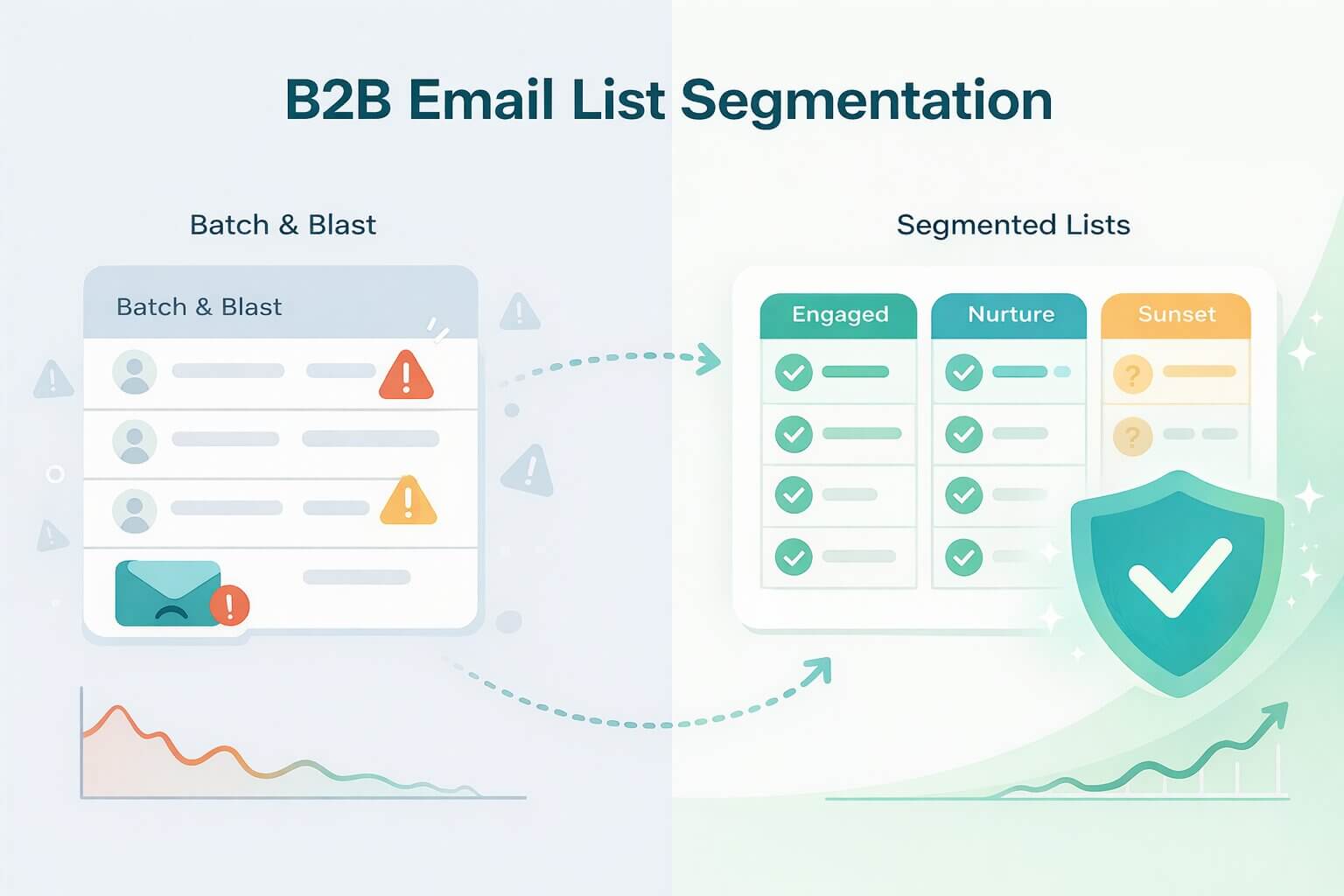
In B2B sales, relevance is the currency of attention. Sending generic blasts to your entire list ensures your message is ignored by the C-Suite and deleted by potential champions. Without clear segmentation, you force your best prospects to sift through noise, drastically lowering your reply rates and causing missed revenue opportunities.
However, the cost of poor segmentation extends beyond just missed deals; it is a direct threat to your technical sending infrastructure. In an era of Apple’s Mail Privacy Protection (MPP) and aggressive spam filtering by Google, low engagement is a primary signal of "spam" to mailbox providers. If you consistently email people who don't interact, you burn your domain reputation, causing even your best, most well-written emails to land in the junk folder.
Modern segmentation acts as the bridge between these two realities. It is the only way to align your revenue goals with the technical requirements of the inbox. By organizing your contacts based on intent, behavior, and risk, you unlock the ability to scale your outreach safely, ensuring your messages remain both persuasive to humans and compliant with filtering algorithms.
This guide provides a pragmatic, 2026-ready framework to execute this strategy. We will move beyond high-level theory into a practical checklist of "segment recipes" you can roll out in your CRM or SEP immediately, focusing on collecting the right data ethically and measuring success through actual revenue impact rather than vanity metrics.
What Is Email List Segmentation—and How Is It Different From Personalization?
While often used interchangeably, segmentation and personalization are distinct mechanisms in your revenue engine. Think of Email List Segmentation as the strategic act of grouping your audience based on shared traits, behaviors, or risk levels. It defines who receives the message and why they are receiving it right now.
Personalization is the tactical execution — tailoring the specific content within that message to make it feel individual. Segmentation provides the context; personalization provides the relevance. You cannot have effective personalization without strong segmentation, as inserting a first name into an irrelevant email only serves to highlight that the sender does not know the recipient.
To visualize the difference, consider a clear example:
- The Segment: "VIP footwear buyers in California who haven't purchased in 90 days".
- The Personalization: "{FirstName}, your size 10s are back in stock at our LA store".
Without the segment, the personalization is wasted. Sending a "we miss you" email to a customer who bought yesterday looks uncoordinated, while sending a "visit our LA store" email to a customer in New York creates friction.
The goal of segmentation is not to create complex workflows for the sake of organization. The goal is to drive a specific behavioral change, whether that is booking a demo, purchasing a seat upgrade, or re-activating a dormant lead. If a segment does not allow you to write a significantly more persuasive message that drives higher engagement—and therefore protects your sender reputation—it does not need to exist.
Why Segment Your Email List? (What Business Problems Does It Actually Solve?)
Segmentation is often sold as a way to "delight the customer", but for a B2B revenue team, it solves a much harder problem: efficiency. In a landscape where attention is scarce and inboxes are overflowing, segmentation moves you from a volume-based strategy (sending more to get the same result) to a conversion-based strategy (sending less to get a better result).
By narrowing your focus, you align your message with the specific reality of the prospect, transforming your email from a nuisance into a resource. This shift impacts three specific layers of your business: engagement, revenue, and infrastructure.
Which Metrics Improve When You Segment Well?
When executed correctly, segmentation acts as a force multiplier for your funnel metrics.
- Higher Open & Click Rates: Relevance captures attention. According to MailChimp, segmented campaigns see 14.31% higher open rates and 100.95% higher click-through rates compared to non-segmented campaigns.
- Revenue Growth: The impact on the bottom line is drastic. Strategic Vantage reports that marketers who use segmented campaigns note as much as a 760% increase in revenue. By stripping away irrelevant offers, you reduce the friction between the prospect and the "Buy" button.
- Deliverability (Domain Reputation): This is the metric most leaders overlook. High engagement rates act as a "trust signal" to Mailbox Providers (MBPs) like Google and Outlook. As detailed in our guide on Engagement Based Filtering, when a specific segment consistently opens and replies to your emails, it creates a "halo effect" that protects your domain reputation. This ensures that even your colder, riskier outreach still lands in the Primary Inbox rather than the Spam folder.
Where Can Segmentation Hurt If Misused?
Despite the benefits, there is a point of diminishing returns. "Over-segmentation" creates operational friction that can slow your team down.
- The "Sample Size" Trap: If you slice your audience into tiny micro-segments of fewer than 100 contacts, you lose statistical significance. You cannot effectively A/B test or measure performance because the data set is too small to show a trend.
- Trigger-Happy Follow-ups: Segmentation often leads to aggressive automation (e.g., “You clicked this link, so here are 3 emails in 24 hours”). This behavior mimics spam bots. Just because a user signaled intent does not mean they consented to harassment. Aggressive frequency based on weak signals will spike your spam complaint rate, undoing the deliverability gains you fought for.
- Operational Drag: If your sales ops team spends more time maintaining complex lists than your sales team spends selling, you have over-engineered the process. Segmentation should enable speed, not bottleneck it.
Which Segmentation Types Matter Most—and When Should You Use Each?
Effective segmentation is not about collecting every data point available; it is about isolating the variables that predict behavior. While there are infinite ways to slice a database, high-performing revenue teams focus on these five core categories.
1. Demographic & Firmographic (Who They Are)
This is your foundational layer. In B2B, "Firmographics" are the digital DNA of the company and prospect you are targeting. This data dictates the context and tone of your message. A Series A startup needs "speed and growth", while a Fortune 500 enterprise needs "compliance and security".
- Key Data Points: Role/Seniority, Company Size (Headcount), Revenue, Industry (SIC/NAICS codes), Technographics (Tech Stack), Time Zone.
- The Strategic Recipes:
- The "Tech Stack" Piggyback: Segment companies that use a specific competitor or complementary tool. Example: If you sell a Salesforce integration, your segment is "Uses Salesforce + Headcount > 50".
- The Value Prop Pivot: Segment by Seniority.
- To the VP: "Reduce overhead and improve forecasting precision". (Strategic)
- To the Manager: "Automate your Friday reporting". (Tactical)
- Pro Tip: Technographic Segmentation. Don't just target "Marketing Managers". Target "Marketing Managers at companies using Marketo". This implies they have a sophisticated budget and specific technical pain points you can reference immediately.
- Operational Note: Use Time Zone segmentation not just for personalization, but to stagger your sending volume. Sending 5,000 emails at 9:00 AM EST triggers velocity filters; spreading them across EST, CST, and PST windows naturally smooths your traffic.
2. Behavioral (What They Did)
Behavioral data is the strongest signal of intent because it is based on action, not just identity. It moves you from "guessing" they need help to "knowing" they are actively looking. This data has a short half-life; a behavior exhibited today may be irrelevant next week.
- Key Data Points: Page views (Pricing vs. Blog), Content downloads, Video completion rates, Webinar attendance, Click depth, Form sign-up.
- The Strategic Recipes:
- The "High-Intent" Researcher: "Visited Pricing Page > 2 times" OR "Visited 'Book Demo' page but didn't convert". This segment needs a direct, low-friction offer immediately.
- The "Education" Seeker: "Downloaded Whitepaper" OR "Viewed Blog Category X". Do not pitch them a meeting yet. Send them the next logical piece of content to nurture trust.
- The Window Shopper: "Added to cart — no purchase in 24 hours".
- Pro Tip: The "Nudge, Don't Stalk" Rule. When writing copy for this segment, acknowledge the topic, not the surveillance.
- Bad: "I saw you were on our pricing page at 2:00 PM". (Creepy).
- Good: "Curious if you had questions about which Enterprise plan features would fit your team?" (Helpful).
3. Transactional (What They Bought)
Your best future customer is usually your current customer. Transactional segmentation allows you to maximize Customer Lifetime Value (LTV) using the RFM Model: Recency (How recently did they buy?), Frequency (How often?), and Monetary Value (How much?).
- Key Data Points: Last Purchase Date, Average Order Value (AOV), Total Lifetime Spend, SKU/Category history.
- The Strategic Recipes:
- The "Whale" (High LTV): These are your top 5% of spenders. Never send them a generic discount code. Segment them for "Early Access", "Beta Testing", or "Concierge Support".
- The "Discount Junkie": Customers who only buy during sales. Do not email them full-price offers; it trains them to ignore you. Only trigger emails to them during promo windows.
- The Cross-Sell Opportunity: Segment customers who bought Product A (e.g., Laptop) but not Complementary Product B (e.g., Docking Station).
- Pro Tip: Replenishment Timing. If your product has a 30-day usage cycle, trigger a segment at Day 25: "Running low?" This turns a one-time transaction into a subscription habit.
4. Lifecycle Stage (Where They Are in the Journey)
A prospect who just heard of you today has different anxieties than a customer who has been with you for three years. Lifecycle segmentation ensures you don't send a "Intro to our Brand" email to a loyal advocate, or a "Refer a Friend" request to a brand new lead who hasn't seen value yet.
- Key Data Points: Signup Date, Activation Date (First usage of key feature), Renewal Date, Net Promoter Score (NPS).
- The Strategic Recipes:
- The Onboarding Sprint: New subscriber (Days 1–14). Goal: Habit formation. Send "How-to" guides, not sales pitches.
- The "Aha!" Moment Bridge: Users who signed up but haven't used [Key Feature]. Goal: Activation. Send a specific tutorial or case study showing the result of that specific feature.
- The Churn Risk: Users whose login frequency has dropped by 50% in the last 30 days. Goal: Intervention. Trigger a "Need help?" outreach from a Customer Success Manager.
- Pro Tip: The Renewal Warm-Up. For B2B contracts, start a specific segment 90 days before the contract ends. Shift content from "Tactical Tips" to "ROI Reports" to arm your champion with data for the renewal conversation.
5. Engagement (How They Interact with your Emails)
This is your Deliverability Safety Valve. In the eyes of Google and Yahoo, your sender reputation is heavily influenced by the ratio of engaged recipients to unengaged ones. Segmenting by engagement is the only way to manage this ratio.
- Key Data Points: Last Click Date, Last Reply Date, Reply Status.
- The Strategic Recipes:
- The "Super Actives" (Replied/Clicked in last 30 days): These are your "Reputation Boosters". You can email them at higher frequency. Use them to test new subject lines because they are most likely to open.
- The "Soft Actives" (Opened Only): Treat this segment with caution. Due to image pixel pre-loading, an "Open" does not guarantee human eyes. Do not assume high intent here unless it is paired with a site visit.
- The "Cooling" (No engagement 30–90 days): They are tuning out. Reduce frequency immediately. Switch content format (e.g., from newsletter to text-only check-in).
- The "Sunset" Segment (No engagement 90+ days): These contacts are toxic to your domain. If you keep emailing them, you look like a spammer. Move them to a final "Break-Up" flow. If they don't click, stop emailing them.
- Pro Tip: The Click-Based Cleanse. Stop pruning your list based on "Unopens" (which misses people). Start pruning based on "Non-Clicks". If a prospect hasn't clicked a link in 6 months, downgrade them to a "Quarterly Update" segment to protect your primary sending reputation.
20 High-Impact Email Segmentation Strategies
A segmentation strategy is only as good as its execution. While there are dozens of ways to slice a list, these 20 strategies offer the highest return on effort for B2B revenue teams and high-volume senders.
1. Validation Status (The Deliverability Shield)
- The Recipe: Segment by Verification Status = "Valid" vs. "Risky"
- The Strategy: Send your high-volume sequence to the "Valid" segment. Route "Risky" contacts to a slower, low-volume "Test" sequence or exclude them entirely.
- Deliverability Benefit: This prevents "Hard Bounces" and "Spam Traps" from ruining the reputation of your main domain. This is the single most effective way to prevent domain blacklisting.
2. New Subscribers (The "Welcome" Window)
New subscribers are at their peak engagement level. Do not let them sit cold.
- The Recipe: Trigger an automated email immediately (Day 0) upon signup.
- The Strategy: Don't just say "Welcome". Use this high-engagement touchpoint to ask a question (e.g., "What is your biggest challenge right now?").
3. Job Title / Role (The B2B Context)
A generic pitch to a "Marketing Team" will fail. A VP cares about strategy; a Manager cares about execution.
- The Recipe: Segment by Job Title contains "VP/Director" vs. "Manager/Specialist".
- The Strategy: Pitch "ROI and Efficiency" to the VP. Pitch "Ease of use and Time-saving" to the Manager.
4. Lead Magnet Specifics (Content Affinity)
If a prospect downloaded a technical whitepaper, they don't want a "Beginner's Guide".
- The Recipe: Tag users by the topic of the asset they downloaded (e.g., "Topic: Security" vs. "Topic: ROI").
- The Strategy: Send follow-up content that deepens that specific topic. If they downloaded a Security Guide, send them a Case Study on Data Compliance, not a generic newsletter.
5. The "Window Shopper" (Browsed but Didn't Buy)
Behavioral data is a stronger signal than demographic data.
- The Recipe: Trigger for users who viewed a specific Category or Pricing Page > 2 times in 7 days but did not convert.
- The Strategy: Send a helpful "Comparison Guide" or "Top 3 Sellers" list. Avoid aggressive "I saw you watching" language, which feels invasive.
6. Cart Abandonment / Pricing Drop-off
This is the classic "low-hanging fruit" for revenue recovery.
- The Recipe: Trigger 3–24 hours after a cart (B2C) or demo request (B2B) is abandoned.
- The Strategy: Focus on removing friction, not just discounting. Ask, "Did you have a question about the Enterprise plan?" rather than just offering 10% off immediately.
7. High-Intent Content Consumers (B2B)
Not all downloads are equal. An ROI Calculator download signals much higher intent than a blog post view.
- The Recipe: Trigger when a user interacts with "Bottom of Funnel" assets (Calculators, Case Studies, Pricing).
- The Strategy: Fast-track these leads to sales. Offer a consultation or an "Expert Review" rather than nurturing them with more content.
8. First-Time Purchasers
The drop-off after the first purchase is the biggest leak in the bucket.
- The Recipe: Trigger 7–21 days post-purchase.
- The Strategy: Send "Success Content"—guides on how to get the most out of what they just bought.
- Deliverability Benefit: This builds trust. If the user feels supported, they are less likely to unsubscribe or report spam when you eventually send a cross-sell offer.
9. VIPs / High LTV
Your top 5% of customers should never receive a generic batch-and-blast email.
- The Recipe: Segment by Lifetime Value (LTV) > $X or Order Count > 5.
- The Strategy: Give them "Early Access", "Beta Testing Rights", or "Exclusive Webinars". Make them feel like insiders.
- Deliverability Benefit: This segment is your "Domain Shield". Their incredibly high open/reply rates help offset the lower engagement of your cold leads.
10. The "Price-Sensitive" Buyer
Some buyers only convert when a deal is present. Sending them full-price emails trains them to ignore you.
- The Recipe: Segment users who only purchase using discount codes or during EOQ (End of Quarter).
- The Strategy: Suppress them from full-price newsletters. Only email them during major sales events (Black Friday, End of Quarter). This protects your open rates and your margins.
11. Replenishment / Renewal Timing
If your product has a lifecycle (e.g., software renewal or physical goods), timing is everything.
- The Recipe: Trigger 30–90 days before renewal or expected run-out date.
- The Strategy: "Running low?" or "Contract renewal coming up—here is your ROI report".
- Deliverability Benefit: These transactional-style reminders have massive open rates (often 50%+), boosting your overall sender reputation.
12. Inactivity (The "Ghost" Protocol)
This is the most critical segment for infrastructure health.
- The Recipe: No clicks or replies in 90+ days.
- The Strategy: Move them to a "Re-engagement" flow. Ask, "Do you still want these updates?" If they don't click, stop emailing them.
- Deliverability Benefit: Continuing to email ghosts signals to Google that you are a spammer. Pruning this list improves your inbox placement for everyone else.
13. Event No-Shows
Registrants who missed the webinar are still interested; they were just busy.
- The Recipe: Registered for Event AND Did Not Attend.
- The Strategy: Send the recording + a text summary of the key takeaways. Do not just send a link; give value in the email body.
14. Churned Trials (B2B SaaS)
Users who trialed and left aren't dead leads; they just wasn't the right time.
- The Recipe: Trial ended > 30 days ago AND No Upgrade.
- The Strategy: Re-engage only when you have a new feature that solves a specific objection. "We fixed the X issue you might have seen".
15. Back-in-Stock / Feature Release
- The Recipe: User requested alert for specific Item/Feature.
- The Strategy: Send immediately when available.
- Deliverability note: Throttle this send. If 10,000 people are on the waitlist, do not blast all 10,000 instantly. Send in smaller batches to avoid a velocity spike that triggers spam filters.
16. Geolocation (Time Zone Staggering)
- The Recipe: Segment by IP Country/Region.
- The Strategy: Send at 9:00 AM local time.
- Deliverability Benefit: This is a crucial velocity control. By spreading your sends across APAC, EMEA, and NA time zones, you smooth out your server traffic, looking less like a bot and more like a human sender.
17. Device Type (Mobile Optimization)
- The Recipe: >50% of historical opens occurred on Mobile.
- The Strategy: Use shorter subject lines (under 40 chars) and larger CTA buttons for this segment.
- Deliverability Benefit: Mobile users delete unreadable emails instantly. High deletion rates hurt your sender score.
18. Referral Source
Did they come from a Partner, a Facebook Ad, or a Cold Outreach campaign?
- The Recipe: Segment by Source tag.
- The Strategy: Contextualize the welcome. "Thanks for coming from [Partner Name]" creates instant trust, whereas a generic welcome feels disconnected.
19. NPS / Advocates
- The Recipe: Customers who rated you 9 or 10 on NPS.
- The Strategy: Ask for a review or a referral.
- Deliverability Benefit: These users are your "Safe Haven". If your domain reputation dips, increase volume to this segment to generate positive signals (opens/clicks) and repair your score.
20. Subscription Downgrades
Users looking to cancel or downgrade are at high risk.
- The Recipe: Visited "Cancel" page or FAQ.
- The Strategy: Trigger a helpful outreach: "Before you go, did you know about the [Lower Tier] plan?"
- Deliverability Benefit: Tread carefully. If you annoy a user who is trying to leave, they will mark you as spam out of spite. Keep the tone helpful, not desperate.
Best Practices for Implementing Segmentation
The most common failure mode in segmentation is not a lack of data, but an excess of complexity. Revenue teams often fall into the trap of "over-engineering", building dozens of hyper-specific micro-segments that are impossible to maintain.
To build a system that scales without paralyzing your operations, you must follow a disciplined approach to simplicity, hygiene, and automation.
Start with the "Rule of Three"
Your goal is revenue, not granularity. Instead of launching twenty complex segments on Day One, focus entirely on the three variables with the highest correlation to conversion: one Demographic segment (such as Role), one Behavioral segment (such as Demo Abandonment), and one Risk segment (Active vs. Inactive).
This restraint is mathematical, not just operational. If you slice your audience into tiny cohorts of fewer than 500 contacts, you lose statistical significance. You cannot effectively A/B test or measure performance because the sample size is too small to show a reliable trend, leaving you guessing based on noise rather than data.
Clean Your Data First
Segmentation is useless if the underlying data is toxic. You can have the most relevant "Vice President" segment in the world, but if 20% of those emails are invalid or risky catch-alls, your domain reputation will tank. Your emails will land in spam regardless of the content quality.
Before a contact enters any active segment, they must pass a strict verification protocol. Implementing a real-time verification layer, like Allegrow’s Safety Net, ensures that "Invalid" or "Spam Trap" emails are flagged and quarantined before they ever enter your high-volume sending value. This turns hygiene from a periodic cleanup task into an always-on defensive layer for your domain.
Kill the Static List
If your team is still manually downloading CSV files, filtering them in Excel, and re-uploading them to your sending platform, your data is already stale by the time you hit send. B2B data decays at a rate of roughly 22.5% per year as prospects change jobs or companies fold. Relying on static lists ensures you are constantly messaging people who are no longer relevant.
You must transition to Dynamic Logic within your CRM or SEP. By setting rules—such as "If Last Activity < 30 Days AND Role = VP"—you ensure that contacts flow in and out of segments in real-time. This guarantees that a prospect who becomes "Inactive" today is immediately removed from your "High Frequency" sequence tomorrow, preventing the exact kind of annoyance that leads to spam complaints.
The Impact of Segmentation on Sender Reputation
Most sales leaders view segmentation purely as a conversion lever, assuming the only goal is to get the right message to the right person so they buy. While true, this misses the most critical technical benefit. In the eyes of mailbox providers like Google and Yahoo, segmentation is one of the primary mechanisms used to calculate your Sender Reputation.
These algorithms constantly monitor the relationship of positive signals (replies, clicks, moves to folders) against negative signals (spam reports, deletes without reading). If you send a single, massive blast to a mixed list of 10,000 active and inactive contacts, the low engagement from the "ghosts" dilutes the high engagement from your fans. The algorithm sees a mediocre average and suppresses your future emails for everyone.
Effective segmentation allows you to engineer a "Halo Effect" for your domain. By isolating your most engaged segments and emailing them first or most frequently, you generate a dense cluster of positive signals. This tells Google’s filters that your domain is trusted and valuable.
This accumulated trust acts as a "reputation credit" that protects you when you inevitably email your colder, riskier segments. The high engagement from your segmented "Safe" list essentially subsidizes the risk of your "Cold" list, ensuring that your cold outreach still lands in the primary inbox rather than the spam folder.
If you fail to segment, you lose this leverage. The drag from your inactive contacts will pull your reputation down until even your most important transactional emails begin to land in the junk folder.
Conclusion
Effective segmentation is the difference between a revenue engine that scales and a domain that gets blacklisted. By moving away from static "batch and blast" lists and embracing dynamic, intent-based segments, you align your outreach with the technical reality of the modern inbox.
You do not need to implement all 20 strategies tomorrow to see results. Start with the "Deliverability Shield" — separating your valid contacts from the risky ones — and build outward from there. This single step will do more to protect your deliverability than any subject line optimization ever could.
To execute this, you need data you can trust. You can begin segmenting today with a Free 14-Day Trial of Allegrow. Unlike legacy tools that frequently return vague "unknown" results, Allegrow’s advanced verification provides definitive "Valid" and "Invalid" statuses even for the most challenging catch-all servers and Secure Email Gateways (SEGs). It also surfaces hidden spam traps before they damage your reputation.
Ultimately, the goal of segmentation is not just to send more emails. It is to ensure that the emails you do send actually land, get read, and drive revenue.
FAQs on Email List Segmentation
How many segments should I start with?
Start with just 3–5 core segments, but ensure your absolute first priority is a Safety Segment (Valid vs. Risky). Before you slice by job title or behavior, you must isolate safe contacts from those that will bounce or trigger spam traps to protect your deliverability. Beyond that foundation, align your remaining segments to your immediate revenue goals. Run these for 1–2 cycles to establish a baseline before expanding based on actual performance data.
What if my data is sparse?
If you lack deep behavioral data, rely on Infrastructure Segmentation. You don't need to know a prospect's purchasing history to know if their email address is safe. Segmenting by Verification Status (Valid vs. Risky) is the highest-ROI step you can take with sparse data, ensuring you only email safe accounts while you build up your enrichment profile over time.
What’s the difference between segmentation and personalization?
Think of Segmentation as the strategy (grouping people by shared traits to determine who gets the message). Personalization is the tactic (inserting specific details like names or company data to determine how the message reads). Segmentation ensures relevance; personalization ensures connection. You cannot have effective personalization without strong segmentation.
Should I personalize every email?
No, because relevance beats forced personalization every time. A highly relevant email sent to a well-defined segment (e.g., "New compliance rules for CFOs") will outperform a generic email that simply merges in a {FirstName}. Focus your manual personalization efforts only on your highest-value segment (VIPs/Enterprise), and rely on strict relevance for the rest.
How often should I update my email segments?
Your segments should update automatically in real-time. If you are manually moving contacts between lists, your operation is too slow for 2026 standards. Use dynamic logic in your CRM so that the moment a prospect clicks a link or changes roles, they are instantly moved to the correct segment without human intervention.
How often should I prune inactive contacts?
You should have an automated "Sunset Policy" that runs continuously. A standard benchmark is 90 days: if a contact hasn't opened or clicked in 3 months, move them to a re-engagement sequence. If they still don't engage, suppress them immediately. Holding onto "ghost" contacts drags down your engagement rates and signals to mailbox providers that your content is unwanted.