Revenue operations teams rely on email verification to keep their CRM data clean and protect their domain reputation. Many turn to SMTP handshake email verification expecting a flawless system that perfectly separates active inboxes from dead ones. However, relying purely on this method often leads to misleading results, causing teams to accidentally delete valid prospects or blindly send to hidden risk accounts.
To use this technique safely, you must understand what happens beneath the surface. An SMTP handshake is a server-to-server protocol where your verification tool attempts to negotiate a connection with the recipient's mail server. By analyzing this digital conversation, you can infer whether an address appears deliverable without ever actually sending a message.
While powerful, this process has strict reliability limits when dealing with complex enterprise domains and catch-all servers. Modern security firewalls are designed to mask mailbox existence, frequently returning ambiguous signals that disrupt your workflows. This guide will break down the exact steps of the SMTP handshake, explain why false positives occur, and show you how to layer your verification checks for definitive results.
TL;DR: SMTP handshake verification is a diagnostic process that "pings" a recipient's mail server to check for a mailbox's existence without sending a message, but in 2026, this legacy method is no longer a standalone reliability metric. While it effectively identifies simple hard bounces, it frequently fails against modern enterprise defenses— such as Secure Email Gateways (SEGs) and catch-all configurations— which are designed to return "Valid" responses for every query to mask internal directories. Relying purely on this digital handshake leads to a "Ghost Seat" phenomenon, where deactivated or uninitialized inboxes appear active, causing you to burn your domain reputation on non-existent users. To maintain deliverability, revenue teams must move beyond simple connectivity checks and adopt a multi-stage validation stack. By layering SMTP pings with protocol-level activation signals and behavioral analysis through platforms like Allegrow, you can conclusively resolve the 30% of B2B data that legacy tools label as "Unknown".
What is SMTP handshake email verification?
SMTP handshake email verification is a diagnostic process that uses a server-to-server conversation to check if an email address is deliverable. Instead of actually sending a payload to your prospect, the verification tool initiates a standard dialogue with the receiving server. By analyzing how the server responds to the proposed recipient, the system infers whether the mailbox actually exists. This approach is highly effective for cleaning out obvious hard bounces and entirely dead inboxes before a campaign launches.
It provides a much deeper level of certainty than basic syntax checks, which only confirm if an address is typed correctly. However, it is critical to understand the technical limitations of this server handshake. While the receiving server might confirm the mailbox is "Valid", this check cannot prove that a human being actively monitors that inbox or will ever reply to your outreach.
What is SMTP and what happens during an SMTP handshake?
Simple Mail Transfer Protocol (SMTP) is the foundational rulebook governing how email travels from one server to another across the internet. Before a message can be successfully delivered, the sending and receiving servers must establish a connection and agree on how to communicate.
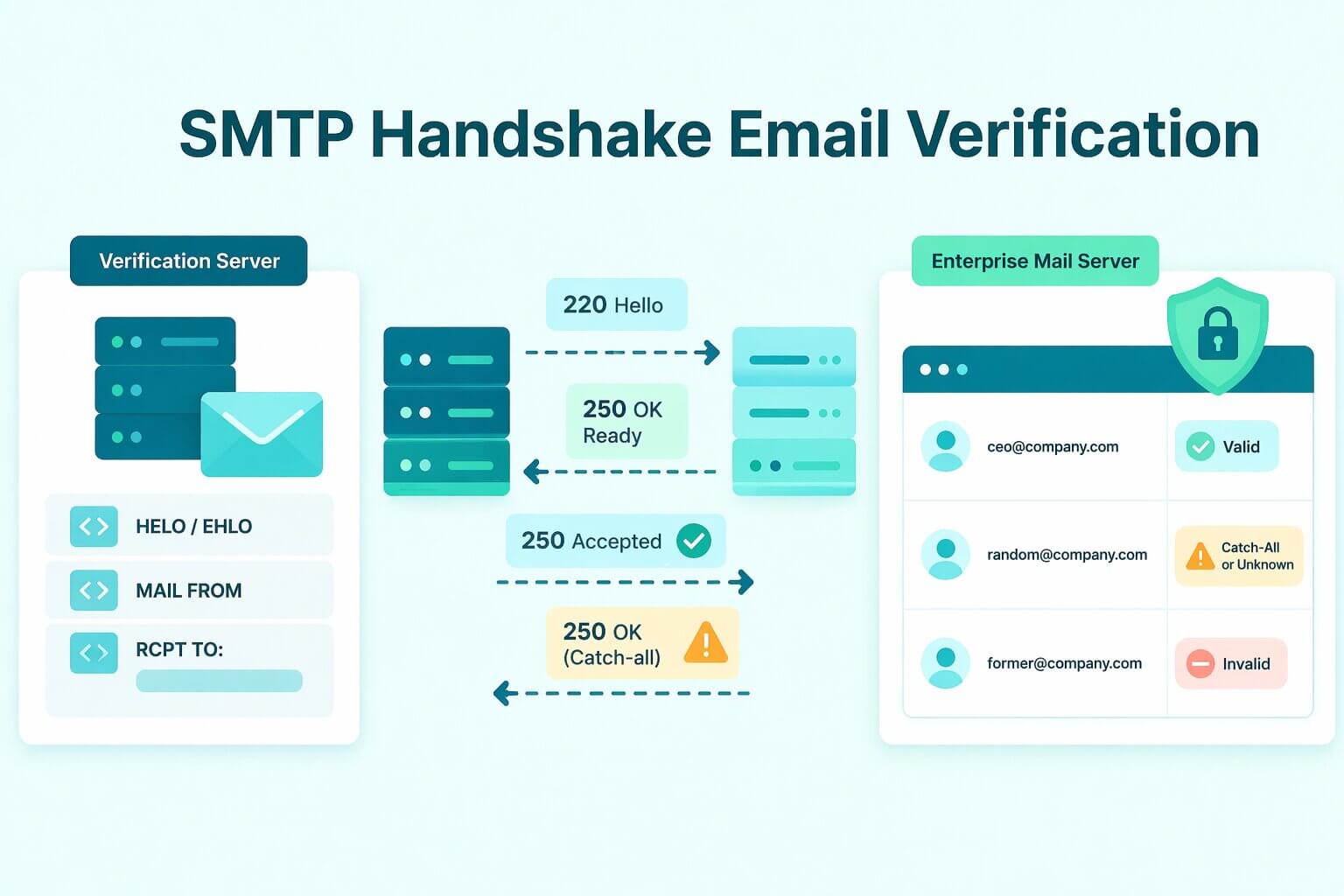
This initial negotiation is known as the SMTP handshake. The sequence begins with a basic connection request, followed by a greeting where both servers identify themselves and exchange their security capabilities. Once basic trust is established, the sending server proposes the specific recipient address it wants to reach.
After the receiving server either accepts or rejects this recipient, the connection gracefully closes. In a standard email delivery workflow, the servers would immediately proceed to transfer the actual message body.
During an SMTP verification check, however, the process intentionally stops right after the recipient negotiation phase. The verification tool strictly watches how the receiving server reacts when the specific email address is proposed. By analyzing the acceptance or rejection code at this exact moment, the tool infers the validity of the inbox without ever transmitting a real email.
What is the difference between SMTP verification and traditional email validation?
Revenue teams often use the terms SMTP verification and email validation interchangeably, but they represent entirely different scopes of work. SMTP handshake verification is merely one specific technical action focused entirely on server-to-server interaction. In contrast, comprehensive email validation is a multi-step diagnostic pipeline that incorporates several different checks to determine overall deliverability. A standard validation sequence begins with a basic syntax check to ensure structural formatting, followed by an MX record lookup to verify the destination domain can actually receive mail.
Only after these foundational steps pass does the system execute the SMTP handshake to query the specific mailbox. Relying solely on an SMTP check without the preceding steps leaves you blind to basic misconfigurations, which is why layering these checks is essential before your campaign launches.
What is the difference between SMTP verification and SMTP authentication?
It is easy to confuse SMTP verification with SMTP authentication (SMTP AUTH), but they serve entirely opposite functions in the email ecosystem. SMTP authentication is a security process used by your own mail server to verify your identity before allowing you to send an outgoing message. It acts as a digital checkpoint, proving that you are an authorized sender rather than a malicious actor trying to hijack the infrastructure.
This authentication process involves standard security mechanisms like password credentials or OAuth tokens, often paired with external domain alignment protocols like SPF, DKIM, and DMARC. These frameworks work together to prove your legitimacy to the rest of the internet. As of 2026, Microsoft has fully aligned with Google’s strict sender standards for all Outlook and 365 accounts, meaning unauthenticated or misaligned emails are now treated as active security threats rather than just "risky" mail. While authentication authorizes your infrastructure, verification remains the only way to confirm the recipient's mailbox actually exists.
The easiest way to separate the two concepts is by looking at directionality. Authentication happens entirely on your sending side to authorize your outbound infrastructure. Verification, on the other hand, happens entirely on the receiving side to confirm the recipient's mailbox actually exists.
How does SMTP handshake verification work step by step
The verification flow begins with an MX record lookup to locate the specific mail server responsible for the recipient's domain. Once identified, the verification tool connects to the server— typically over standard email ports— and introduces itself using a standard HELO or EHLO greeting. Following this greeting, the tool identifies the simulated sender using the MAIL FROM command, setting the stage for the actual mailbox query.
The most critical phase of the handshake occurs when the verifier issues the RCPT TO command, proposing the exact email address it wants to test. At this exact moment, the tool is carefully monitoring the receiving server's behavior. The goal is to see if the server immediately rejects a non-existent recipient or accepts the command without throwing an error.
This is where the verification tool reads the server's standardized response codes to determine deliverability. Following the IANA standard for SMTP response classes, a code starting with "2" (e.g., 250 OK) signals success, while a code starting with "5" (e.g., 550) denotes a permanent failure. If the server responds with a 250 code, it signals that the mailbox is accepted, whereas a 550 code explicitly means the mailbox is not found. After interpreting these specific codes, the tool categorizes the address and promptly issues a QUIT command to cleanly terminate the session without transmitting a payload.
However, it is important to remember that mail server configurations are not universally standardized. Server behaviors vary widely based on strict internal security policies and the sender reputation of the verification tool. Because of these layered defenses, testing the exact same email address can yield entirely different handshake outcomes depending on who is asking and how the server is configured.
What are the benefits of SMTP handshake verification?
The primary advantage of SMTP handshake verification is its ability to catch dead inboxes before they cause obvious hard bounces. Because it goes beyond basic format-only checks, it actively protects your list hygiene and preserves your underlying sender reputation.
Furthermore, it provides a much stronger deliverability signal than an MX record lookup alone. While an MX check merely confirms that a domain possesses a configured mail server, the SMTP handshake tests the actual routing interaction with that specific infrastructure. This deeper inquiry reveals how the server responds to the exact address in real time.
Despite these advantages, SMTP verification is most useful when deployed as part of a layered workflow rather than a single source of truth. Because modern firewalls frequently obscure mailbox existence, relying exclusively on one handshake leaves you vulnerable to misleading server responses.
When should you use SMTP verification instead of syntax only checks?
Syntax-only checks are the absolute baseline of data hygiene, designed purely to catch obvious human typos like a missing "@" symbol or a misspelled domain. Because these format checks require zero server interaction, they are incredibly fast and cheap to run in real-time. This makes them perfect for the top of your funnel, such as instantly validating an address the moment a prospect hits "submit" on your website.
However, a perfectly formatted email address means absolutely nothing if the prospect left the company six months ago. Syntax checks cannot tell you if the underlying inbox has been deactivated, leaving your domain completely exposed to hard bounces if you rely on them for campaign delivery.
This is exactly when you must escalate to SMTP handshake verification. You should deploy this deeper server-level check right before launching any new outbound cadence, or when auditing a decaying Salesforce list that hasn't been emailed in months. By actively querying the receiving mail server, SMTP verification catches the deactivated accounts and dead aliases that easily slip past basic formatting filters. Upgrading to this server-side check is the only way to proactively protect your sender reputation from stale, unmonitored B2B data.
Why SMTP verification fails on catch-all and enterprise domains?
The root cause of verification failure lies in modern server defense mechanisms. To protect their infrastructure from spammers attempting address enumeration, advanced enterprise servers intentionally avoid revealing mailbox existence during the early stages of a connection. This is exactly why modern revenue teams rely on Allegrow to safely navigate these blind spots without triggering aggressive security filters.
This defensive posture creates a massive operational consequence for revenue teams. Treating every accepted response as absolute truth creates false confidence, while an influx of "unknown" results quickly becomes a pipeline bottleneck. Modern B2B data hygiene requires interpreting a spectrum of signals rather than blindly trusting a single SMTP response.
What is a catch-all domain and why it causes false positives?
A catch-all domain is configured to accept all incoming emails, regardless of whether the specific user prefix actually exists. When your verification tool queries these servers, they simply return a "valid" response for every single address proposed during the handshake.
This architecture completely neutralizes standard verification checks. Because invalid recipients are not rejected during the handshake, your tool cannot cleanly distinguish between a CEO's actual inbox and a completely fabricated address.
To navigate this blind spot, advanced verifiers employ a specific detection technique. They test a known-fake, heavily randomized recipient against the domain during the handshake process. If the server accepts the fake address, the tool flags the entire domain's behavior as a catch-all.
Operationally, a "catch-all detected" result should never be treated as an automatically "valid" lead. Instead, these addresses must be carefully segmented and monitored. This is why revenue teams use platforms like Allegrow to safely manage catch-all-heavy B2B lists, layering multiple data signals to confidently separate real buyers from hidden spam traps.
Why enterprise servers hide mailbox existence during the handshake?
Large organizations configure their servers to actively defend against directory harvesting and enumeration attacks. Instead of cleanly rejecting a dead inbox and confirming its non-existence, these defensive servers intentionally return non-informative, generalized responses to protect their employee directory.
Furthermore, strict internal policies and spam filters can trigger "misleading bounces" during your check. A server might throw a mailbox-like error code simply to block your verification tool, even when the underlying inbox is perfectly active. Treating these defensive errors as deterministic proof of a dead lead creates severe deliverability risks, often causing teams to suppress entirely valid prospects.
What temporary failures and greylisting mean for verification results
Verification tools frequently encounter temporary response classes— such as greylisting or 400-level errors— which produce an ambiguous "retry" or "unknown" status. To prevent their own IP addresses from being permanently blocked by these defenses, reputable tools will strictly rate-limit and stage their dialogues to reduce network noise. Rather than viewing a repeated temporary failure as a definitive mailbox verdict, revenue teams must treat it as a workflow signal indicating that the target server is heavily shielded.
How reliable is SMTP handshake verification?
SMTP handshake verification is a highly valuable diagnostic signal, but it is not a definitive guarantee of deliverability. Even if a server returns a perfectly "valid" response during the initial handshake, that exact same email address can still hard bounce when you launch the actual campaign.
This frustrating discrepancy occurs because the initial server acceptance happens entirely independently of the message payload. In complex enterprise setups, the perimeter server might accept the routing request during the handshake simply to keep network traffic moving. However, once the actual email is transmitted, deeper internal spam filters and secondary firewalls analyze the content and may quietly reject it. The verification tool simply cannot predict these delayed, content-based policy rejections because it never sends a payload to trigger them.
Ultimately, modern data hygiene is about classifying risk and reducing harm rather than guaranteeing absolute truth. The most reliable revenue systems use SMTP checks to strip out the guaranteed failures, treating a "valid" response as a strong indicator to proceed rather than a flawless promise.
How should you interpret SMTP results in a verification workflow
When interpreting SMTP results in a verification workflow, you must move away from a binary mindset. Instead, revenue teams should process these results through a simple decision lens: "remove", "retry", "segment", or "needs more signals".
Clear "Invalid" bounces should be removed immediately to protect your domain reputation. Conversely, temporary failures require a "retry" rule to gently ping the server again after a cooldown period. This ensures you do not permanently suppress a valid lead just because their infrastructure was momentarily busy.
The most challenging category is always the "unknown" or "risky" result. You should never discard these contacts automatically, as they often contain your most lucrative enterprise targets hiding behind complex firewalls. Instead, decide their fate based on their core ICP value and your broader channel plan, perhaps routing them to LinkedIn or phone outreach first.
For organizations managing complex B2B data, relying on a single SMTP response is a dangerous gamble. Instead of manually guessing on these ambiguous results, revenue teams use Allegrow to achieve conclusive "Valid" or "Invalid" statuses even on the hardest-to-verify enterprise and catch-all domains. By layering advanced signals like primary email detection, Allegrow cuts through server defenses so you can confidently reach your most valuable targets.
Conclusion
SMTP handshake email verification is undeniably a powerful diagnostic layer for your data hygiene strategy. However, as modern enterprise defenses grow increasingly sophisticated, a standalone server ping can no longer consistently prove mailbox existence. Relying exclusively on these handshake responses, especially when navigating complex catch-all domains, will inevitably leave your revenue team vulnerable to misleading deliverability signals.
To truly protect your sender reputation, you must adopt a comprehensive, layered validation approach. The best modern workflows combine baseline formatting filters with disciplined handling of those frustrating "unknown" and "risky" statuses. By refusing to over-trust a single SMTP response, you ensure your sales reps spend their time engaging with real buyers rather than bouncing off hidden firewalls.
Stop guessing with ambiguous server signals and start making confident list decisions. You can start a 14-Day Free Trial to audit your existing CRM data and achieve definitive "Valid" or "Invalid" statuses for your hardest-to-reach enterprise contacts. The trial allows you to verify up to 1,000 B2B addresses via CSV upload, safely detecting primary executive inboxes and cleanly navigating catch-all domains.
FAQs about SMTP handshake email verification
What is SMTP handshake email verification?
SMTP handshake email verification is a technical diagnostic process that simulates a server-to-server conversation to infer if a mailbox exists. By analyzing the receiving server's response to a specific recipient request, the system identifies dead inboxes without actually delivering a message. While this method reduces obvious hard bounces, it cannot definitively prove that a human being actively monitors the inbox or will eventually reply to your outreach.
Does SMTP verification send an email?
No, this process simulates a digital dialogue with the mail server but stops the connection immediately before the data transfer phase begins. This allows you to verify an address without cluttering a prospect's inbox or triggering a "sent" notification in your own system . however, performing this check at extreme scale against the same domain still carries risk, as modern firewalls may flag repetitive handshake attempts as suspicious behavior.
How accurate is SMTP handshake email verification?
The accuracy of a standalone SMTP handshake is highly variable and depends entirely on the security configuration of the target mail server. While it is excellent for catching standard deactivated accounts, it struggles to provide a definitive "Valid" or "Invalid" status for enterprise domains that hide their internal directory. To achieve high accuracy, you must interpret the handshake as one signal within a broader, multi-layered validation pipeline.
Why do emails pass SMTP verification but still bounce later?
An email can pass a handshake check but still bounce because the initial server acceptance often happens before deeper content filters and spam policies are triggered. Once you send the actual message payload, secondary firewalls may reject the email based on your sender reputation, link quality, or specific keywords. Additionally, some enterprise servers are configured to accept all incoming traffic at the perimeter only to "silently" drop invalid addresses later in the delivery chain.
What is a catch-all domain and how does it affect SMTP verification?
A catch-all domain is a mail server configured to accept every incoming message regardless of whether the specific recipient prefix is a real employee. Because these servers never return a "mailbox not found" error during the handshake, standard verification tools will incorrectly label every address at that domain as "Valid". To avoid these false positives, you must use advanced detection to identify these domains and treat their results as "Risky" rather than confirmed deliverable.
What is the difference between SMTP verification and SMTP authentication?
SMTP verification is a tool used to check if a recipient's mailbox exists on an external server. In contrast, SMTP authentication (SMTP AUTH) is a security protocol your own server uses to verify your identity as an authorized sender before allowing an email to leave your system. While they share a similar name, verification is about the person receiving the email, whereas authentication is about the person sending it.
Why do verifiers return unknown after SMTP checks?
A verifier returns an "Unknown" status when the receiving server provides an ambiguous response, such as a temporary 400-level error or a greylisting challenge. These results are often triggered by aggressive anti-spam defenses or temporary server throttling designed to slow down automated queries. Rather than guessing, a reputable verifier will pause the check and label the result as unknown to prevent you from making a high-risk sending decision.