Finding accurate business email addresses has become a core part of modern B2B growth. Sales teams use them for outbound prospecting, recruiters use them to reach candidates, partnerships teams use them to open conversations, and marketers use them to build targeted campaigns. The challenge is that finding an email address is no longer the hard part. Finding one that is accurate, relevant, and valid is what determines whether outreach succeeds or damages sender reputation.
That distinction matters more than most teams realize. A large list of stale or risky contacts creates hidden costs through bounced emails, lower deliverability, wasted SDR effort, and declining domain reputation. According to the U.S. Federal Trade Commission (FTC), businesses sending commercial emails must also comply with requirements around identification, opt-outs, and truthful messaging.
This guide explains how to find business email addresses using both manual and scalable workflows. It covers company research, Google operators, LinkedIn-based discovery, bulk email-finding systems, verification methods, and compliance considerations. Most importantly, it explains why email discovery and email verification should always work together.
For B2B teams, data providers, and outbound operators, the real goal is not simply to collect more contacts. It is to build a reliable pipeline of verified business emails that can safely support outreach at scale.
TL;DR: The hardest part of modern B2B outbound is no longer finding an email address; it is proving that the address is actually safe to engage. While data providers, Google search operators, and LinkedIn scraping tools can rapidly generate massive lists of likely corporate contacts, treating these unverified guesses as campaign-ready data is a catastrophic operational error. B2B data decays at a staggering rate as employees change jobs, and corporate mail servers are heavily guarded by Secure Email Gateways (SEGs) and catch-all configurations that accept unverified incoming mail just to trap spammers. If revenue teams blindly launch outbound sequences to these unverified "found" emails, they guarantee devastating hard-bounce spikes that will permanently destroy their domain's sender reputation. To scale a profitable outbound engine, finding an email is only step one; step two must always be routing those discovered contacts through an out-of-band verification API like Allegrow to conclusively separate the active enterprise buyers from the silent spam traps.
What is the best way to find business email addresses?
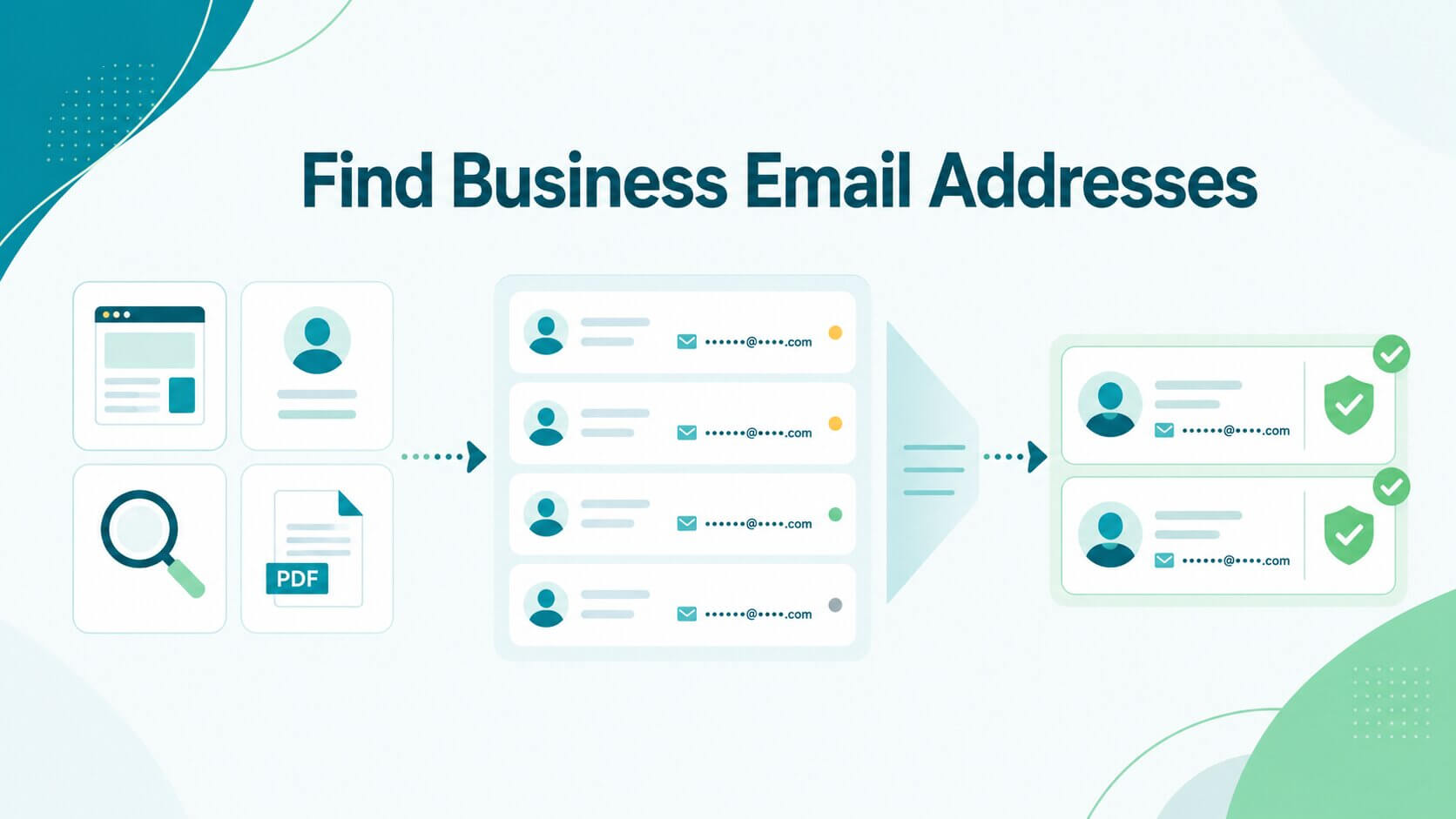
The best way to find business email addresses is to use a layered workflow instead of relying on a single tool or source. High-performing outbound teams typically follow the same sequence: identify the right contact, locate a likely email address, cross-check the information, verify the mailbox, and only then add it into outreach systems.
This approach improves accuracy while reducing bounce risk. Think of it like verifying a shipping address before sending a package. If the destination is wrong, everything downstream becomes expensive.
This workflow matters even more for pipeline-generating outreach. A smaller list of accurate contacts usually outperforms a massive list filled with guessed or outdated records.
Why does accuracy matter more than volume?
Many teams assume that more contacts automatically means more meetings. In practice, low-quality contact data often creates the opposite effect. Poor-quality emails increase bounce rates, reduce inbox placement, and weaken sender reputation across future campaigns.
Email infrastructure providers increasingly evaluate sender quality the same way banks evaluate creditworthiness. For example, Google’s official sender guidelines strictly enforce domain-wide blocks on any sender whose user-reported spam rate hits just 0.3%. A domain consistently sending to invalid or abandoned inboxes develops a poor reputation over time, triggering these strict algorithmic penalties and destroying campaign performance long after the original outreach ends.
The financial impact also compounds internally. SDRs waste time following up with dead inboxes, recruiters lose response opportunities, and marketing teams distort campaign reporting with unreliable engagement metrics. Large datasets become expensive when they contain stale or risky addresses.
What does a safe email-finding workflow look like?
A safe workflow starts with relevance before discovery. Teams should first identify the correct company and the right contact based on role, buying authority, or business function. Once the target is confirmed, the next step is to search company-owned sources such as leadership pages, press releases, blogs, PDFs, and author bios.
If the email is not publicly visible, researchers often use LinkedIn profiles, Google search operators, or email finder platforms to identify likely addresses. However, no discovered email should automatically enter outreach sequences without verification.
Verification acts as the final quality checkpoint. It helps identify invalid mailboxes, disposable addresses, risky catch-all environments, and stale records before outreach begins. Modern B2B verification platforms also evaluate deeper mailbox signals that traditional SMTP-only systems miss.
For example, Allegrow combines syntax analysis, MX and SMTP validation, and proprietary behavioral signals to produce more conclusive results for enterprise mailboxes and catch-all domains. This matters because many legacy verification systems return “unknown” statuses that leave teams guessing whether an email should actually be used.
How can you find business email addresses manually?
Manual research remains one of the most accurate ways to find business email addresses, especially for high-value accounts or executive contacts. While it takes more time than automated tools, it often produces cleaner and more context-rich data.
This approach works particularly well when targeting enterprise buyers, founders, or specialized decision-makers where accuracy matters more than speed. It is also one of the best ways to find business email addresses for free or at a low cost.
Common methods include company websites, LinkedIn research, Google search operators, press releases, author pages, webinar listings, and downloadable PDFs. These sources often reveal company email patterns or direct contact details that help identify the right person.
Manual workflows work best when relevance and accuracy matter more than scale. Instead of building massive lists with stale data, teams can focus on smaller groups of high-confidence contacts that are more likely to respond.
Can you find business emails on company websites?
Company-owned websites are often the most reliable starting point because the information originates directly from the organization itself. Useful pages include Contact, Team, About, Leadership, Press, Investor Relations, Blog author pages, and Careers sections.
Some companies also publish employee emails inside downloadable PDFs, media kits, conference decks, or support documentation. For example, a company blog may list an author’s full name alongside an email signature or media contact information. Press releases frequently contain PR or communications contacts that reveal the organization’s email format.
That said, company websites often prioritize generic inboxes such as info@company.com or support@company.com instead of direct employee addresses. Those inboxes can still be useful for customer support or partnership routing, but they are rarely ideal for outbound sales targeting.
Can LinkedIn, social media, and Google help find business emails?
LinkedIn remains one of the strongest research platforms for finding professional email addresses because it helps confirm role, company affiliation, and organizational context. While LinkedIn usually does not display direct email addresses publicly, it helps validate the exact contact you should target.
Google search operators can then help uncover publicly indexed references to the email itself. Useful searches include:
- site:company.com "Jane Smith"
- "Jane Smith" "@company.com"
- site:company.com email
- filetype:pdf "@company.com"
These searches sometimes surface conference PDFs, blog pages, webinar transcripts, or archived press materials containing business email addresses.
Social media platforms can also provide supporting signals. X profiles, GitHub pages, conference speaker bios, podcast pages, and newsletter archives occasionally include direct contact information or reveal company email patterns.
Should you guess business email patterns?
Many companies use predictable email structures such as:
- firstname.lastname@company.com
- firstinitiallastname@company.com
- firstname@company.com
If you already know the company’s email format from another employee, you can often infer the likely address structure for your target contact. However, guessed emails should never be used without verification. An address that appears structurally correct may still point to an inactive mailbox, alias, spam trap, or secondary inbox.
This is especially important for enterprise organizations using catch-all domains or Secure Email Gateways like Barracuda and Mimecast. Traditional verification tools often struggle with these environments, which increases the importance of advanced B2B verification workflows.
What tools can help you find business emails faster?
Manual research works well for small lists and strategic outreach. However, larger prospecting operations usually require automation.
Sales teams, recruiters, data providers, and RevOps organizations often need to process thousands or millions of records across CRM systems, enrichment pipelines, and outbound sequences. In these environments, email finder tools and B2B data providers dramatically reduce manual work.
When should you use an email finder or B2B data provider?
Email finder tools are useful when you already know the person and company but need help locating the correct address. Most systems accept inputs such as name, company domain, LinkedIn profile URL, or job title.
B2B databases and enrichment platforms expand this process further by providing contact discovery at scale. These systems help teams build buying committees, identify hiring managers, enrich CRM records, or generate outbound lead lists.
However, even strong data providers contain stale or incomplete records. Employee turnover, mailbox changes, alias routing, and security infrastructure all affect data quality over time. That means email finding and email verification should always operate together rather than as separate systems.
For data providers specifically, verification quality directly affects customer retention. If customers purchase inaccurate contact data, trust erodes quickly. This is one reason why many providers prioritize verification APIs capable of handling hundreds of millions of requests while maintaining transparent verification logic and enterprise-grade compliance standards.
How do bulk email-finding workflows work?
Bulk workflows usually begin with a CSV upload or CRM sync. Teams upload records containing names, company domains, LinkedIn URLs, or organizational metadata. The system then attempts to match contacts with likely business email addresses.
Once discovered, records are enriched, verified, filtered, and exported back into CRM or sales engagement systems. The workflow often looks like this:
- Upload contact dataset
- Match company domains
- Generate or enrich likely emails
- Verify mailbox status
- Remove invalid or risky contacts
- Export valid contacts into outreach systems
The operational difference between finding and verifying becomes especially important at scale. A finder identifies likely emails. A verifier determines whether the mailbox is actually usable.
How do you verify business email addresses after finding them?
Verification is the most important step in the entire workflow. Every discovered email should be checked before outreach, especially if it was guessed, enriched, scraped, or sourced through bulk systems.
Without verification, teams risk sending to invalid mailboxes, abandoned aliases, or spam traps that hurt deliverability. It also creates unnecessary strain on sender reputation, which can reduce inbox placement even for future campaigns that use clean data.
Once an email is found, the goal is not just to confirm that it exists, but to understand whether it is safe and reliable to use for outreach. This is where structured verification steps become essential before any contact enters a sales or recruitment workflow.
What does a basic email verification check?
Basic verification typically checks email syntax formatting, domain validity, MX records, disposable email detection, and SMTP mailbox responsiveness. These checks help determine whether the email is structurally valid and whether the receiving mail server can accept messages.
However, modern B2B environments are significantly more complex than traditional consumer inboxes. Enterprise mail systems frequently use catch-all routing, Secure Email Gateways, alias masking, and aggressive filtering rules that create uncertainty for legacy verification systems.
What should you do with catch-all, unknown, or risky results?
Catch-all domains are particularly difficult because the server may appear willing to accept every incoming message, regardless of whether the mailbox actually exists. Many traditional verifiers respond with “unknown” statuses in these scenarios. That creates a serious operational problem for sales and data teams, as an “unknown” result is difficult to act on because it provides no real confidence about deliverability.
This is where Allegrow positions itself differently. Allegrow’s B2B-focused verification system goes beyond basic SMTP checks by analyzing proprietary behavioral signals alongside MX and SMTP validation. Instead of leaving teams with large pools of unresolved “unknown” contacts, Allegrow helps convert many catch-all and enterprise records into clearer “valid” or “invalid” outcomes while minimizing false positives. The platform also identifies non-primary aliases, spam traps, inactive mailboxes, and secondary executive inboxes that legacy systems often misclassify as usable contacts.
When should you suppress or avoid using a found email?
Not every found email should be used in outreach. Teams should suppress invalid mailboxes, disposable addresses, high-risk catch-all records, generic inboxes with poor targeting relevance, stale records, contacts unrelated to the outreach purpose, and unverified guessed emails.
This distinction matters because “found” does not mean “valid.” Even technically deliverable addresses may be poor outreach targets if they belong to inactive aliases or irrelevant contacts. For outbound infrastructure, protecting sender reputation should always outweigh list size.
How do you stay compliant when finding business emails?
Compliance requirements vary by jurisdiction, so organizations should always review the rules applicable to their region and outreach model.
In the United States, the FTC’s CAN-SPAM guidance requires commercial emails to include accurate sender information, truthful subject lines, clear identification that the message is an advertisement, a valid physical postal address, and a functioning opt-out mechanism. The FTC also states that opt-out requests must be honored within 10 business days, and that the opt-out mechanism itself must remain active and able to process requests for at least 30 days after the message is sent.
Organizations operating in Europe should also review GDPR requirements related to lawful basis, legitimate interest, and data handling practices. The goal is not only legal compliance. Respectful outreach also improves reply quality and long-term sender trust.
What should every outreach email include?
For U.S. commercial outreach under CAN-SPAM, emails should include accurate sender identification, non-deceptive subject lines, a valid physical mailing address, and a clear opt-out method. For international outreach, teams should also review local privacy and marketing rules, such as GDPR or UK GDPR requirements around lawful, fair, and transparent data use. These elements are not just best practices; they directly influence whether your message is trusted, opened, or marked as spam. When recipients can clearly understand who is contacting them and why, they are more likely to engage, even if the outreach is unsolicited.
Transparency also plays a practical role in deliverability. Consistent sender identity and clear opt-out handling reduce complaint rates, which helps protect domain reputation over time and improves the chances that future emails reach the inbox instead of spam folders.
How do you avoid low-trust outreach?
Low-trust outreach usually comes from generic blasts sent to poorly targeted lists. Recipients can quickly recognize irrelevant messaging, especially when personalization is superficial or inaccurate.
The best outreach strategies prioritize relevance over scale. Messages should clearly connect to the recipient’s role, company context, or business challenge. Source transparency also matters. If a recipient asks how their contact information was obtained, teams should be prepared to answer clearly and professionally.
What are the biggest mistakes to avoid?
Many outreach problems originate from avoidable data-quality mistakes rather than messaging issues. Teams often focus heavily on copywriting while overlooking the quality of the underlying contact data. When the foundation is weak, even well-written emails underperform because they never reach the right inbox or arrive with reduced trust signals.
Understanding where these breakdowns happen helps teams protect deliverability, improve reply rates, and avoid unnecessary waste in outbound effort.
Sending to guessed or scraped emails without verification
Guessed emails can sometimes be accurate, but they should never enter campaigns without verification. Scraped lists create even greater risks because they often contain stale addresses, aliases, recycled domains, or contacts that no longer exist.
High bounce rates directly damage sender reputation and reduce future inbox placement. Over time, this can affect even correctly targeted campaigns because mailbox providers interpret poor list hygiene as a signal of low-quality sending behavior. Verification should always happen before outreach, not after performance issues appear.
Treating generic inboxes like direct decision-maker emails
Generic inboxes such as info@, support@, or sales@ can still be useful in specific contexts. They may work for customer support requests, vendor inquiries, or partnership routing where messages are meant to be triaged internally.
However, they are rarely effective substitutes for direct decision-maker outreach. These inboxes are often shared, monitored inconsistently, or filtered through internal routing systems, which reduces the likelihood of getting a timely or relevant response. In most B2B use cases, personalized outreach requires verified individual contacts tied to a specific role or function.
Relying on one source or stale data
No single source stays accurate indefinitely. Company websites change, employees move roles, LinkedIn profiles become outdated, and purchased databases degrade over time as organizations evolve.
The strongest workflows combine multiple sources and re-verify records before campaigns launch. This is especially important for teams managing large CRMs or running recurring outbound programs, where even a small percentage of outdated records can scale into significant deliverability and reporting issues.
Conclusion
The best approach to finding business email addresses combines smart discovery methods with rigorous verification before outreach. Company websites, LinkedIn research, Google operators, enrichment platforms, and B2B databases all play useful roles, but none of them guarantee accuracy on their own.
That is why verification matters so much. A found email address only becomes valuable when teams know whether it is valid, relevant, and appropriate to use. This becomes even more critical for enterprise contacts, catch-all domains, and large-scale outbound systems where small data-quality issues can compound quickly.
Allegrow is built specifically for B2B verification environments where traditional tools struggle. Its layered verification engine combines syntax analysis, SMTP and MX validation, proprietary behavioral signals, advanced risk detection, and enterprise mailbox handling to produce more conclusive results. The platform also helps reduce uncertainty around catch-all domains and enterprise inboxes protected by systems like Barracuda and Mimecast.
For GTM teams, recruiters, and data providers operating at scale, that means fewer unresolved records, cleaner outreach lists, stronger sender reputation, and better operational confidence. Start a 14-day free trial with Allegrow to verify up to 1,000 B2B email addresses, identify catch-all risks, detect inactive or disposable mailboxes, and see what your current finder or verifier may be missing.
FAQs about finding business email addresses
How can I find a business email address for free?
You can often find business email addresses on company websites, via LinkedIn research, using Google search operators, on author pages, in press releases, and in public PDFs. Free methods are effective for smaller lists or high-value contacts, but they usually require more manual effort and should still be paired with verification before outreach.
What is the most accurate way to find business email addresses?
The most accurate approach combines multiple sources with verification. Teams should confirm the contact’s role, identify the likely email pattern, cross-check company and public sources, and then verify the mailbox before sending outreach.
Is it legal to find and use business email addresses?
Business email outreach laws vary by jurisdiction. In the United States, organizations should comply with the FTC’s CAN-SPAM requirements regarding truthful messaging, sender identification, and opt-out handling. European organizations should also review GDPR obligations and local regulations before conducting outreach.
Should I verify every business email before sending?
Yes, verification is especially important for guessed, enriched, scraped, or bulk-found emails. B2B teams using enterprise outreach systems should verify every record before sending to reduce bounce rates and protect sender reputation.