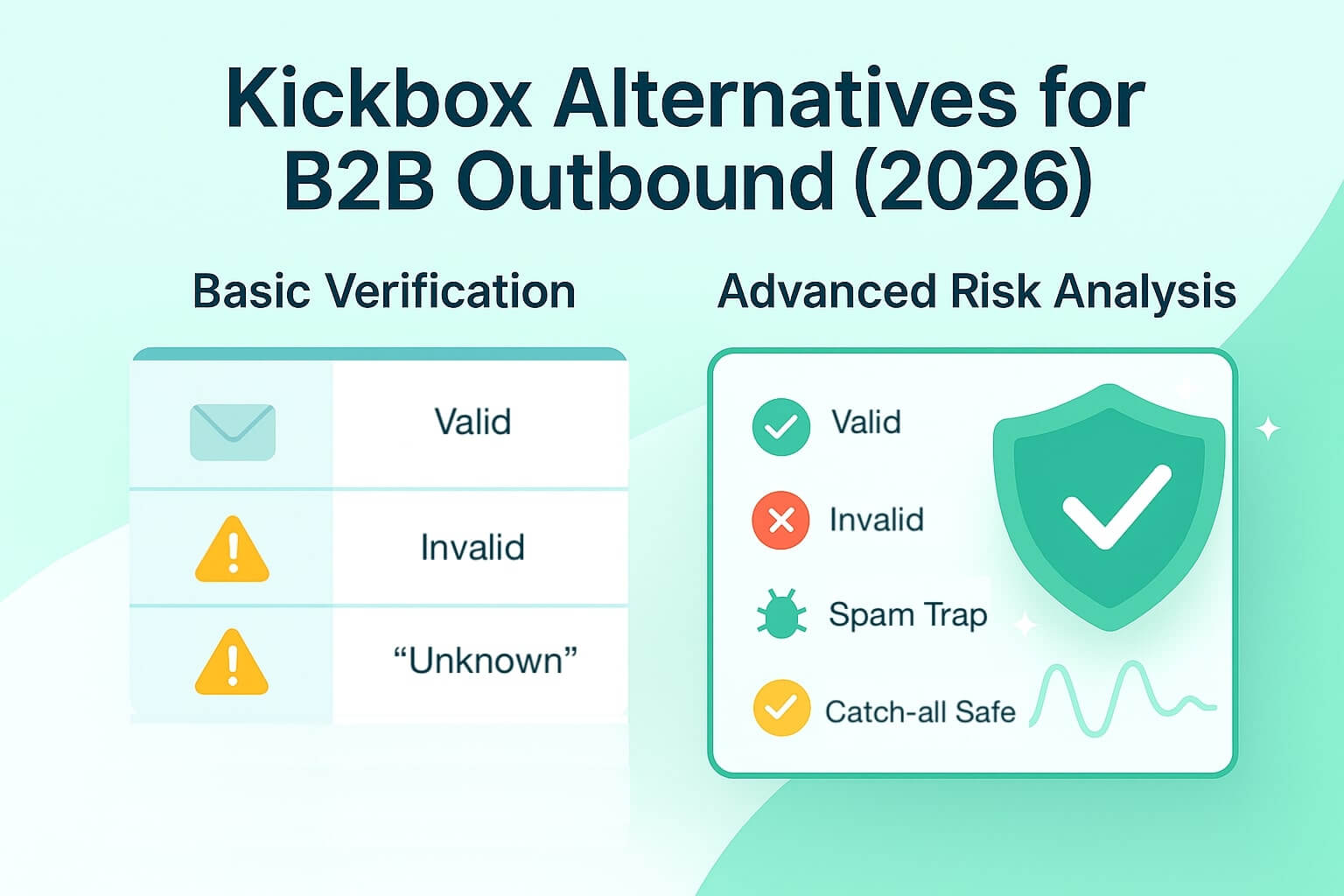
Kickbox is often one of the first tools teams try for batch email validation with basic verification (cleansing lists via format/MX/SMTP checks). For marketing or newsletter use, that layer alone may suffice. But when you’re running high-stakes sales outreach sequences, you’ll run into limitations like catch-all domains, spam traps, tighter mailbox filters, and compliance risks that basic verification just can’t resolve.
In this article, you’ll get a clear, unbiased look at Kickbox’s capabilities and trade-offs, and define the key buying criteria. Along the way, we’ll compare leading alternatives and note where Allegrow’s B2B-focused approach tends to offer stronger results for outbound programs.
TL;DR: Scaling sales teams are increasingly migrating away from Kickbox as they hit the diminishing returns of basic verification in high-stakes outbound environments. While Kickbox effectively handles standard list hygiene for newsletters, its reliance on simple SMTP checks fails to detect sophisticated B2B risks—specifically spam traps, manual reporters, and catch-all domains—which leaves sender reputation vulnerable to reactive ISP punishment. Consequently, modern RevOps strategies now prioritize specialized deliverability platforms (like Allegrow) that go beyond "cleaning" to offer SEP-native enforcement and continuous domain monitoring, ensuring that high-risk contacts are blocked before they trigger a suspension.
Why look for a Kickbox alternative?
Many teams outgrow Kickbox, not because it’s bad, but because basic verification platforms hit diminishing returns in outbound contexts. Here are the top reasons organizations seek alternatives:
- Catch-all ambiguity and limited actionable statuses: Kickbox (and many verifiers) often return “unknown / accept-all” statuses without deeper risk signal insights. This puts your team in a situation where you either ignore up to 30% of your list (losing potential opportunities) or reach out recklessly to each of them, risking degradation of your domain reputation
- Lack of advanced risk analysis: No built-in detection of spam traps, manual reporters, or non-primary inboxes. That means a list can appear “clean” even while it contains contacts that trigger filters, slow your domain, and create negative feedback signals you never see coming.
- Minimal enforcement in sales tools: Most verification tools don’t integrate with CRMs/SEPs to block risky senders before send. This leads to preventable bounces, blocks, and reputation hits that impact the entire team, sometimes even causing temporary sending suspensions.
- Scaling cost and credit burn: Kickbox’s public pricing begins at $5 for 500 verifications (i.e., $0.01/credit). This credit model starts cheap, but outbound teams burn through credits fast when nothing stops risky contacts from being re-verified and re-sent. Costs rise, but list safety doesn’t, making verification an expensive loop instead of a preventive layer.
In outbound email, the difference between a risky contact slipping through and being blocked before send can be tens of thousands in lost deliverability or worse, account suspension.
What to look for in a Kickbox alternative for B2B?
When vetting alternatives to Kickbox for outbound B2B, focus on the following capabilities to avoid running into the same scaling roadblocks.
Risks signals
Look for tools that detect and flag:
- Spam traps (pristine and recycled)
- Manual spam reporters
- Disposable, role-based, or throwaway addresses
- Catch-all with actionable Valid/Invalid email status (not just “unknown”)
These provide proactive safety that basic syntax/MX checks cannot.
Pre-send enforcement
A true outbound-ready tool enforces rules inside your Sales Engagement Platform (SEP). It should automatically block high-risk addresses or pause sequences before a send ever leaves the platform. This kind of prevention-first control is far more effective than cleaning up reputation damage after the fact, and it gives teams real peace of mind. With enforcement in place, every email that goes out has already been vetted, reducing the chance of hitting dead mailboxes or risky contacts and ensuring reps are only sending to real, reachable people.
Continuous monitoring & posture checks
A one-off verification isn’t enough to keep outbound safe. Your sending posture can shift day-to-day based on authentication changes, infrastructure drift, or how receivers react to your emails. That’s why advanced systems monitor continuously, either hourly or daily, across the core elements that determine inbox placement:
- SPF/ DKIM/ DMARC health and drift: Detecting alignment issues or configuration drift before they break authentication and trigger spam filtering
- Inbox placement trends/ spam-rate analysis: Identifying whether deliverability is weakening across providers or specific sequences.
- Blocklist hits/ deliverability alerts: Catching early signs of reputation damage before they escalate into widespread blocks or deferred sends.
With continuous monitoring, teams can respond to problems before they turn into bounce spikes, bulk-foldering, or sender suspensions, rather than discovering too late that their reputation has already taken a hit
Integrations & Workflow
Strong integrations aren’t just a convenience, they’re what make deliverability protection actually work. The tool you choose must connect directly to your existing tech stack so verification, risk filtering, and suppression happen inside the systems your team already uses.
When these checks run natively in your SEP or CRM, you avoid workflow fragmentation, eliminate manual data shuffling, and prevent the drift that happens when lists are cleaned in one platform but sent from another.
In practice, this means looking for platforms with:
- Native SEP integrations (e.g., Outreach, Salesloft, HubSpot) so risky contacts are blocked before a sequence fires.
- CRM sync and suppression logic to keep all contact records aligned over time.
- Real-time checks at capture to prevent bad data from entering the system in the first place.
With the right integrations, your team doesn’t have to change their workflow or build new processes - safe sending simply becomes automatic.
Pricing at scale
Credit-based models (like Kickbox) can skyrocket in cost at scale. Better alternatives offer:
- An unlimited/ flat model for ongoing verification
- Or very generous credit usage tiers with a predictable total cost
- Transparent overage fees or scaling steps
When evaluating alternatives, pricing should encourage good deliverability habits, not penalize them. Credit-based verification tools often make teams ration checks because every list upload or re-verification cycle burns through credits. The result is that databases go stale, risky contacts slip through, and verification becomes a “special occasion” instead of a routine hygiene step.
Unlimited or volume-aligned pricing models remove this friction entirely. They allow teams to validate full databases, run frequent re-checks, and verify new contacts at capture without worrying about cost spikes. For outbound teams that scale activity up or down throughout the quarter, this kind of predictable pricing ensures deliverability quality improves as you grow, rather than degrading because verification became too expensive to do consistently.
Security & compliance
For outbound teams handling large volumes of prospect data, security and compliance aren’t just checkboxes, they directly affect legal exposure, data trust, and the company’s ability to run outreach at scale. Any Kickbox alternative you consider should meet industry standards such as SOC 2 and align with GDPR and CCPA requirements. These frameworks ensure that data is stored, processed, and transmitted securely, with strict controls around access, retention, and encryption.
Strong compliance also reduces risk when syncing data across CRMs, SEPs, and verification platforms. If a tool lacks proper certifications or transparent privacy practices, you’re effectively introducing a weak link into your outbound workflow - one that could compromise prospect information or prevent your legal team from approving high-volume outreach. Choosing a provider with a mature security posture ensures your verification and risk-filtering process is not only accurate, but also safe, compliant, and scalable across your entire go-to-market stack.
Best Kickbox Alternatives (Features, Pros, Cons, and Best Fit)
Below is a curated look at tools most often considered as Kickbox alternatives, particularly for teams focused on outbound deliverability. Each option brings its own strengths, limitations, and ideal use cases depending on scale and workflow maturity.
Allegrow: best for outbound B2B risk prevention (recommended)
Allegrow is designed specifically for outbound B2B teams that need to detect and prevent risks to protect their inbox placement from the tight mailbox filters found in these environments. Unlike traditional verifiers, it combines spam-trap and manual-reporter detection with valid/invalid catch-all statuses, instead of the vague “unknown” many tools return.
Its Safety Net feature integrates with your SEP or CRM and blocks risky sends in real time, while hourly SPF, DKIM, and DMARC checks ensure authentication stays aligned. It also adds continuous inbox placement monitoring tracking performance across domains and sequences.
Allegrow also offers an API for high-volume users making millions of verifications every month, and is SOC 2 compliant.
Pros: Built specifically for B2B it helps prevent bounces and spam complaints proactively, verifies risk behind catch-all mailboxes, and has native integrations to the SEPs that most outbound teams use.
Cons: Best suited to structured teams; not aimed at one-off, tiny batch checks.
Best for: RevOps, Sales Ops, or GTM teams running scaled outbound sequences with deliverability risk exposure.
ZeroBounce
Click here to read a full in-depth review of ZeroBounce.
ZeroBounce offers a mix of bulk and API-based verification with several reputation add-ons, such as email scoring and abuse detection. It has a wide ecosystem of integrations, making it easy to plug into most marketing stacks.
Pros: Established reputation, reliable performance, and solid ecosystem support.
Cons: Operates on a credit-based model, which can become costly at scale, and lacks spam trap detection and catch-all verification.
Best for: Marketing and B2C teams that focus on periodic list hygiene rather than continuous outbound.
NeverBounce
Click here to read a full in-depth review of NeverBounce.
Known for its real-time, bulk validation and strong API support, NeverBounce has earned a reputation for accuracy and ease of integration. It’s a good fit for teams that value reliability over advanced risk filtering.
Pros: Developer-friendly with a comprehensive help center, accurate for basic SMTP verification, and simple to deploy.
Cons: Limited risk logic not being able to detect spam traps, spam reporters, and risk behind catch-alll addresses.
Best for: SMBs that need dependable verification without the complexity of outbound prevention layers.
Bouncer
Click here to read a full in-depth review of UseBouncer.
Bouncer focuses on high-accuracy verification with a strong commitment to GDPR compliance, appealing to privacy-conscious or EU-based organizations. Its interface is straightforward, emphasizing precision and data protection.
Pros: Excellent accuracy for basic SMTP verification and strong EU data handling posture.
Cons: Fewer outbound-specific workflows; lacks advanced risk analysis, like most legacy verifiers, it is only able to surface dead emails and not other reputation risks.
Best for: EU teams or compliance-driven organizations needing basic SMTP verification aligned with strict data standards.
Clearout
Click here to read a full in-depth review of Clearout.
Clearout provides bulk and API verification with claimed spam-trap detection and numerous integrations across ESPs and CRMs. It’s positioned for speed and convenience, offering 24/7 support and quick processing times.
Pros: Fast throughput, user-friendly experience, and round-the-clock support.
Cons: Some risk-detection claims; testing is advised to confirm accuracy. It also can’t verify risk on catch-all emails or surface manual spam reporters.
Best for: SMB marketing operations teams that look to upgrade their deliverability.
Emailable/ MailerCheck
Click here to read a full in-depth review of Emailable.
Emailable and MailerCheck are straightforward verification tools with simple APIs and ESP connectors. They’re ideal for teams that need a lightweight, affordable way to basic SMTP existence checks but don’t require complex risk analytics.
Pros: Low-cost entry, intuitive interface, and easy setup.
Cons: Minimal prevention depth and no advanced risk detection beyond standard syntax and SMTP checks.
Best for: Smaller teams performing occasional list hygiene or light outbound without major compliance or reputation risks.
Head-to-Head Comparison Table
How to choose the right Kickbox alternative? (3-step plan)
Choosing a Kickbox alternative isn’t just about comparing features; it’s about understanding where your outbound performance actually breaks down. Whether it’s high bounce rates, deliverability blind spots, or limited visibility into inbox placement, the right tool depends on diagnosing your weakest link first.
Step 1: Diagnose your bottleneck
Start by identifying your core problem. Are you struggling with high bounce or complaint rates, or is your issue more about visibility and analytics?
- If your bounce rate or complaint rate exceeds your team’s safe threshold, you need a solution focused on risk filtering and pre-send enforcement. These tools prevent problems before they reach inboxes by blocking spam traps, complainers, and invalid contacts.
- If your lists are generally clean, but you lack clarity on where your emails land (e.g., inbox vs. spam), then an inbox placement testing tool might be enough to fill that gap.
Understanding this distinction saves both time and cost, and ensures you invest in prevention rather than just cleanup.
Step 2: Map your stack
Next, map your current go-to-market stack to see where deliverability controls should sit. Outbound teams should aim for tight integration between the chosen software and their sales engagement tools or CRMs.
The ideal setup includes:
- Sales Engagement Platform (SEP)-native enforcement, so risky contacts are automatically blocked before messages are sent.
- CRM sync and suppression logic to prevent reintroducing bad data into campaigns.
- Verification layers at multiple points: when leads are captured, before sending, and at scheduled intervals.
- Native workflows in the platforms your team already uses to ensure minimal manual overhead.
If a solution doesn’t integrate or enforce within your main outbound tools, it’s a stop-gap, not a long-term fix.
Step 3: Pilot and measure outcomes
Finally, validate your choice through a focused pilot. Run a two-week test using real prospect data, not seed lists, to see how each platform performs under your actual sending conditions.
Track key metrics such as:
- Reply rates (indicator of inbox placement)
- Bounces and undeliverables (indicator of verification accuracy)
- Complaints or unsubscribes
Focus on trend improvements, not just absolute numbers. If bounces drop and replies rise, your deliverability logic is working.
To round out the evaluation, compare your pilot findings with reviews or buyer guides. Cross-referencing user feedback helps confirm whether performance gains are consistent with what other outbound teams experience.
By following these three steps, you’ll identify not just a tool, but a sustainable deliverability partner that fits your operational model and risk profile.
Conclusion
Kickbox is a capable verification tool, especially for hygiene and lower-risk use cases. But sales-led B2B outreach demands more: advanced risk analysis, actionable catch-all statuses, and enforcement before send.
With Allegrow, you get not only verification (catching spam traps, flagging manual reporters, ruling on catch-alls), but also proactive protection, enforcing safety in your outreach stack, and continuously monitoring domain posture.
If you’re scaling steadily, run a 14-day Allegrow Free Trial to surface hidden risks in your list that your current verifier isn’t able to detect. Verify up to 1,000 contacts free and protect your deliverability before your next outbound push.
FAQs
Is Kickbox good for real-time form/API verification?
Yes, Kickbox supports real-time and batch verification and integrates with CRMs and marketing tools like HubSpot. It’s a fair choice for low-risk operations offering basic SMTP checks and catching dead emails before they ever reach your database.
What does Kickbox cost, and how does it scale?
Kickbox’s pricing starts at $5 for 500 verifications, scaling up to $4,000 for 1,000,000 verifications in a pay-as-you-go credit model. For outbound teams sending at scale, this can lead to significant credit usage and higher long-term costs, these teams are usually better of with an unlimited plan.
Why would an outbound team need more than Kickbox?
Because basic SMTP and syntax verification aren’t enough to guarantee reliable inbox placement in outbound sales motions. Outbound programs face additional risks, such as spam traps, manual reporters, and risky catch-all domains, that require deeper risk analysis and pre-send blocking. Those capabilities go beyond Kickbox’s verification scope.