Every year a meaningful share of the contacts in your CRM quietly stop being reachable. They take new roles, move to new companies, and leave behind an email address that still sits in your database looking perfectly valid. For B2B sales, RevOps, customer success, and marketing teams, each of those moves is two things at once: a warm opportunity at a new company, and a broken record at the old one.
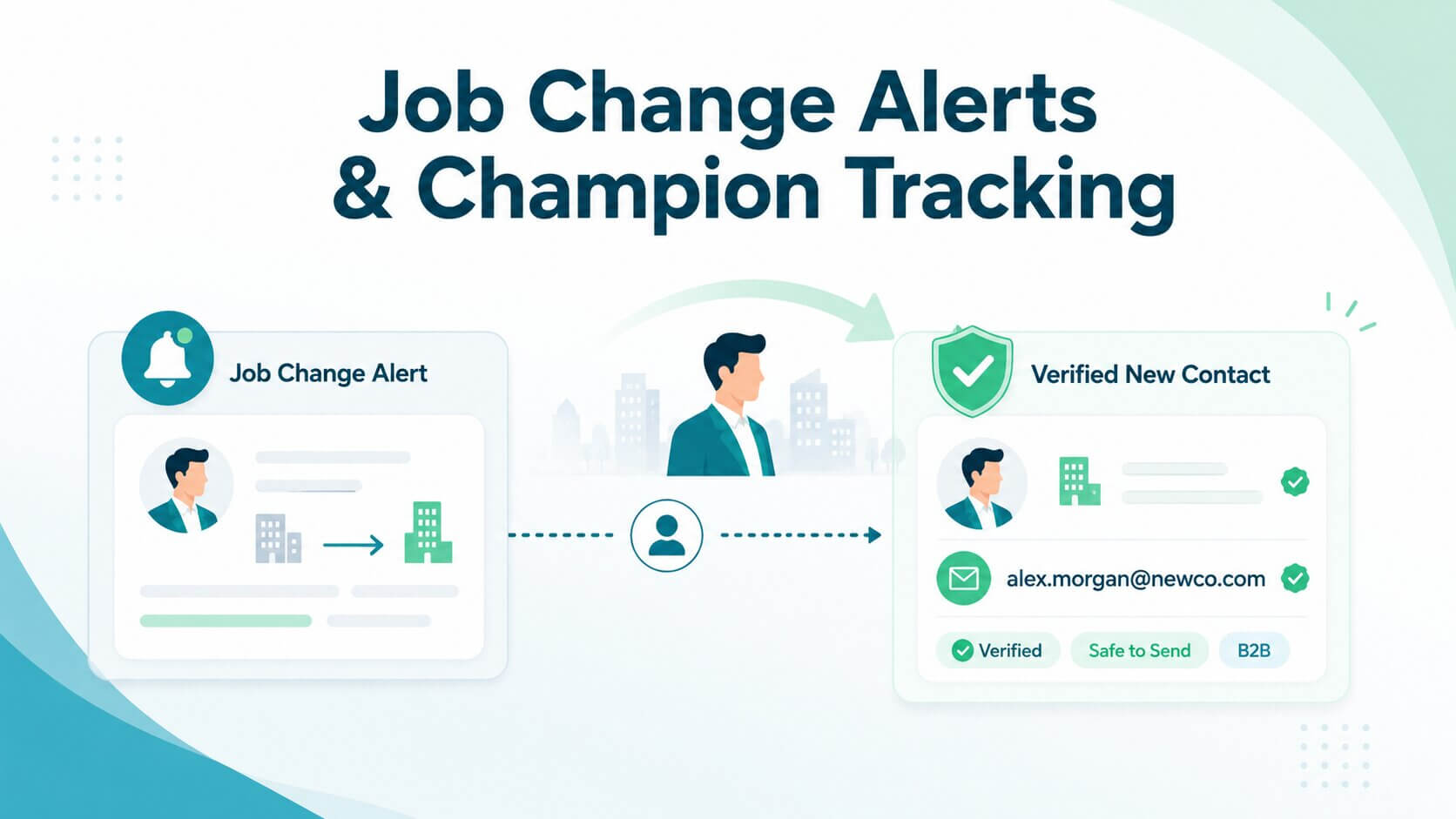
Job change alerts exist to catch the first half. They tell you when a customer, champion, or buyer changes company, title, or role, so a rep can reconnect while the relationship is still warm and the new leader still has a mandate to change things. What the alert does not give you is a way to actually reach the person. Their old address is now a bounce waiting to happen, and their new one has to be worked out and confirmed before anyone sends anything.
That gap is what this guide is about. We cover what job change alerts are, how they differ from champion tracking, the practical ways teams detect career moves, and then the step most playbooks skip: turning a detected move into a verified, safe-to-use business email. The core idea is simple. A job-change signal only becomes commercially useful when you can confirm three things: the person's new company, their new role, and an email address you can actually send to.
TL;DR: A job change alert fires when a contact's employment data changes (new company, title, promotion or departure), sourced from profile data, enrichment tools, champion-tracking platforms or API webhooks. Champion tracking is the judgment layer, narrowing the noise to past buyers, sponsors and advocates whose moves actually affect revenue. Moves cut both ways: a warm entry at a new logo, and risk to an open deal or renewal at the old one. With roughly a fifth to a third of B2B contacts moving each year, manual audits fall weeks behind the 30-day window when new leaders reconsider tools. The gap most programs miss is that detection isn't a usable contact. The full path runs: confirm the move, enrich the new company, identify the domain, generate likely formats (first.last@, flast@), verify the candidates, suppress the old address, and route the record. Never send to permutations or treat bounces as detection, since that buys intelligence with sender reputation. Catch-all and gateway domains cluster at big employers, so conclusive verification is what makes the new contact safe.
What are job change alerts?
A job change alert is an automated notification that fires when a person's employment data changes: a new company, a new title, a promotion, or a departure. Underneath the marketing language, that is all it is, a signal that someone's position or work-experience record no longer matches what you have on file.
Those signals come from several places. Most originate in professional profile data, since a person updating their own LinkedIn profile is still the earliest public sign of a move. From there they reach you through enrichment platforms and sales intelligence tools that monitor profiles at scale, through dedicated job-change and champion-tracking products, through CRM signals when a record gets refreshed, through API webhooks that push an event the moment a change is detected, or through plain manual monitoring if your list is small enough.
The delivery mechanism matters less than what you do next. An alert is a starting gun, not an outcome.
What do job change alerts help B2B teams detect?
The underlying events are narrower than they sound. Most alerting comes down to a handful of changes: someone starts a new job, leaves a role without a new one recorded, closes one position and opens another, picks up a new title at the same employer, or makes several moves in quick succession.
Each maps to a different business reality. A new employer means your contact is now inside a different account, which may or may not be one you sell to. A new title at the same company can mean expanded budget authority. A closed role with nothing after it often means a departure you have not been told about, which is exactly the case that quietly breaks a renewal.
The value spreads beyond sales, too. RevOps uses these events to keep CRM records from decaying, customer success uses them to spot when the person who championed a renewal has left, recruiting uses them to track talent movement, and market intelligence teams read them in aggregate as a signal about which companies are growing or losing people.
How are job change alerts different from champion tracking?
Job change alerts detect movement. Champion tracking decides which movements matter.
That is the whole distinction, and it is worth being precise about, because the two terms get used interchangeably. An alert system will happily tell you that 400 contacts changed jobs last quarter. Champion tracking narrows that to the people whose movement actually affects revenue: past buyers, executive sponsors, evaluators who nearly closed, and power users who advocated for you internally. Those are contacts with relationship value, where outreach is a reconnection rather than a cold approach.
The practical consequence is that champion tracking needs something alerting does not: a defined list. Someone has to tag who counts as a champion in your CRM, which contacts sit on active opportunities, and how far back your closed-won history should be monitored. Without that, you get volume instead of signal, and reps learn to ignore the notifications.
Not every job change is a champion signal. Most, honestly, are not.
Why do job changes matter for sales and customer teams?
The logic is straightforward: relationships live with people, not with logos. When someone who already trusted your product lands somewhere new, you inherit that trust at a company that has never bought from you, and you arrive at the exact moment they have a mandate to change things. New leaders are expected to make decisions early, and reviewing tools sits near the top of that list.
The published numbers point the same way, though they deserve a caveat. Almost all of this data comes from vendors selling job-change tracking, so treat the direction as informative and the decimals as marketing. Champify's 2025 Impact Report reports that opportunities involving contacts with prior experience of the product won at 37%, against 19% without, while UserGems says past buyers who moved are 3x more likely to buy than an average lead. Estimates of how fast contact data decays vary too, with vendors putting annual job-change rates somewhere between roughly 20% and 30% of B2B contacts. Any figure in that range makes the same point: a contact list you never refresh loses a fifth to a third of its accuracy every year.
There is a genuinely useful finding buried in the same Champify report, and it is about your own data rather than conversion rates: CRMs are missing 78% of former champions who have made qualified job changes, and of those that were present, only half had ever been engaged. The opportunity is not that job changes are valuable, most teams accept that. It is that most teams cannot see the moves happening.
The same movement cuts the other way, which vendor playbooks tend to skip. A champion leaving an open opportunity can stall or kill a deal that was ready to close, because the replacement has no context and no relationship with you. A champion leaving a customer account puts the renewal at risk. And an executive sponsor who quietly departs leaves an ownership gap nobody notices until someone asks why the account went dark. Job-change signals are as much a defensive instrument as an offensive one.
Which job-change scenarios should teams prioritise?
Not every move deserves the same response, or the same owner. These are the five that justify a defined play.
Two patterns run through that table. First, the owner changes depending on the scenario, so routing rules matter as much as detection; an alert that reaches the wrong person is a missed play. Second, every row ends in contact with a human being, which means every row depends on having an email address that actually works.
How do teams track job changes?
There are five broad approaches, and most teams end up combining two or three rather than picking one. What decides your approach is not budget, it is the size of your contact base.
Manual monitoring is where nearly everyone starts, and it works fine at small scale. CRM-based tracking uses your own records as the monitoring set, flagging contacts whose data no longer matches reality. Enrichment-based tracking has a provider refresh your records on a schedule and surface what changed. Sales intelligence and dedicated champion-tracking platforms monitor profiles continuously and push alerts into your CRM or Slack. API and webhook-based tracking is the engineering route: instead of repeatedly polling for changes, you subscribe to events and receive a notification the moment a qualifying change is detected, which is how Coresignal's employee webhooks work and how most teams feed a custom workflow.
The arithmetic is what forces the upgrade. If a fifth to a third of your contacts move each year, a 2,000-contact database produces roughly 400 to 600 moves, more than one a day. A quarterly audit catches them an average of six weeks late, which is deep into or past the window when a new leader is forming their vendor opinions. Manual works until it doesn't, and it stops working sooner than most teams expect.
What are the main ways to monitor job changes?
In practice, these are the monitoring methods worth knowing, roughly from lightest to most automated:
- Professional profile monitoring. Watching for profile updates directly. Free and earliest, but dependent on the person updating their profile and on the platform surfacing it to you.
- Sales Navigator-style alerts. Save contacts as leads and get flagged when they move. Reliable, but the alerts live outside your CRM and arrive with no context about the new employer.
- Job-change and champion-tracking platforms. Purpose-built monitoring with CRM routing. The most complete option and the most expensive.
- Enrichment tools. Scheduled record refreshes that surface changed fields as a by-product of keeping data current.
- CRM data updates. Your own system flagging records that changed, useful only if something upstream is actually refreshing them.
- API webhooks. Event-driven notifications pushed to your endpoint, ideal when you want job changes to trigger an automated workflow rather than a human reading an inbox.
- Manual quarterly audits. Export your top few hundred contacts, check them, flag the movers. The floor of a real process: scheduled, owned, and logged.
- Email bounce signals. Emails to a known contact start hard-bouncing, which usually means they have gone.
Operationally, whichever methods you choose, the pattern is the same: import or connect your contacts, define the monitoring set (champions, open-opportunity contacts, closed-won going back a couple of years), filter for the change events you care about, group the qualifying people into a segment, then attach alerts and views so the right owner sees the right move.
One method on that list deserves a warning rather than a recommendation. Bounce monitoring appears in most job-change guides as a legitimate detection channel, and technically it is: a hard bounce is proof someone left. But look at what it costs. You only get the signal by sending to a dead address, and hard bounces are exactly what damages your sender reputation and pushes your future email toward spam. You are paying for the intelligence in deliverability, on an account you did not know you were about to lose. Treat bounces as a safety net that catches the people no other method surfaced, never as a monitoring strategy, and act on them by cleaning the record rather than sending again to confirm.
How do you turn job change alerts into verified contact records?
Detection is the part the market has solved. A dozen products will tell you that your champion moved. What none of them hands you is the thing you actually need to act: a confirmed email address at the new company that is safe to send to.
That is the gap between an alert and a usable contact, and it is where most job-change programs quietly fail. The alert fires, the rep sees it, and then they either guess an address and send, or paste in whatever an enrichment tool returned and send. Both routes end in bounces often enough to matter, and bounces on a brand-new domain are a bad way to introduce yourself.
The full path from signal to sendable contact runs like this: confirm the move, enrich the new company, identify the new domain, generate the likely email formats, verify them to find the real one, suppress the old address, and route the confirmed record to whoever owns the play. Seven steps, and only the first is what the alert gives you.
What should happen after a customer or champion changes jobs?
Here is the workflow in full, with what each step needs and what happens if you skip it.
Two steps carry most of the value. Step 5 is what converts a guess into a contact, and step 7 is what stops the old address quietly damaging you while you celebrate the new one. Teams that run this well treat the whole sequence as automated plumbing with one human decision (is this worth a play?) rather than a manual research task per alert.
How can email permutations help find a champion's new work email?
When a known contact turns up at a new company, you already hold both inputs needed to work out their address: their name, and the company's email domain. That is what makes job changes unusually tractable compared with cold prospecting, where you often have neither.
The formats themselves are predictable. Most B2B addresses follow first.last@ or first-initial-plus-last-name@, with first@ common at smaller companies and a long tail of variants (firstlast@, f.last@, last.first@) making up the rest. Take the name, apply it across those patterns against the new domain, and you have a short candidate list in seconds. This is what email finders call permutation, and for a single champion you can do it by hand.
What you must not do is send to the list to see which one sticks. That is the same mistake as bounce-based detection, wearing a different hat: you learn which address is real by damaging your reputation on the ones that are not, at a company where you have no sending history to absorb it. Permutation without verification is not a workflow, it is a controlled way to burn a domain.
Verification is what closes it, and the results are messier than a simple yes or no. A candidate can come back invalid, or valid, or role-based (info@, sales@, unread by the person you want), or stale, or unknown because the domain will not say. That last case is the common one at exactly the companies champions tend to move into. On a catch-all domain the server accepts every address you try, so an ordinary check reports success for all of your permutations and confirms nothing. Our own study of the Fortune 500 found 47% of those companies running catch-all domains and 69% catch-all, gateway-fronted, or both, which means the bigger and more valuable the new employer, the more likely a basic verifier shrugs. Resolving those cases takes conclusive catch-all verification that tests whether the specific mailbox exists rather than reading the server's blanket acceptance.
How does Allegrow support job-change workflows?
Allegrow sits at step 5, and it is worth being clear that it does not do steps 1 through 4. It is not a job-change tracker, it does not monitor LinkedIn, and it will not tell you that your champion moved. Pair it with a signals or enrichment product that surfaces the move; that combination is the point.
What it does is turn the candidate addresses into an answer. B2B email verification built for corporate infrastructure returns a conclusive valid or invalid result on the permutations you generate, including on the catch-all and gateway-protected enterprise domains where basic tools return unknown, and it does that with a low false-positive rate so you are not discarding a real champion because their new employer looks opaque. For teams processing moves in volume rather than one at a time, the same checks run through an API so verification becomes a step in the pipeline instead of a manual task.
Two things follow from getting that step right. The obvious one is that outreach lands. The less obvious one is that the risky records never enter your sequences: Safety Net flags spam traps and known manual reporters before you send, and the deliverability layer (inbox placement monitoring, hourly SPF, DKIM, and DMARC checks) tells you if the sending itself starts to degrade. Verification makes the new contact usable; that layer keeps it that way.
The division of labour is simple. Your tracking tool finds the move. Allegrow makes the resulting contact safe to actually use.
What should outreach look like after a job change?
Once you have a verified address, the message still has to earn a reply. The best job-change outreach is relationship-led rather than trigger-led: it acknowledges the move, draws on the history you actually have, and connects their new situation to something useful. The worst reads like an alert fired and a template followed, which is exactly what it was.
Timing helps, within reason. The first 30 days are when a new leader is most open to reconsidering tools, and the window narrows noticeably after about 90 as they settle into whatever their new employer already runs. That is a reason to be prompt, not a reason to be pushy.
How do you reach out without sounding opportunistic?
Lead with the person, not the product. Acknowledge the new role first, genuinely and briefly, because a champion who moved has spent their first week being congratulated by everyone and pitched by half of them. Then reference the prior relationship naturally, and only as strongly as it really was. There is a difference between "we worked together on the rollout at your last company" and implying a friendship that never existed.
Make the substance about their new context rather than your renewal math. What are they inheriting, what will they be measured on in their first quarter, and what did you actually help them achieve last time that is relevant here? A single specific detail from the previous engagement does more work than any amount of personalisation tokens.
A few practical guardrails:
- Do not pitch in the first message. Reconnect first; the ask can come later.
- Do not reference how you found out. "I saw your profile update" is accurate and slightly unsettling. A simple congratulations needs no sourcing.
- Do not assume the same problem followed them. New company, new constraints. Ask rather than assert.
- Use more than email. A LinkedIn note alongside the email often does better than a longer email, particularly in the first weeks when a new inbox is overwhelmed.
And keep in mind that detection was the easy part. Getting the alert is a small fraction of the work; the outcome depends on prioritising which moves deserve effort, personalising the few that do, and following up when the first message goes unanswered, which it often will.
What mistakes should teams avoid with job change alerts?
Job-change programs fail in predictable ways, and most failures are operational rather than strategic. These are the ones that cost the most.
Which data and outreach mistakes create the most risk?
- Treating every job change as an opportunity. Most moves are not champion signals. Routing all of them to reps teaches reps to ignore alerts.
- Emailing the old work address. Once someone has left, that address is a bounce or a black hole. Suppress it when you detect the move, not after your bounce rate tells you.
- Sending to guessed permutations. Candidate addresses are hypotheses; verify them, and never test them by sending.
- Skipping verification on enriched emails. An address a tool handed you is not the same as an address confirmed to exist.
- Ignoring catch-all and unknown results. These are not minor edge cases, they cluster at exactly the large employers your champions move into. Treating unknown as valid is how a clean-looking list bounces.
- Routing non-ICP moves to sales. If the new company will never buy, the alert is noise regardless of how warm the contact is.
- Enrolling unverified contacts into sequences. One bad list entering an automated sequence does more reputation damage than any single manual send.
- Letting duplicate records accumulate. The same person now exists twice, at two companies, and reporting quietly breaks.
- Acting fast with weak context. A same-day message that shows you know nothing about their new role is worse than a thoughtful one next week.
The tension running through that list is speed versus quality, and the honest resolution is that speed only wins when the underlying data holds up. Being first into the inbox is worth very little if the address is wrong, the company is a poor fit, or the send costs you sender reputation you will need for the next hundred contacts.
Conclusion
Job change alerts do one job well: they tell you when a customer, champion, buyer, or key contact moves. Champion tracking adds the judgment layer on top, narrowing the noise to the people whose movement actually affects revenue, whether that is a past buyer landing at a target account or a sponsor quietly leaving an account up for renewal.
What turns either into pipeline is the workflow behind the alert. A detected move should trigger enrichment of the new company, verification of the new business email, suppression of the old one, a fit check, routing to whoever owns the play, and outreach that reads like a reconnection rather than a trigger-fired template. Miss the middle steps and you have a notification system, not a revenue channel.
That middle is where Allegrow fits. Pair a signals or enrichment product that surfaces the move with verification that confirms the new address, and a job change stops being an interesting fact and becomes a contact you can safely email: catch-all uncertainty resolved, risky records flagged before they reach a sequence, and the old address retired before it starts bouncing.
If you have run a job-change or champion-tracking play recently, the fastest way to see the difference is on those exact contacts. Start a 14-day free trial and verify the new addresses your last batch of alerts produced, including the enterprise and catch-all domains where basic checks came back unknown. If you also want a read on how your sending is holding up, you can request a deliverability audit alongside the trial.
FAQs about job change alerts and champion tracking
Can you find a new work email after someone changes jobs?
Usually, yes. If you know the person's name and their new company's domain, you can generate the likely address formats (first.last@, flast@, first@ and similar) and verify which one exists. This works particularly well when a former customer joins an ICP-fit account. Verify the candidates rather than sending to them, and use a tool that resolves catch-all domains, where ordinary checks accept every address and confirm none.
How do you find customers who changed jobs?
Monitor your CRM contacts against professional profile data, using enrichment platforms, sales intelligence or champion-tracking tools, API webhooks for event-driven detection, or a manual quarterly audit if your list is small. Hard bounces also reveal departures, but only after the damage to your sender reputation is done. Once you find a move, verify the new business email before any outreach.
Why should you verify emails after a job change alert?
Because both addresses involved are now unreliable. The old work email is heading for a hard bounce, and the new one, whether enriched or generated from a name and domain, may be invalid, role-based, stale, or unresolvable on a catch-all or gateway-protected domain. Verifying first gives you a clear valid or invalid answer before you risk your sender reputation on a guess.
Is Allegrow a job change tracking tool?
No. Allegrow does not monitor profiles or detect job changes. It verifies the business emails those tools and enrichment providers surface, resolving catch-all and enterprise cases into conclusive results and flagging risky contacts before outreach. Use a tracking product to find the move, and Allegrow to make the resulting contact safe to use.