GlockApps is an email deliverability platform built around inbox placement testing, DMARC analytics, uptime monitoring and deliverability consulting. Its best-known feature is Inbox Insight, which uses seed-list testing to show where an email lands across different mailbox providers before you send the real campaign.
But what does a seed test actually measure? It shows where a message landed in mailboxes the testing provider manages, which run the mailbox providers' default filtering. Real B2B recipients sit behind secure email gateways and filtering rules their own IT teams configure, so a seed test can understate how badly a damaged reputation is affecting the mailboxes you actually send to. In our own test on the same mailbox on the same day, GlockApps put 47.6% of mail in spam, while Allegrow's measurement across real B2B inboxes put 88.89% there.
This review covers what each GlockApps product does, what it costs, how accurate it is (including the full results of that test), what it does not tell you, and how it compares with Allegrow. It closes with the alternatives that suit teams needing placement measured in real mailboxes, warm-up, or simpler one-off testing.
Key takeaways
- GlockApps is broader than a spam tester. The platform includes Inbox Insight, DMARC Analyzer, Uptime Monitor and Consulting Services, plus a set of free DNS and email diagnostic tools.
- Paid plans start at $59/month billed annually. The Essential tier costs $85/month on monthly billing. There is also a free tier with two spam-test credits, and pay-as-you-go packs start at $16.99 for three credits.
- Its strength is the depth of the placement report. Each test scores the message against five spam filters and reports on sender score, blocklists, authentication and content.
- In our test, the seed test understated a reputation problem. On the same mailbox and the same day, GlockApps showed 47.6% of mail in spam, while Allegrow's real B2B inboxes showed 88.89%, and every GlockApps infrastructure check passed.
- GlockApps does not show which mailbox is hurting your domain. It offers blacklist monitors, a Sender Score snapshot per test and Google Postmaster data, but no reputation score for your domain or individual mailboxes. It has no warm-up to repair a reputation once a test reveals damage.
- Allegrow covers the full deliverability loop. Real-mailbox placement, reputation tracking, warm-up and verification sit in one platform, while GlockApps keeps the edge on DMARC aggregate reporting and blocklist monitoring.
What is GlockApps?
GlockApps is an email deliverability platform that tests inbox placement, monitors DMARC and sender infrastructure, checks uptime and blocklists, and provides deliverability consulting. Its current product suite grew from the original spam-testing tool into four main products designed to diagnose different parts of the email delivery chain.
The product is primarily aimed at email marketers, agencies, ESPs, and teams running email outreach or high-volume campaigns. It is particularly useful when the question is, "Where did this message land in a test, and is my infrastructure set up correctly?" rather than, "Which mailbox is hurting my reputation, and how do I repair it?"
What GlockApps actually does
GlockApps is sometimes described simply as an email spam tester, but that undersells the platform. The current product suite covers four different areas:
Inbox Insight
Inbox Insight is GlockApps’ inbox placement testing tool. You send a message to a seed list of mailboxes controlled by GlockApps, then get a report showing whether it landed in the inbox, spam folder, or a tab for each provider.
There are three testing options. Manual tests are designed for one-off campaigns, automatic tests rerun on a schedule and can trigger alerts, while proxy tests let you send to a single auto-updating address instead of copying and pasting the full seed list.
GlockApps scores the message against five spam filters: SpamAssassin, Barracuda, Microsoft Exchange Online Protection, Proofpoint, and a Google filter. The report also includes IP analytics with sender score and blocklist records, domain analytics, DKIM alignment, content and HTML analysis, and recommended actions.
DMARC Analyzer
DMARC Analyzer is the second major component of GlockApps. Rather than testing an individual campaign, it looks at authentication activity occurring across your domain.
The practical benefit is visibility into who is sending email using your domain and whether those messages are passing authentication. That can expose legitimate sending sources that have not been properly configured as well as unauthorized or unexpected sources.
Uptime Monitor
Uptime Monitor takes GlockApps beyond campaign-level testing and into infrastructure monitoring. It can monitor email-related DNS records including SPF, DKIM, and DMARC, check IPs against major industry blocklists, and monitor TLS and TCP ports. HTTP checks can also be used for website availability.
Alerts can be delivered through email, Slack, Telegram or PagerDuty.
Consulting Services and free tools
GlockApps also offers deliverability consulting for teams that want help interpreting problems and deciding what to fix. There is also a substantial set of free tools, including spam, domain, SPF, DKIM, DMARC, MX, TXT, BIMI, and email-security checkers. These are useful for basic diagnostics even if you do not need the complete paid platform.
The API is another feature. GlockApps says API access is available on all plans, including the free tier. Its documentation also describes connecting the API to AI assistants so they can retrieve deliverability reports and help interpret the results.
GlockApps pricing
GlockApps pricing is more complicated than a simple "starting at" number suggests because there are three ways to buy the product: a Bundle subscription, a standalone DMARC Analyzer plan, and one-off spam-test credit packs. The following prices were checked against GlockApps' pricing page in October 2026:
For occasional testing, GlockApps also sells standalone spam-test packs. The current options are $16.99 for three credits, $47.99 for ten, and $75.99 for twenty. The credits are valid for one, two, and three months, respectively.
The free plan is useful for trying the platform. It includes two spam-test credits, 10,000 DMARC messages, unlimited DMARC domains, five uptime monitors and one IP reputation monitor. GlockApps also provides free record-checking tools outside the subscription.
The credit system is where the pricing gets harder to read. A spam-test credit represents an email spam or placement test, but the plan presentation can show annual totals for annual subscriptions and monthly allocations for monthly subscriptions. That makes simple price-per-test comparisons harder than they should be, and it matters more because subscription credits do not roll over: unused credits on a monthly plan lapse at the end of the month, and on an annual plan at the end of the year.
There is also a standalone DMARC Analyzer purchase route if you do not need the full Bundle. Its current monthly plans start at $55, with higher tiers at $95 and $199 per month.
Is GlockApps accurate?
GlockApps accurately reports where a test message landed in its own seed mailboxes. Whether that predicts placement with your real recipients is a different question, and in our test it did not. On the same day, GlockApps put roughly half our messages in spam, while Allegrow's measurement across real B2B mailboxes put nearly nine in ten there.
The gap comes from what a seed mailbox is. GlockApps describes its seed list as mailboxes it manages, running "the default email filtering rules applied by the ISPs." B2B mailboxes rarely run on defaults. Mail to a company domain usually passes through a secure email gateway and filtering rules the company's IT team has configured, on top of the provider's own filtering. Each of those layers is another point where a weak sender reputation can push a message to spam, and none of them exists in a seed mailbox. So a reputation problem can register more mildly in a seed test than in the mailboxes you actually send to.
Our test: GlockApps and Allegrow on a domain with a damaged sender reputation
To see how large that gap can be, we ran both tools against the same mailbox. We used mail.allegrow.net, a burner domain we keep for testing, and the mailbox kieran.baker@mail.allegrow.net, which has been connected to Allegrow since October 2024.
On 1 October 2026 we ran a GlockApps Inbox Insight test from that mailbox and compared it with Allegrow's reading for the same day.
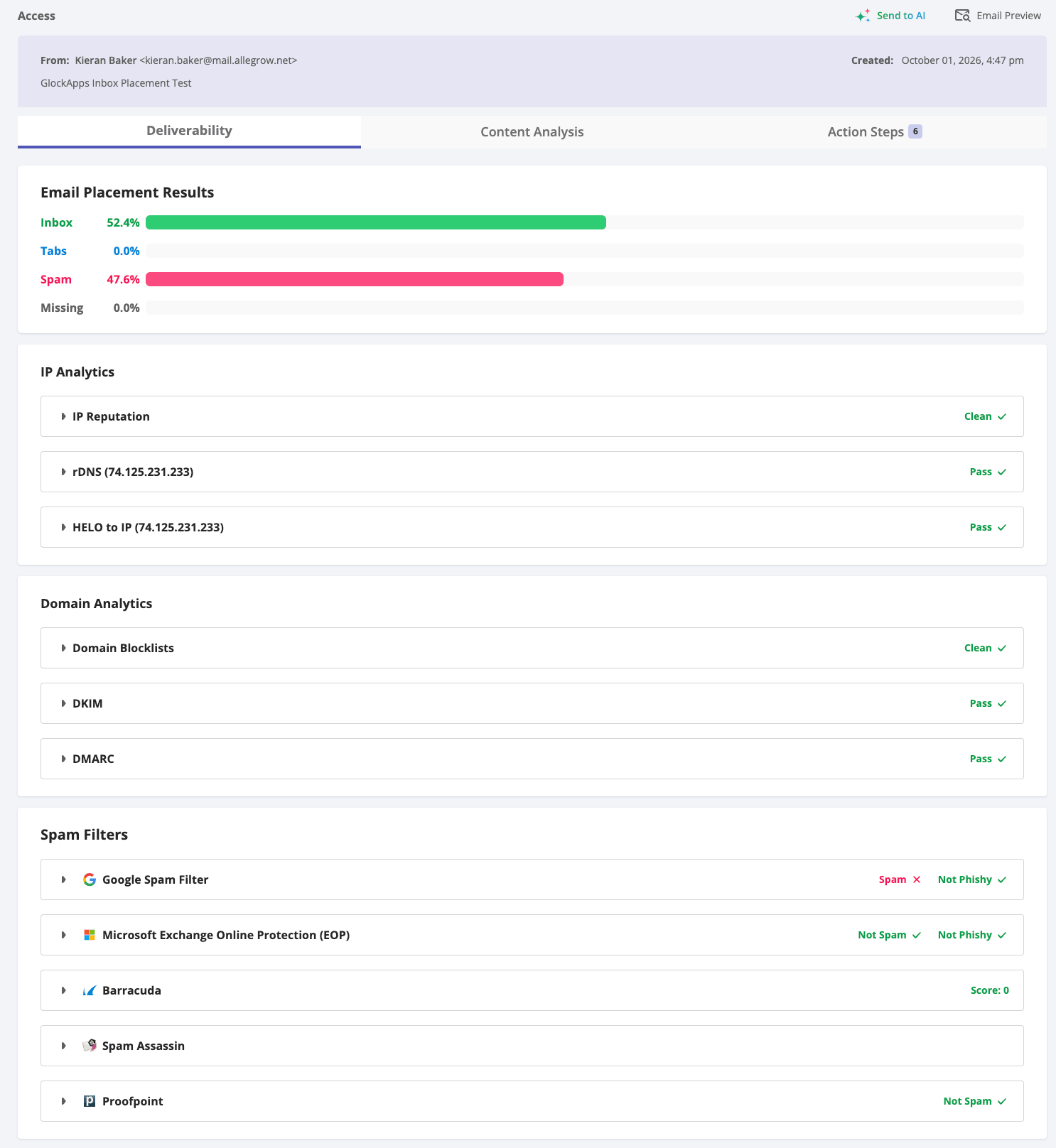
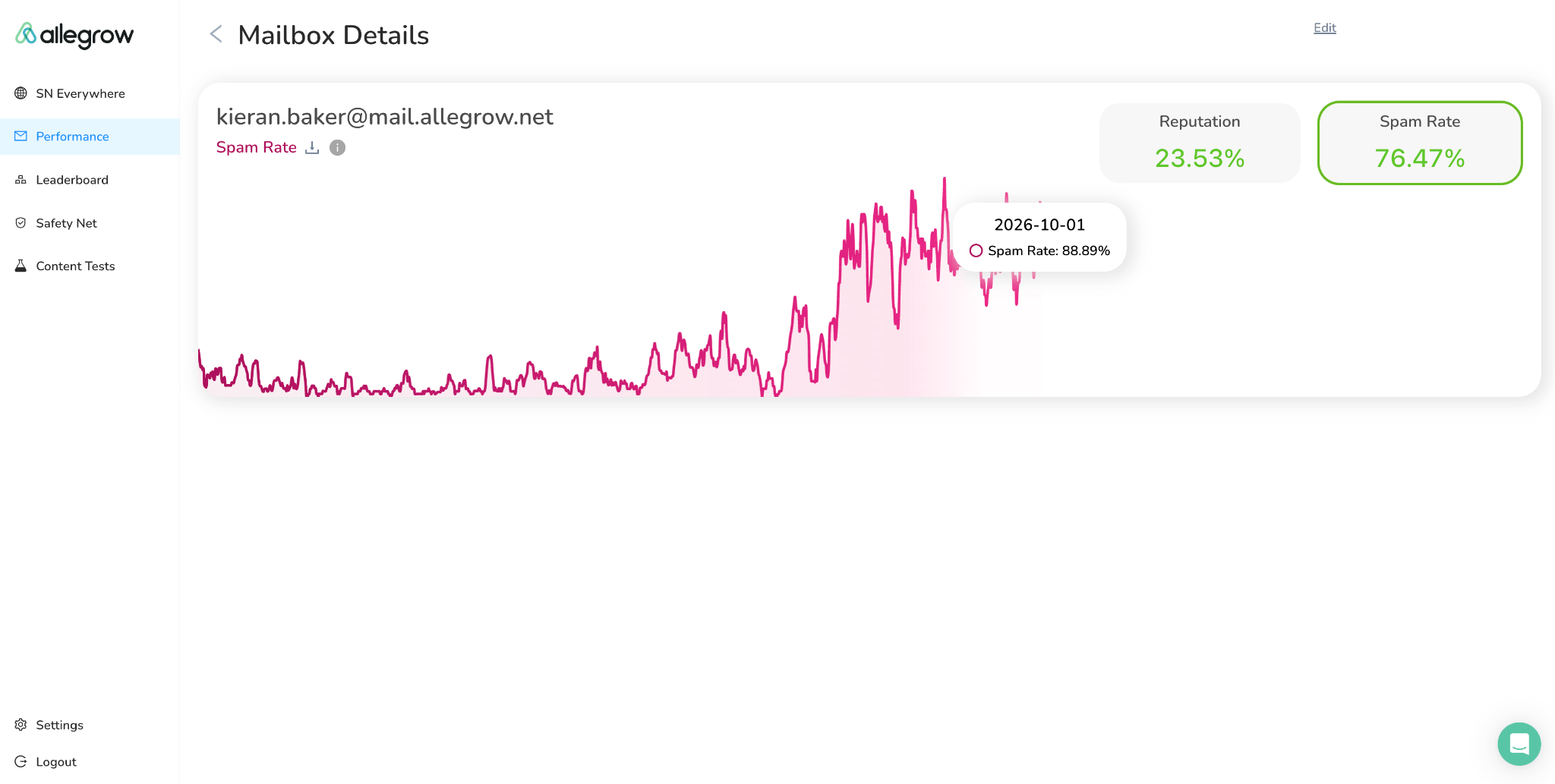
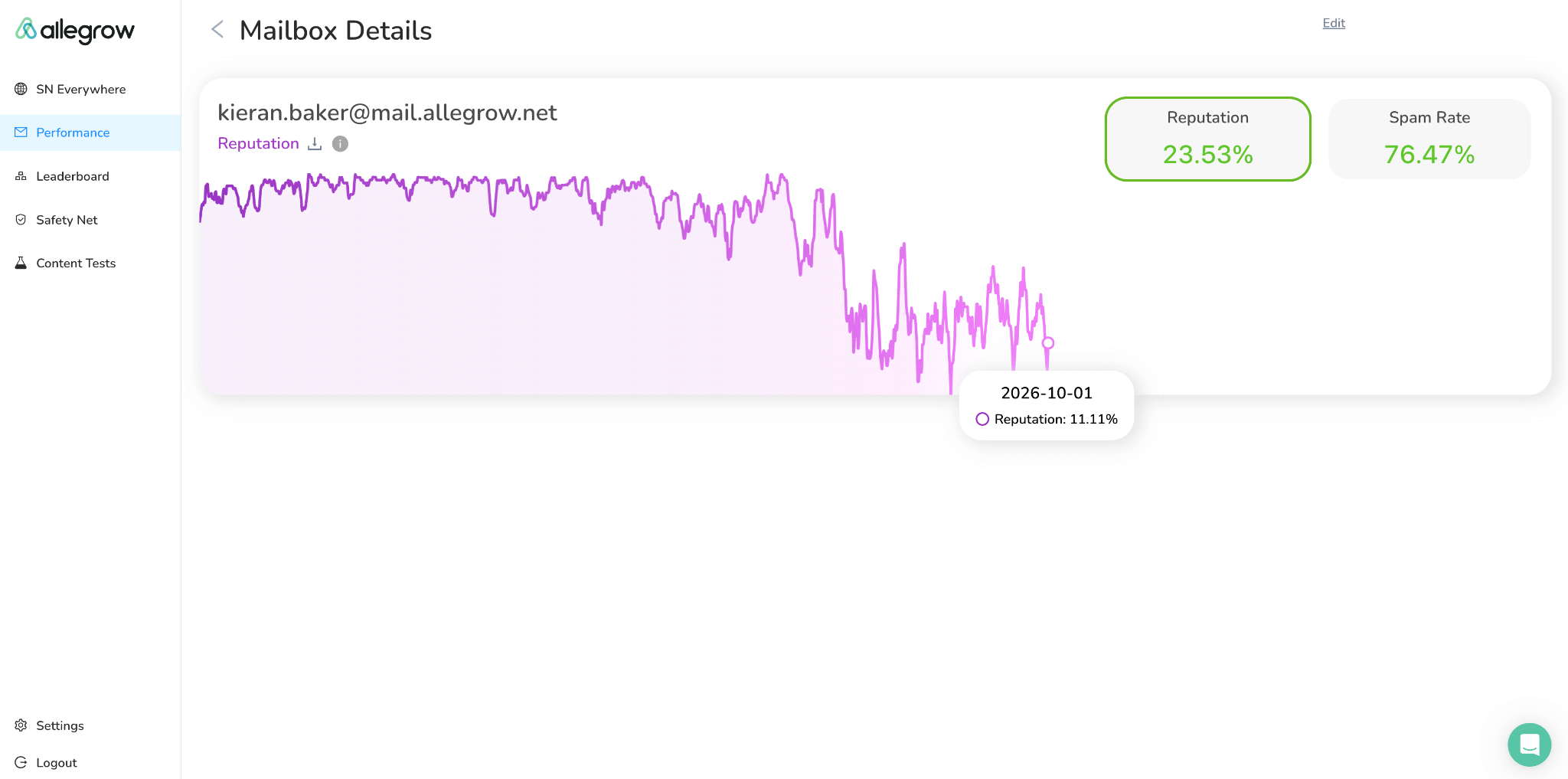
The rest of the GlockApps report is where the gap matters most. Every infrastructure check passed: IP reputation and domain blocklists came back clean, DKIM and DMARC passed, and so did the rDNS and HELO checks. Google's spam filter flagged the message, while Microsoft Exchange Online Protection and Proofpoint did not, and Barracuda scored it 0. A sender reading that report would conclude the setup is sound and the problem is moderate. Real B2B inboxes showed it was severe.
The difference is not in what each tool checks. Both monitor SPF, DKIM and DMARC, and GlockApps can rerun the same test on a schedule with alerts. The difference is where the message lands. GlockApps' seeds run the mailbox providers' default filtering. Allegrow measures placement in real B2B inboxes on live enterprise domains, behind the secure email gateways and custom rules those companies apply. Those environments filtered the same mailbox far harder.
This shows that a seed test can understate how B2B environments treat a sender, not that GlockApps will understate every domain by the same margin. The practical lesson is that a passing infrastructure report and a moderate spam rate in a seed test do not mean your mail is reaching B2B inboxes. If your recipients are businesses, measure placement where they actually receive mail.
So the fairest answer to "how accurate is GlockApps?" is that it accurately measures placement in the mailboxes it tests, and that is useful for spotting a change. It is a weaker guide to how B2B recipients' mailboxes treat a sender whose reputation is damaged, because seeds run default filtering and none of the gateways and custom rules those environments apply.
What GlockApps does not tell you
A placement test answers one question well: where did this message land? Three questions sit outside it, and for a team with a deliverability problem they are usually the ones that matter next.
It does not show which mailbox is hurting your domain
GlockApps does not track a reputation score for your domain or mailbox over time. What it offers in that area is blacklist monitors, a Sender Score snapshot per test, and Google Postmaster data. Sender Score and blacklists work at the IP and domain level, Postmaster data at the domain level, and each placement test reports only on the mailbox it was sent from.
That matters for outbound teams because every mailbox on a domain shares its reputation. One SDR mailbox sending to a poor list can pull down placement for everyone on the domain, including people outside sales, such as leadership emailing investors. Allegrow tracks reputation at both the domain and the mailbox level, so you can see which mailbox started the decline and warm it up or take it out of rotation before it drags the rest of the team down. In GlockApps, you would have to test each mailbox separately and compare the snapshots yourself.
It does not improve your reputation
GlockApps measures deliverability. It does not build it. There is no warm-up in the platform, and GlockApps itself points users with inactive mailboxes toward separate warm-up services.
So when a test reveals a reputation problem, the fix sits outside the tool. Recovering a damaged reputation takes sustained positive engagement: messages that land in mailboxes where they are opened, replied to and moved out of spam, repeated over weeks. A testing platform can tell you that you need that. It cannot provide it.
It does not check whether the address is real
A seed-list test answers what happened to a message after it reached the testing infrastructure. Email verification asks a different question: is the recipient address a valid, reachable mailbox?
The two connect more closely than they first appear. Repeatedly sending to nonexistent or abandoned addresses generates bounces, and bounces are one of the fastest ways to damage the reputation. A placement test may eventually show the resulting drop, but it cannot identify the invalid address that caused it. On B2B lists that problem concentrates in catch-all addresses, which standard checks return as unknown and which teams often send to anyway.
What real users say about GlockApps
GlockApps has a generally positive review profile, although the sample is small enough that it should not be treated as a statistically representative customer survey. At the time of writing, G2 lists GlockApps at 4.1 out of 5 from 26 reviews. The current G2 page highlights ease of use, detailed analysis, accuracy, deliverability performance, and deliverability improvement among the recurring positive themes.
The positive feedback makes sense given the product's purpose. Users who like the platform tend to value having placement, authentication, blocklist, and troubleshooting information in one dashboard rather than assembling the information manually.
The negative themes revolve around learning difficulty, payment or account verification issues, inadequate reporting, and missing functionality. Historical reviews from October 2024, October 2023, and May 2023 raised concerns around payment verification, pricing changes, and a consulting refund dispute. This is useful context for someone researching the company, but it should not be presented as evidence that the same problems are currently widespread.
GlockApps pros and cons
GlockApps is strongest as a measurement platform. It tells you where a test message landed, how it scored against major spam filters, and whether your authentication and blocklist status are in order. Its gaps sit around that measurement: it does not show which mailbox is pulling your domain's reputation down, it cannot repair a reputation once a test reveals damage, and it does not check whether the addresses you send to are real.
GlockApps vs Allegrow
GlockApps and Allegrow are both deliverability platforms, but they measure placement in different places.
GlockApps sends a test message to its seed list, manually or on a schedule, and reports where it landed. Those seed mailboxes are managed by GlockApps and run the mailbox providers' default filtering.
Allegrow sends throttled messages continuously to real B2B inboxes on live enterprise domains. Those inboxes sit behind the secure email gateways and custom rules a seed list cannot reproduce. That is why the two tools read the same mailbox so differently in our test.
Allegrow also tracks reputation for the domain and for each mailbox on it. When placement drops, you can see which sender is pulling the domain down, and then fix it:
- Warm-up rebuilds that mailbox's reputation through positive engagement from real B2B inboxes.
- Hourly SPF, DKIM and DMARC monitoring flags record problems within the hour.
- Native integrations with Outreach, Salesloft and HubSpot act on results before the send.
GlockApps reports the problem and leaves the fix to other tools.
Verification closes the loop. Invalid addresses are one of the most common causes of reputation damage. Allegrow verifies the list behind your sends, including conclusive valid or invalid results on catch-all addresses, and identifies the primary mailbox when a contact has several. GlockApps does not check addresses.
Where GlockApps has the edge is DMARC aggregate reporting and blocklist monitoring with alerts, neither of which Allegrow offers.
GlockApps vs Allegrow feature comparison
Best GlockApps alternatives
People usually start searching for a GlockApps alternative for one of five reasons: they want placement measured in real mailboxes rather than seeds, lower-cost testing, warm-up bundled with deliverability tools, more enterprise-level monitoring, or a simpler test without the broader GlockApps suite. The right alternative depends on which of those jobs you are trying to do.
Allegrow is the alternative for B2B teams that need more than seed-list testing. It measures placement continuously across real B2B inboxes on live enterprise domains, tracks reputation for the domain and each mailbox on it, rebuilds reputation through warm-up with positive engagement, and A/B tests content by real placement. It also monitors SPF, DKIM and DMARC hourly and verifies the list behind your sends. Choose it if your recipients are businesses and you need to measure and fix deliverability in one place. Look elsewhere, or keep a monitoring tool alongside it, if you rely on DMARC aggregate reporting or blocklist monitoring, which Allegrow does not offer.
MailReach is a strong option for outbound teams because it combines spam testing with email warmup. Its testing plans are volume-based, making it useful for teams that want placement testing alongside active sender warmup.
Inbox Monster is aimed much further upmarket. Its suite covers inbox placement, reputation, spamtraps, blocklists, DMARC, alerts and ESP integrations, with public pricing starting at $15,000 annually.
Validity Everest is another enterprise-focused option, offering deliverability monitoring, reputation data, APIs, ESP integrations and alerting. Pricing is more sales-led, so it is harder to compare directly with GlockApps.
InboxAlly focuses more heavily on sender reputation and warmup. Its Starter plan costs $149/month and includes 100 seed emails per day, with higher tiers offering more volume and sender profiles. Warmup Inbox takes a simpler, warmup-focused approach. Plans start at $19/month or $15/month when billed annually, with spam, category and reputation monitoring included.
MailGenius is better suited to basic spam checking than full deliverability monitoring. It offers free tests and an API for lightweight diagnostics. Mail-tester is similarly focused on individual message testing, starting at $5 for 10 tests or $10/month for 50. It is a simpler option if you only need occasional diagnostics.
One caveat applies to most of the placement-testing alternatives: they rely on seed lists. Coverage and reporting differ between tools, but a seed mailbox runs default filtering rather than the gateways and custom rules of a real B2B environment, which is the gap the test above exposed.
Who should use GlockApps?
GlockApps makes the most sense for teams that need to monitor deliverability across consumer mailbox providers and want several related tools in one subscription. It is particularly useful for agencies that need to run recurring placement tests and report results to clients. The automatic testing and alerts also suit teams that do not want deliverability checks to depend on someone remembering to run them.
It can also be a good fit for organizations that want inbox placement testing alongside DMARC monitoring, blocklist monitoring and infrastructure checks. The broader suite is more compelling when you actually need those functions rather than only wanting an occasional spam score.
GlockApps is less compelling if your recipients are mostly businesses and your deliverability depends on sender reputation, which for cold outbound it usually does. A seed test can show that something is wrong without showing how serious it is, as our test found, and seeds cannot reproduce the secure email gateways many enterprise recipients sit behind. It does not show which mailbox is pulling the domain down, and once reputation slips, it has no warm-up to help repair it.
It is also not the best fit if you strongly prefer simple, predictable pricing without credits, or if list quality is part of your problem, since GlockApps does not verify addresses.
Conclusion
GlockApps is a capable deliverability platform and considerably more than a basic spam checker. Inbox Insight produces a detailed placement report, and DMARC Analyzer and Uptime Monitor extend the platform into domain authentication and blocklist monitoring.
What it measures, though, is placement in a seed mailbox. In our test, that showed half the mail in spam with every infrastructure check passing, while real B2B inboxes were filtering nearly nine in ten messages from the same mailbox. For a B2B sender, a bad placement result raises three follow-up questions: how serious is it, why did it happen, and how do you fix it? Answering them takes placement measured in real B2B environments, reputation tracked for the domain and each mailbox, warm-up to repair it, and a verified list so the damage does not recur.
To see how your own domain performs in real B2B inboxes, start Allegrow's 14-day free trial. It includes 1,000 free email verifications, and an inbox placement test and domain reputation check are available on request, so you can compare what a seed test tells you with what real mailboxes are doing.
Frequently asked questions
Is GlockApps legit?
Yes, GlockApps is an established email deliverability platform with more than 15 years of experience, according to the company. G2 currently rates it 4.1/5 from 26 reviews, though the sample is relatively small. Historical reviews include some billing complaints, but these should be separated from the current product experience.
Is GlockApps free?
GlockApps has a free tier. It currently includes two spam-test credits, 10,000 DMARC messages, unlimited DMARC domains and one IP reputation monitor, as well as access to GlockApps' free record-checking tools. Paid subscriptions are required for additional recurring spam-test capacity and higher monitoring limits.
How much does GlockApps cost?
GlockApps Bundle pricing currently starts at $85 per month on monthly billing or $59 per month when billed annually for the Essential plan. Growth costs $142 monthly or $99 per month equivalent annually, while Enterprise costs $185 monthly or $129 per month equivalent annually. One-off spam-test packs cost $16.99 for three credits, $47.99 for ten, or $75.99 for twenty.
How accurate is GlockApps inbox placement testing?
GlockApps accurately reports where a test message lands in the seed mailboxes it manages. But seeds run default filtering, without the gateways and custom rules of real B2B environments, so they can understate a reputation problem. In our test on the same mailbox and the same day, GlockApps showed 47.6% of mail in spam, while Allegrow's measurement across real B2B inboxes showed 88.89%.
Does GlockApps track sender reputation?
No. GlockApps does not track a reputation score for your domain or mailbox over time. What it offers in that area is blacklist monitors, a Sender Score snapshot per test, and Google Postmaster data. To see whether your reputation is rising or falling, you need a tool that tracks a reputation score for your domain and mailbox over time.
What is a seed list and how does seed list testing work?
A seed list is a set of test mailboxes managed by a deliverability provider. You send your email to them, and the provider reports whether it landed in the inbox, a tab or spam. Seeds run the providers' default filtering and cannot reproduce corporate gateways or custom rules, so the results are a signal rather than a guarantee.
Does GlockApps verify email addresses?
No, GlockApps tests message placement and deliverability, not whether an address belongs to a real, reachable recipient. Verification determines whether an address is valid or invalid; placement testing measures what happens to a message sent through a particular environment.
What is the best GlockApps alternative?
For B2B senders, it's Allegrow, which measures placement and reputation continuously across real B2B inboxes and adds warm-up and verification in one platform. For other needs, MailReach combines testing with warm-up, Inbox Monster and Validity Everest target enterprise teams, and Mail-tester and MailGenius offer simpler one-off diagnostics.